Having worked with AI tools and produced material on behalf of brands for more than 3 years, I wanted to provide you with my personal analysis of whether HeyGen will be worth it in 2026.
But before going deeper into this matter, let’s first clear some common questions that might help you in some way…..
Actually, HeyGen is an AI video-generation tool aimed at content creators, educators, marketers, agencies, and businesses that do not require actors, purchasing studio equipment, or hours of editing to create high-quality videos.
In this HeyGen Review, I’ll share my personal experience using its avatars, voice clone, and translation features, plus real results that actually matter for modern creators like you.
When I first tested HeyGen, I was working on an e-commerce client project that needed 5 ad videos. He wanted to make those videos with the help of AI ad generators. He had almost no budget for actors or shoots.
Frankly speaking, I did not know whether AI avatars could be real enough to be a brand. However, having tested, adjusted, and stretched the tool to its limits, I have found the areas where HeyGen works… and where it fails.
This HeyGen Review is based on those real tests, real results, and real creator challenges, so if you’ve ever questioned “Is HeyGen actually worth it?” or “Can I trust AI videos for my content or business?” you’re exactly the reader this guide was written for.
This review covers everything you need to know, based on features, performance, pricing, and real test outcomes.
So, let’s start….
Table of Contents
What is HeyGen?
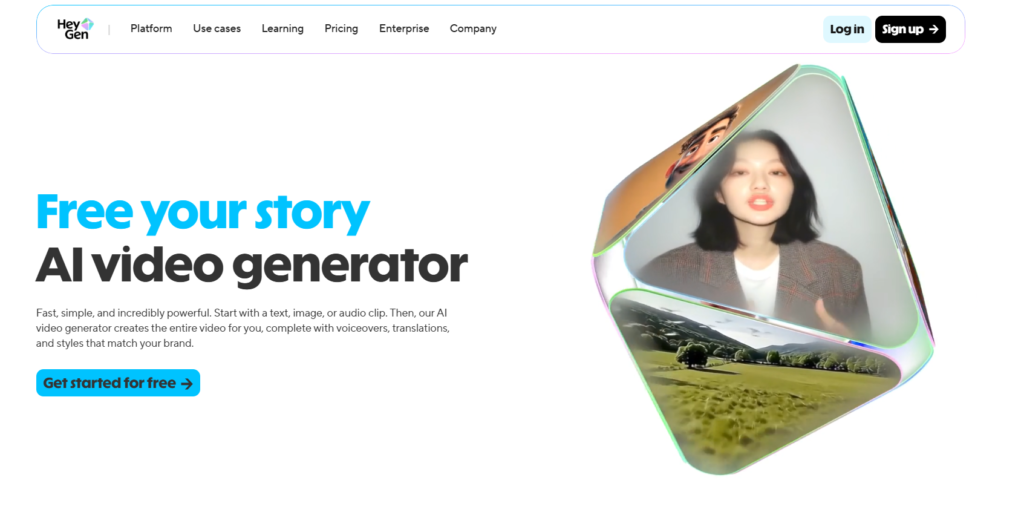
HeyGen is an advanced AI video-generator platform providing everyone with the means to produce high-quality studio videos based on your selected text, pictures, audio, and highly realistic computer-generated avatars.
Who is HeyGen For?
When considering this HeyGen Review, it is essential to realize that the platform is aimed at being an all-in-one AI video maker, which is simple enough to use by beginners but sophisticated enough to accommodate brands, teachers, and other content makers who require high-quality video creation within a short period of time.
The difference between HeyGen and other AI video-generators is that it is fully automated. It reads your scripts, speaks naturally, performs as an avatar, edits, transitions, subtitles, and even does international translation.
Overall, HeyGen allows you to produce professional videos in minutes without the need to have cameras, microphones, or video editing skills.
HeyGen Features
In this part of our HeyGen Review, we’ll look at the features that make HeyGen one of the most advanced AI video generators available today.
The platform combines powerful generative AI tools, lifelike avatars, global translation, and a simple studio interface to help you create high-quality videos quickly and easily.
Below are the key HeyGen features explained in a straightforward, easy-to-understand way.
1. AI Video Generation from Text, Image, or Audio
One of HeyGen’s strongest features is its flexibility in how you create videos. I’ve seen that this platform is very easy to operate as compared to other AI tools.
What This Feature Does
- Text-to-Video: You type a script, and HeyGen generates a complete video with voice, avatar, and visuals.
- Image-to-Video: You upload a picture, and HeyGen turns it into a realistic talking avatar.
- Audio-to-Video: You provide an audio file, and HeyGen automatically syncs speech with an avatar.
This AI tool handles your entire editing process, like voiceover, transitions, subtitles, and pacing, making your video creation incredibly fast.
2. Lifelike AI Avatars (Avatar IV, Video Avatars & Photo Avatars)
HeyGen is widely known for creating some of the most realistic avatars in the AI industry. When you land in HeyGen’s Avatar section, you’ll see multiple options before choosing an avatar for your social ads.
Key Avatar Types
- Digital Twin: This is the most realistic one, where you’ve to provide a single video, and this AI tool will copy your gesture and will act just like you.
- Photo Avatar: This is also an advanced model that produces natural facial expressions and hand gestures from a single photo you provide.
- Video Avatars: Film yourself once and generate a personalised avatar for future videos.
- Photo Avatars: You can turn any photograph into an instantly animated talking character for your ad video.
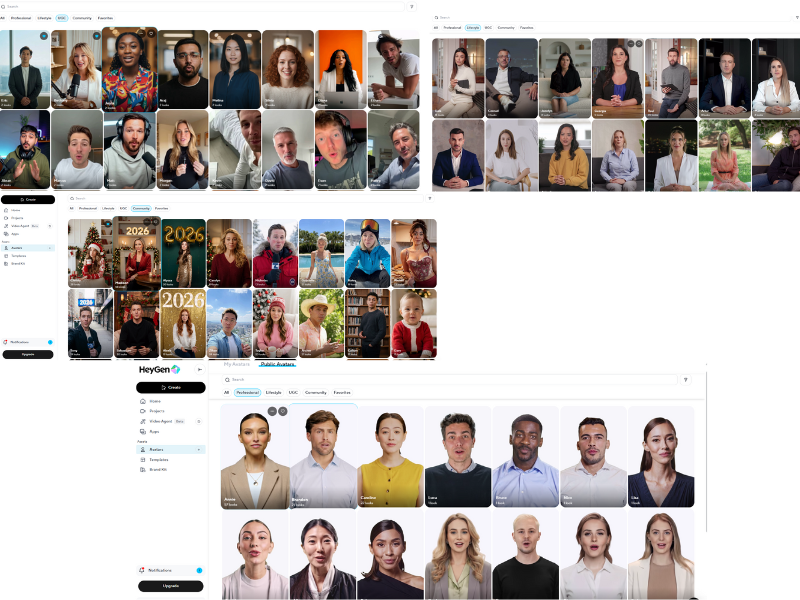
- Stock Avatars/Public Avatars: You’ll find over 1,000 professionally designed avatars suited for every industry. The Public avatar section is filled with many high-quality avatars that look exactly like a human.
These AI avatars are highly customizable, and you can adjust their expressions, clothing, background, gestures, and more.
When I first checked the public avatars section, I became shocked to see the realness on those. I think you may feel the same when you explore this public avatars section of HeyGen.
Here are some examples of different avatar types…..
3. Global Video Translation (175+ Languages)
If you’re wondering about the scalability of your content, then this feature is one of the most impressive and is ideal for creators, brands, and educators targeting global audiences.
What Makes HeyGen Unique
- Translates videos into 175+ languages and dialects.
- Maintains the original speaker’s voice, tone, and pacing.
- Lip-sync is automatically adjusted for natural delivery.
- Subtitles are generated instantly.
- You don’t need to hire a voice-over artist or re-record the video.
4. AI Studio Editor
HeyGen includes a studio editor that makes your video creation feel very simple.
Key Capabilities
- Drag-and-drop simplicity.
- Edit scripts directly and see changes reflected in the video.
- Manage scenes, transitions, and audio.
- Upload and apply brand elements (logos, fonts, colours).
- Collaborate with teammates using comments and tagging.
- Integrate HeyGen into business workflows using the API.
This HeyGen AI studio editor removes the complexity of traditional video editing software, making the process smooth and accessible for you.
Summary of the Most Important HeyGen Features
I’ve tested each of these features personally, and here are some of the most important ones that define the platform:
- Highly realistic avatars with customizable gestures and expressions.
- Multi-input video creation (text, image, audio)
- Global localisation with translation into 175+ languages.
- An AI Studio editor built for speed, consistency, and collaboration without any complexity.
These features together make HeyGen a powerful tool for creators, marketers, businesses, and educators.
So, after testing all the features, I finally moved towards video ad creation to check the reality and hype.
How HeyGen Works: Personal Experience
The real reason for this HeyGen review is to guide people like you who are confused about this AI tool and demand an honest HeyGen review. Generating ads through this ad generator initially excited me, as it contains a huge number of helpful features that are essential to making a social ad more realistic and professional.
Below is the official website link… After clicking the link, it’ll redirect you to their home page…
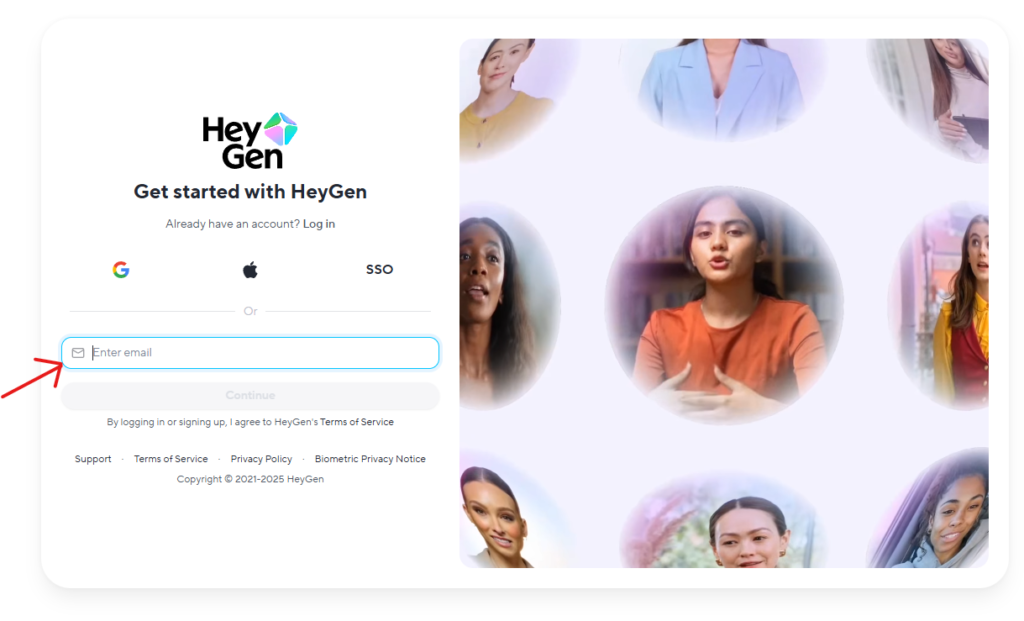
Here, you’ve to log in to this AI platform by hitting the Sign Up button located in the right corner. Now, simply enter your Email and hit continue. Then an OTP will trigger in your email for verification.
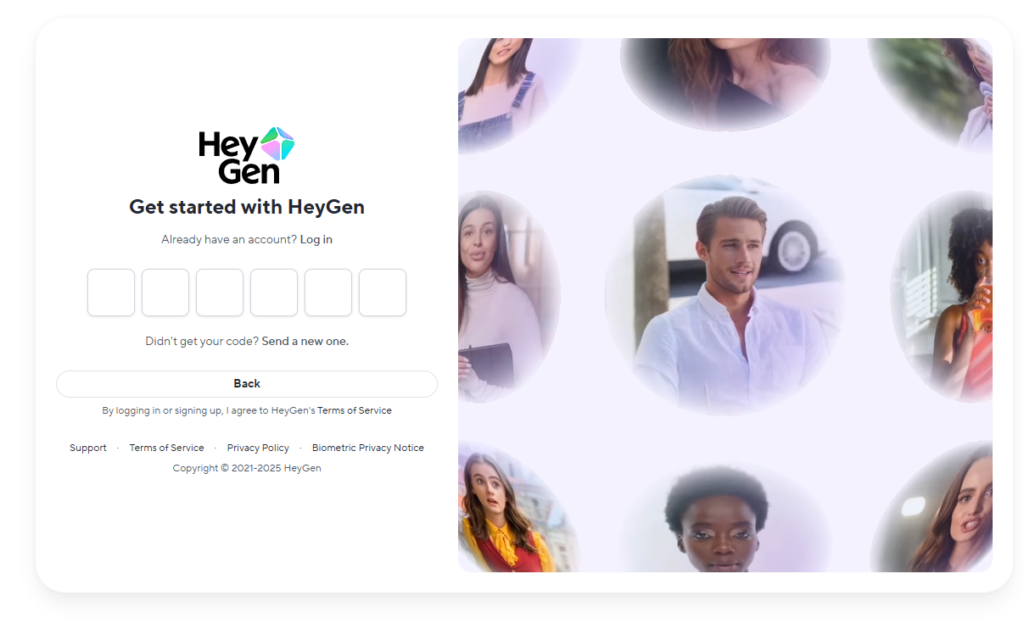
Simply put the 6-digit OTP, and it’ll automatically redirect you to a new window…
Now choose a plan. Look…. here are two pricing plans that HeyGen is offering to you, one is for individuals, and the other is for businesses….
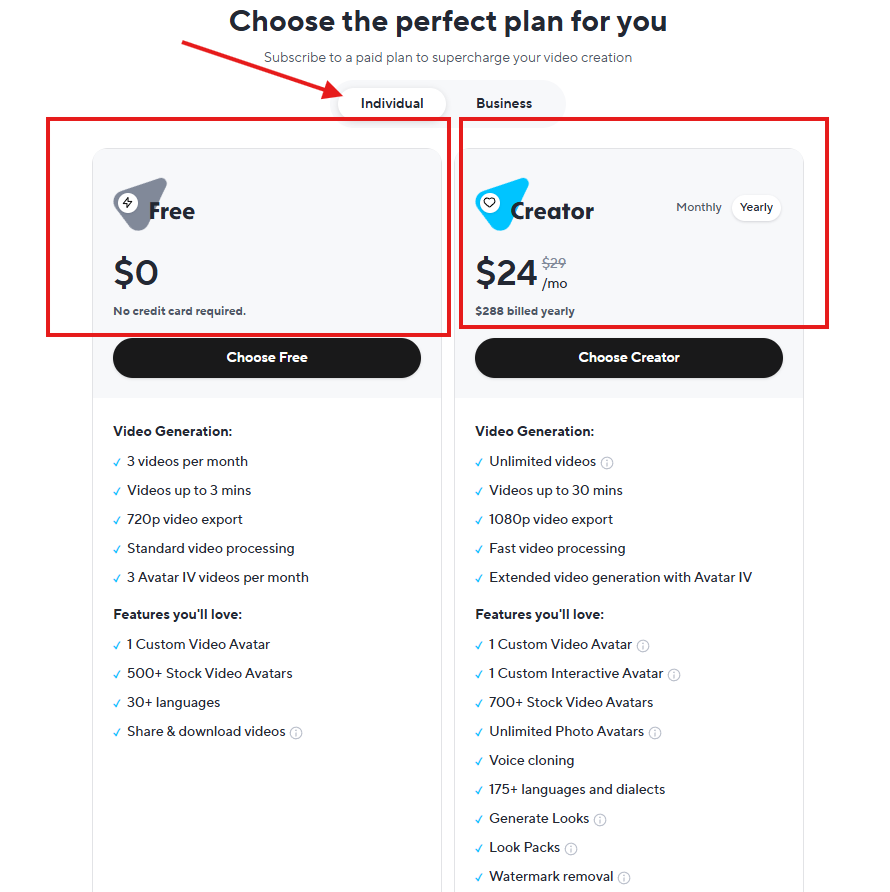
Here is the good news for you, because you can use HeyGen for free for testing purposes, and if you feel satisfied, you can simply invest in the creator plan, which is $24/ per month.
I personally like this type of free trial model because it allows you to test the product before investing money into it…
Now, come to the Business plan. Here you’ll not get anything free. Look at this screenshot to understand the pricing…
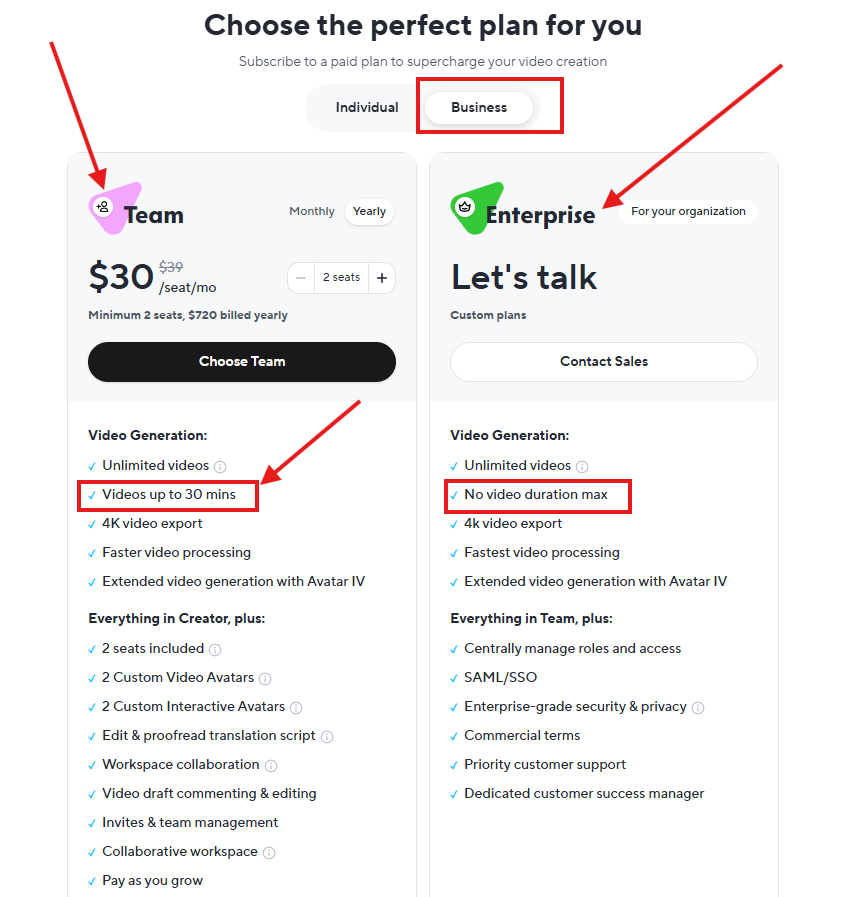
After choosing a plan, HeyGen will ask you some questions regarding your preferred language, occupation, number of people in your company, company URL, company name, etc, etc. (HeyGen will ask you 9 different questions throughout the entire process. )
One thing I want to clear here is about the company name and URL section during the question-answer part.
If you don’t have a website, then you simply blank those areas and move to the next part.
Now you’ll see the main HeyGen dashboard that looks like this….
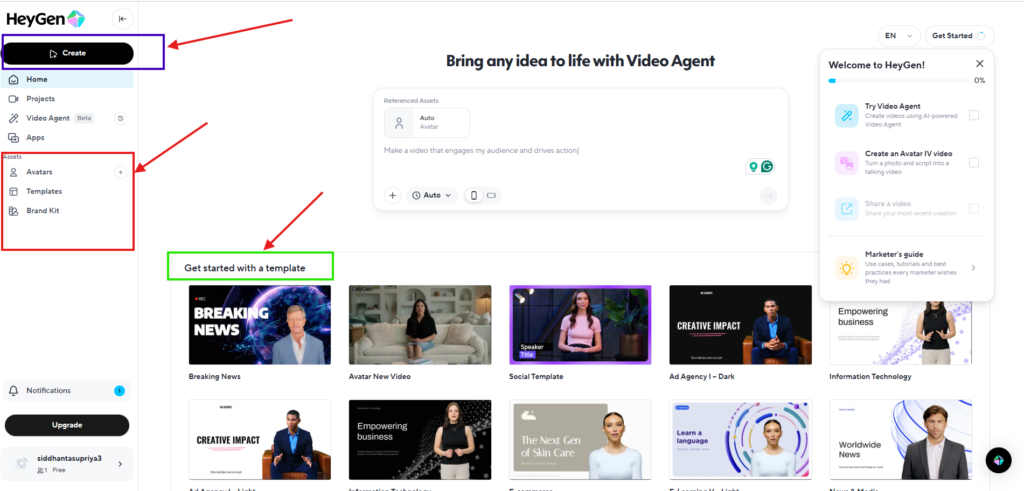
This is the area where everything looks bright and clean. On the left side, multiple options are available to fulfil your desire….
Here, I want to mention three different options, like
- “Avatar” section.
- “Template” section.
- “Brand Kit” section.
“Avatar” section
Let’s first talk about one of HeyGen’s best features located in the “Avatar” option… simply hit the “Avatar” and it’ll take you to a new page… Look at the screenshot…
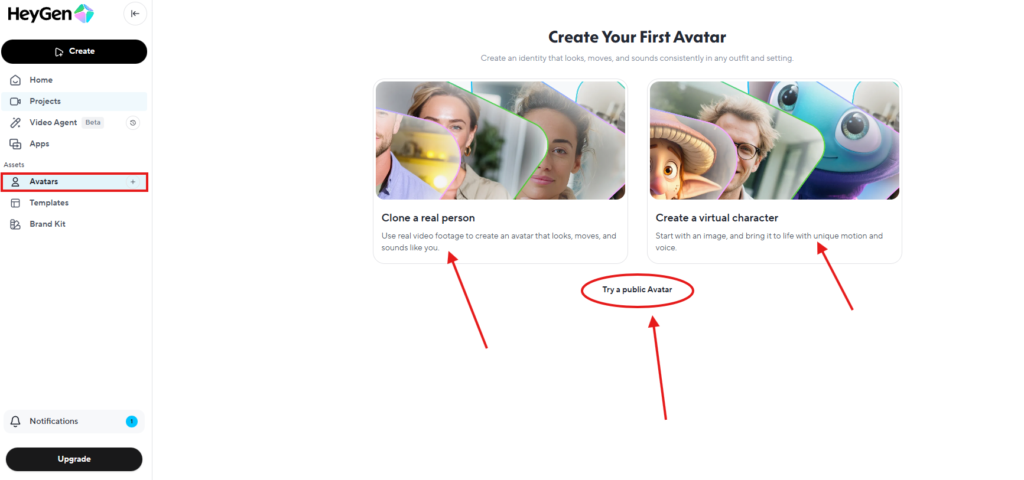
In this section, you’ll see three parts.
- One is “Clone a real person.”
- Another one is “Create a virtual character.”
- The third one is “Try a public avatar.”
Now, I’ll explain to you why this is one of the best features and how it works, and most importantly, how it can help you to create stunning ads for your store.
Clone a real person:- In my experience, this is the most realistic one. Here, you simply upload a video with an avatar, and it automatically creates an avatar like that video that moves and acts just like you. In simple words, it’ll create your replica and copy your gesture in a picture-perfect way.
Create a virtual character:- This option runs on the same concept as cloning just discussed, but in a slightly different way. Here, you refer a photo to this AI tool, and it’ll make it into a motion video with voice.
Try a public avatar:- This section has a number of public avatars that can help you to create real ads for your brand.
Each avatar has many different looks, and you can use whatever you like. I chose a public avatar named “Cristy”, and she has 28 looks…..
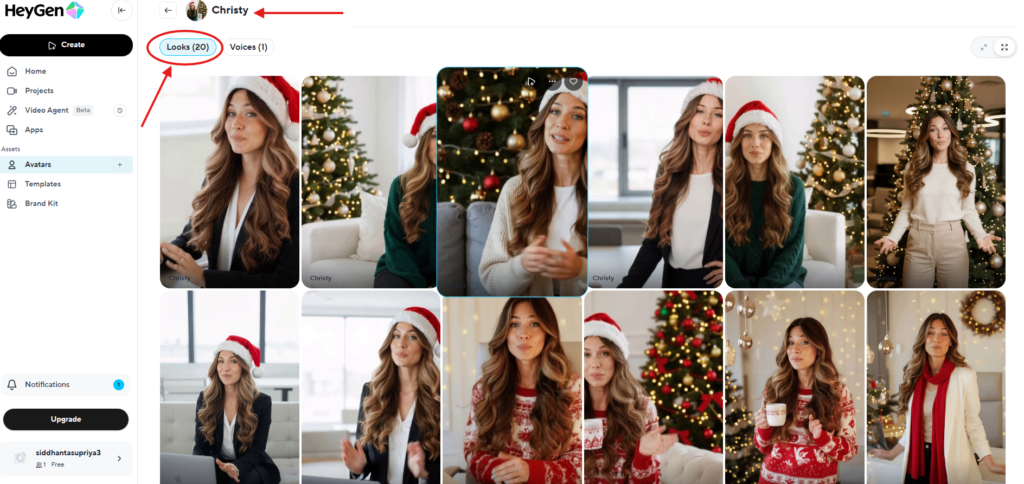
In my experience, these figures look very real, and you’ll not be able to differentiate whether they are real or fake. If you like one, you can save it by tapping the “favourite” option for future use.
Now move to the next section, “Templates”
“Template” section
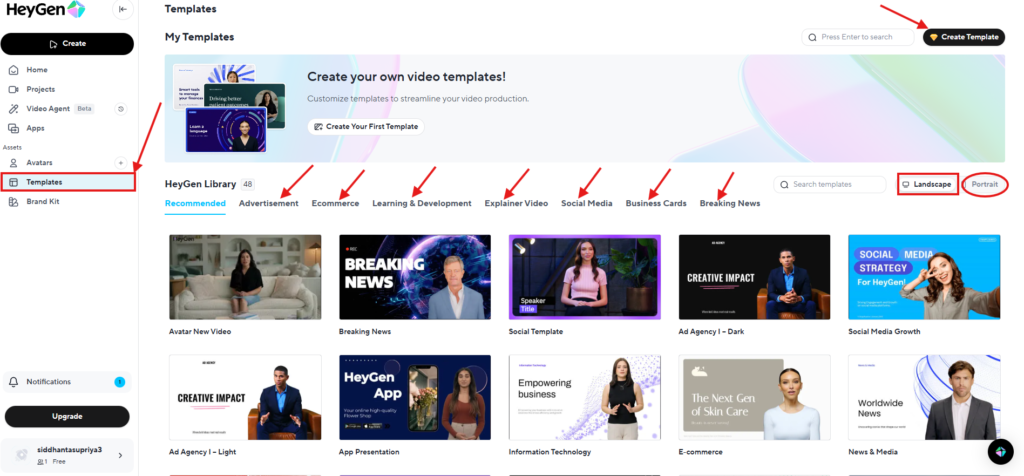
This section is quite vast and huge, as you can select templates according to your needs. This section has sub-sections like advertisement, e-commerce, learning and development, explainer video, social media, business cards, and breaking news.
I use each of the section templates personally. On top of the right corner, there is an option “create template”. So, here you can create your own template and use it again and again for future needs.
Now move to the next section, “Brand Kit”
“Brand Kit” Section
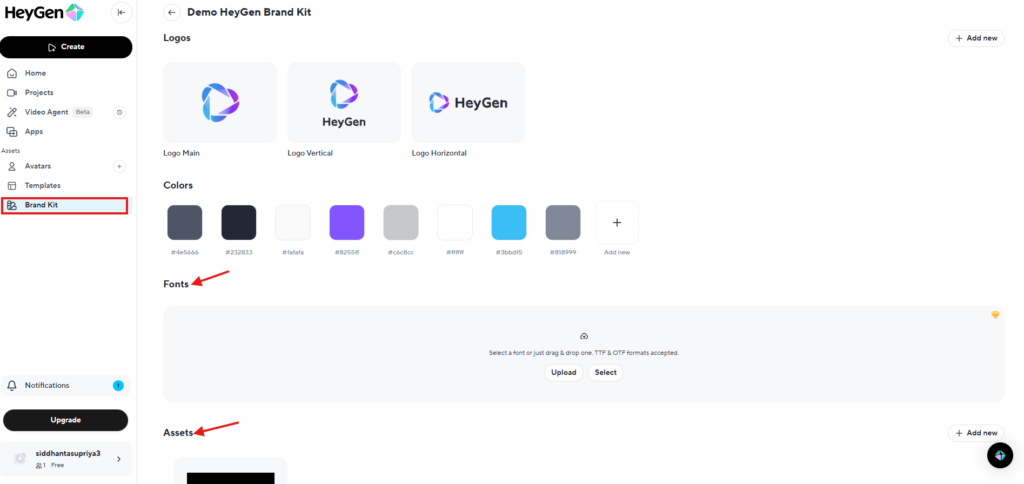
Here you can save your brand kit, like your brand colour, logo, font, etc. This portion is helpful to maintain a clear and specific material related to your brand…
So, I’ve explained all three important features of HeyGen. Now, it’s time to create a genuine, realistic AI ads video for you to understand with all the details and features…
A Step-by-Step Guide
This is one of the best parts of this entire HeyGen review blog…
As I said earlier, I chose a character named “Christy” from the “Public Avatar” section. I selected a look and simply hit on the character…
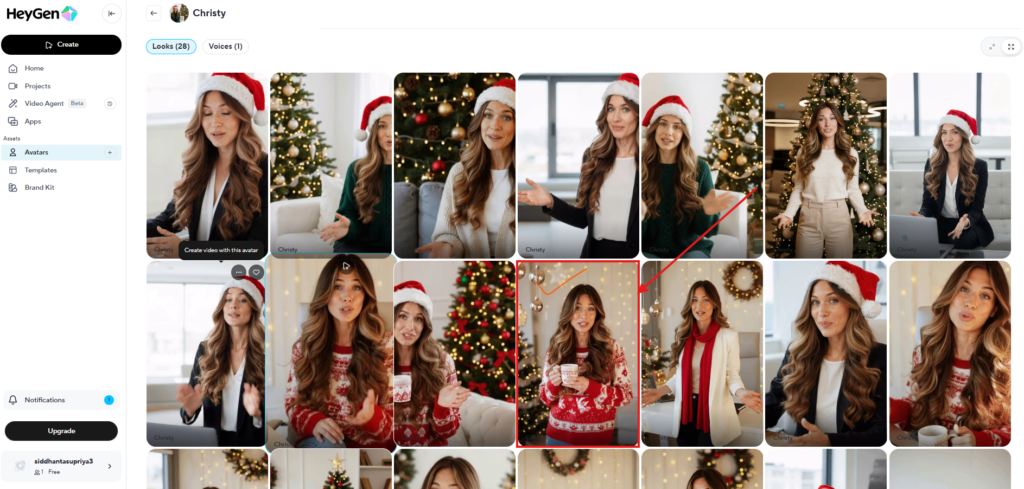
After selecting, a pop-up appears where you’ve to click on the “create with AI studio” button.
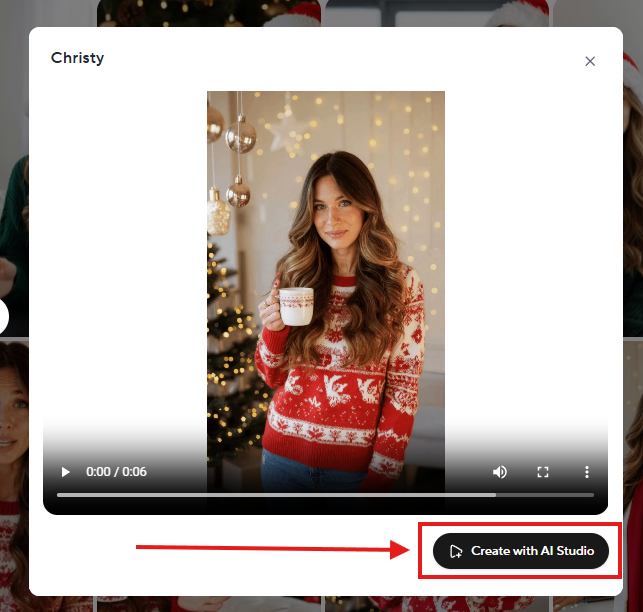
Then it opens another dashboard where the magic will happen.
I’ve seen a lot of options HeyGen provides to make an ad more real and authentic. But you can only use those features if you know how to use them properly for your brand.
But don’t worry, I’m here to help you with every small detail for a smooth journey through this AI tool.
This is what the dashboard looks like…
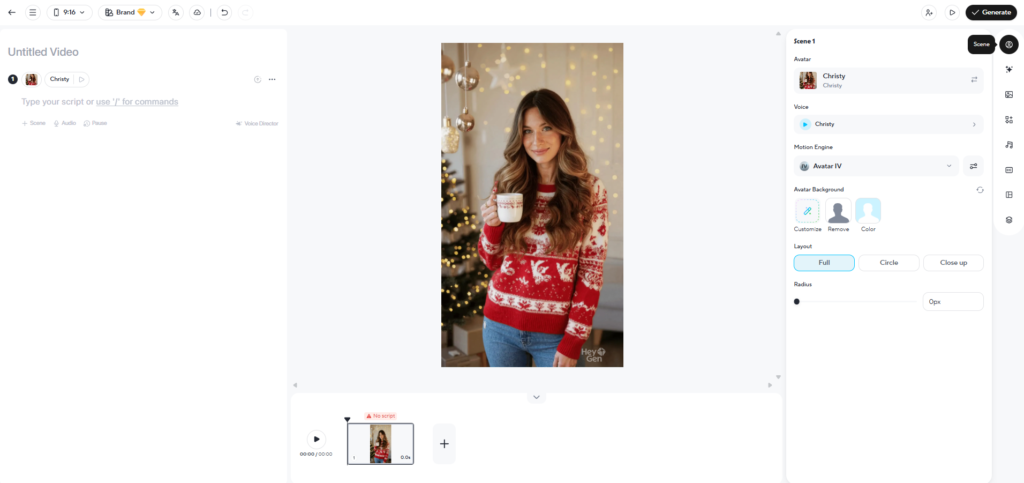
But before making any AI ads, you need a solid script that has the power to convince or present your products in a unique way.
I’ve created a script generation template for you. You can access it from here…. (will be uploaded shortly).
This template has essential elements to pinpoint the target rather than generic speech.
So, don’t forget to use that…..
Okay….. Now it’s time to understand the dashboard in a simple way. You don’t need to have any technical knowledge for this…
HeyGen Review: Real Testing Insights
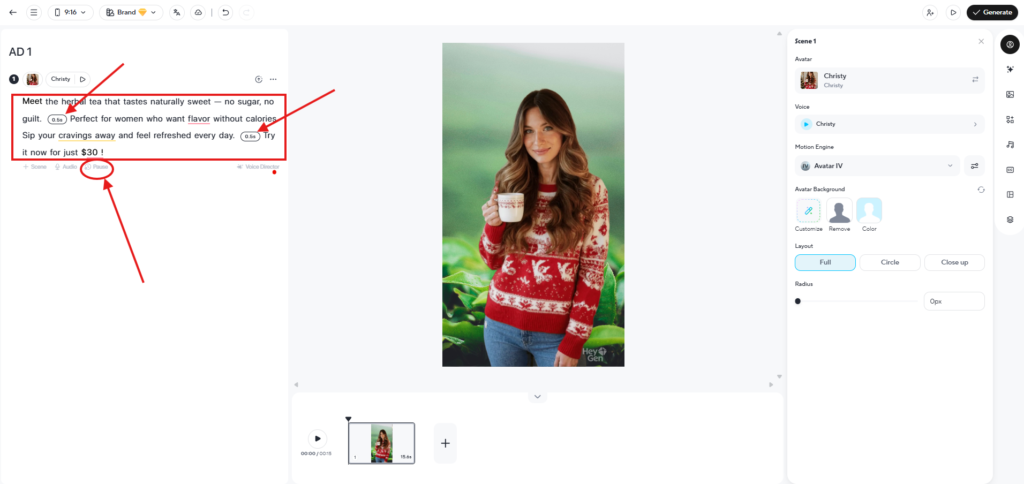
The left side is for script uploading with some options to control the script, like pause, scene and audio.
I personally like the “pause” section because it means you can control the flow of your script as I did here.
I uploaded the script generated by the script generation template and added some pauses according to the flow and pace…
Look at the screenshot…
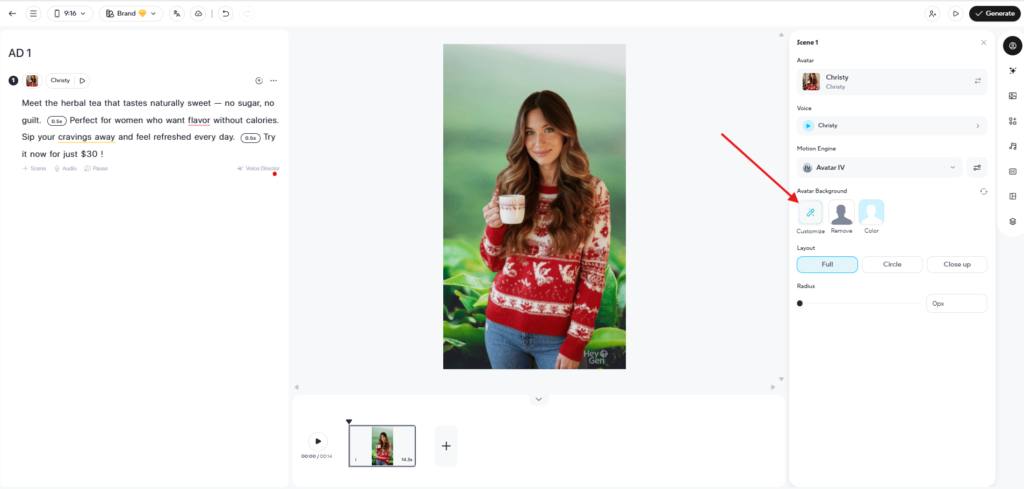
Next move to the right section where a lot of options are available to make your ad more real…
As you can see, I changed the background of the avatar as my product was a herbal tea. So, I simply clicked “Customise” to change the background and searched “Tea” to add a product-related background, as you see here.
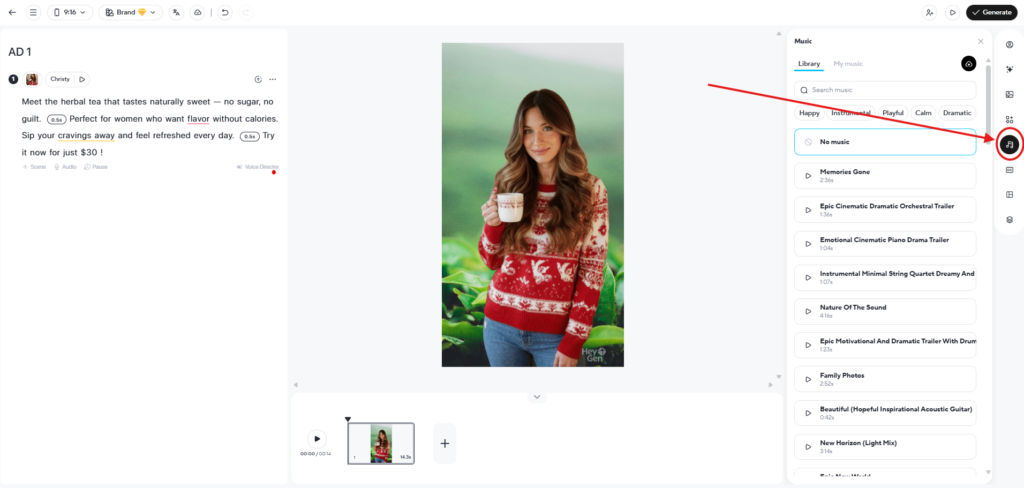
You can also add background music if you want. Click the music sign, and you’ll find a variety of songs waiting for your ad.
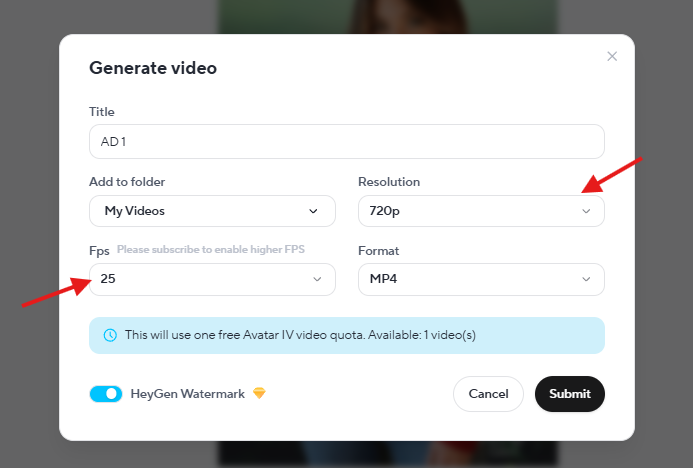
Now you’re ready to generate the final output…. Hit “Generate” and see your creation…
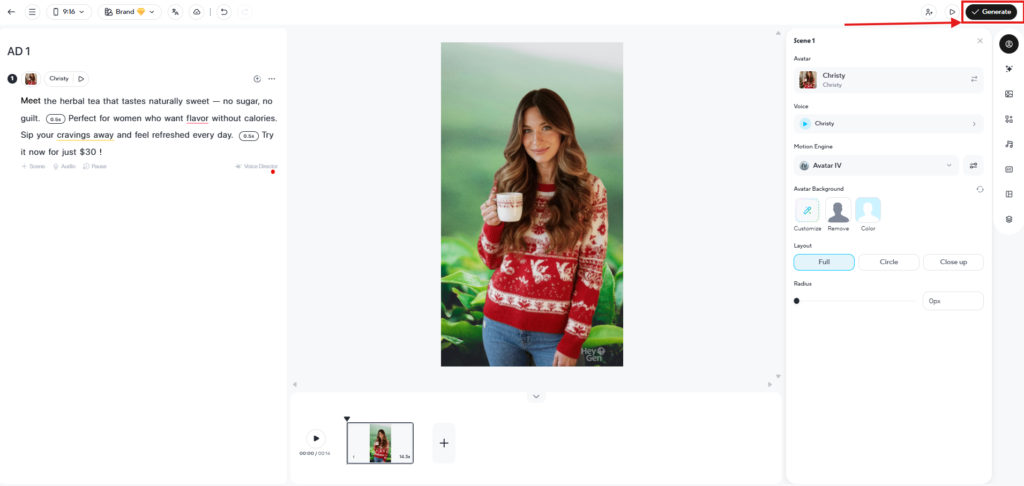
After hitting generate, a pop-up will open with basic resolution options. After checking all the details, hit “Submit”….
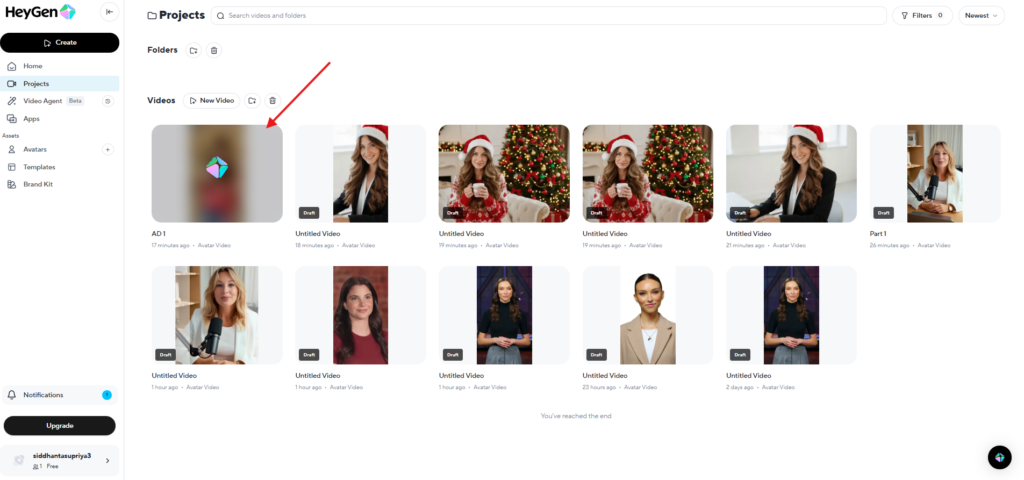
It’ll redirect you to your dashboard, where it takes time to process…
Give it a minute, and your ad is ready for download…..
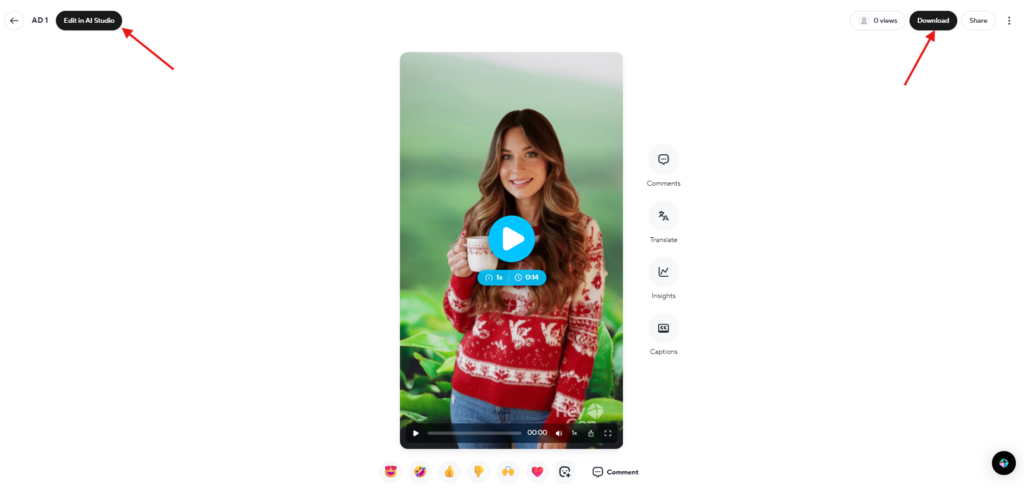
However, you can also edit the final version by clicking on the “edit with AI studio” button marked above, or you can simply download it….
This is the simple process, and you don’t need any model to hire for your business, and you can generate multiple ads from this with multiple figures.
One thing that I truly love here is the lip sync, which looks perfect. See the final output here.
Where It Falls Short
- Emotional expressions are limited.
- Not ideal for cinematic videos.
- Some avatars still have slight “AI stiffness”.
Overall, the results are strong enough for:
- Product reviews.
- Training videos.
- Explainer videos.
- YouTube faceless channels.
- E-commerce demos.
- Corporate presentations.
Pros & Cons of HeyGen in 2026
Pros
- Extremely realistic avatars.
- Industry-leading translation accuracy.
- Easy-to-use interface.
- Great for content creators & businesses.
- Wide avatar library.
- Fast rendering.
Cons
- Emotional expressions are still developing.
- Advanced avatars require higher-priced plans.
- Occasional robotic tone in cloned voices.
Is HeyGen Worth It in 2026?
Yes, HeyGen is absolutely worth it in 2026, especially if you create video content regularly.
Its accuracy, realism, translation quality, and ease of use make it one of the strongest AI video generators available today.
This HeyGen Review shows that the platform delivers professional, multilingual videos that can scale your content creation without expensive cameras, actors, or studios.
If you need:
- Faceless YouTube videos.
- Product review content.
- Training videos.
- Brand explainers.
- Agency-level video production.
Then HeyGen is one of the best tools you can use right now. However, if you want daily high-volume production, then you can try some of the best HeyGen alternatives I have tested in 2026.
FAQs
Is HeyGen a Chinese Company?
This is a common question that appears in search queries related to the HeyGen review. HeyGen is not a Chinese company. It is a US-based AI startup, headquartered in Los Angeles, California. The platform has a global user base and follows strict data privacy and compliance standards. This transparency around data safety is one of the reasons creators trust HeyGen for face and voice uploads.