


Back in 2025, I was scrolling my Medium dashboard and suddenly noticed a post from an American young man showcasing his YouTube faceless video-making journey.
I was excited to see his income screenshot and decided to launch my new channel with my co-worker Gopal in a documentary niche.
But the first problem we hit was finding a perfect AI video generator for faceless YouTube channels that makes watchable long-form videos.
We searched a lot and found many, but to be honest, they all produced just AI filler and struggled with longer narratives.
That was the main problem to us.
However, as I have been writing for a long time, I’ve already acquired the skill of ‘how to write a script for a video‘ because the script and hook matter more than an AI faceless video generator for YouTube.
From there, we started our journey to find the best AI video tool for faceless content creation and tested dozens throughout the process.
And after a long search, I’ve found a video generator that helps me to make scroll-stopping faceless videos with AI that are actually watchable and not AI slop.
In today’s blog, I am going to share all the details about that tool, along with a full beginner-friendly workflow for faceless video creation with perfect B-roll and human-like AI voiceovers (this tool has 2000+ lifelike voiceovers with 80+ languages and dialects) that your audience actually watches.
So, let’s start.
Use COUPON CODE “FLIKIAI10” to get 10% OFF on the monthly planTable of Contents
TL;DR
A good AI faceless video generator can help you create YouTube videos without needing a camera, but it will not give you results if you have weak scripts, generic hooks, or random stock footage. In my test, Fliki worked best as a fast first-draft tool for faceless YouTube videos because it handles text-to-video, AI voiceover, visuals, captions, and export in one workflow. But to make faceless videos actually watchable, you still need human editing: stronger storytelling, better B-roll, clean pacing, and a clear video angle.
Do Faceless AI Videos Make Money?
Yes, faceless AI videos can make money, but not because they are AI-generated. They make money when they are original, useful, and watchable enough to meet YouTube’s monetisation rules.
For ad revenue, YouTube currently requires 1,000 subscribers plus either 8,000 valid public watch hours in the last 12 months or 20 million valid public Shorts views in the last 90 days to join full ad revenue sharing. This is from the new YouTube Partner Program updates. YouTube also says creators can earn through ads, fan funding, Shopping, and YouTube Premium revenue sharing.
However, YouTube does not want mass-produced AI content. Its monetisation policy says generic or unoriginal AI-generated templates with little creator value may be ineligible. So, faceless AI videos can earn money, and YouTubers are earning a huge amount of money from this, but only when you add original scripting, storytelling, editing, and a clear reason for viewers to keep watching.
Quick Verdict: Does This AI Faceless Video Generator Actually Work?
Yes, in my testing, Fliki works as one of the best AI video generators for faceless YouTube channels, but only if you use it as a workflow tool, not a magic one-click YouTube video generator.
In my test, Fliki was useful because it converted text to video in minutes, added realistic AI voiceovers, found visuals, created captions, and helped me create videos without needing a camera. That makes it helpful for beginners who want to create faceless YouTube videos with AI and test ideas faster.
However, the raw output still needs human editing. You need to check the hook, improve the script, replace weak stock footage, adjust pacing, and make sure the AI voiceover does not feel flat.
So, Fliki is worth testing if you want to generate faceless videos up to 30 minutes in any style with a proper workflow. However, please do not expect it to create a perfect long video without your direction.
Use COUPON CODE “FLIKIAI10” to get 10% OFF on the monthly planYou Can Watch the Full Faceless Video Creation Process Here
How I Tested the AI Faceless Video Generator for YouTube
I tested Fliki AI like a beginner content creator who wants to start a faceless YouTube channel, and I literally didn’t want to create a polished brand film.
My goal was simple.
It was to find out if this AI faceless video generator helps create a long-form faceless video that is watchable and not like AI slop.
For the test, I looked at the full workflow:
- Voiceover quality: Did the AI voice sound human enough to carry my faceless video?
- Visual matching: Did the B-roll match the script, or did it feel like random stock footage?
- Long-form consistency: Could it support an 8-10-minute video without any issues?
- Editing control: Could I replace weak visuals, fix pacing, and adjust captions easily?
- Speed: Did it help create the first draft faster than manual editing?
- Watchability: Would a real viewer keep watching after the first minute?
I also checked whether the tool was useful for beginners who want to generate faceless videos instantly with AI, but still need control over the final output.
The test was not about finding a fake “one-click solution.” It was about whether Fliki could help build a repeatable faceless video workflow like this..
Script -> Voice -> Visuals -> Captions -> Edit -> Export.The Workflow: How to Create Long-Form Faceless Videos That People Actually Watch
As I said earlier, my aim is not to share many AI video generators and tell you that every AI tool works.
No… I want to show you something genuine that I hadn’t found earlier during my initial video content creation phase.
So, here is the step-by-step practical workflow to create 8 to 10 minutes of faceless video content that people actually watch.
Step 1:
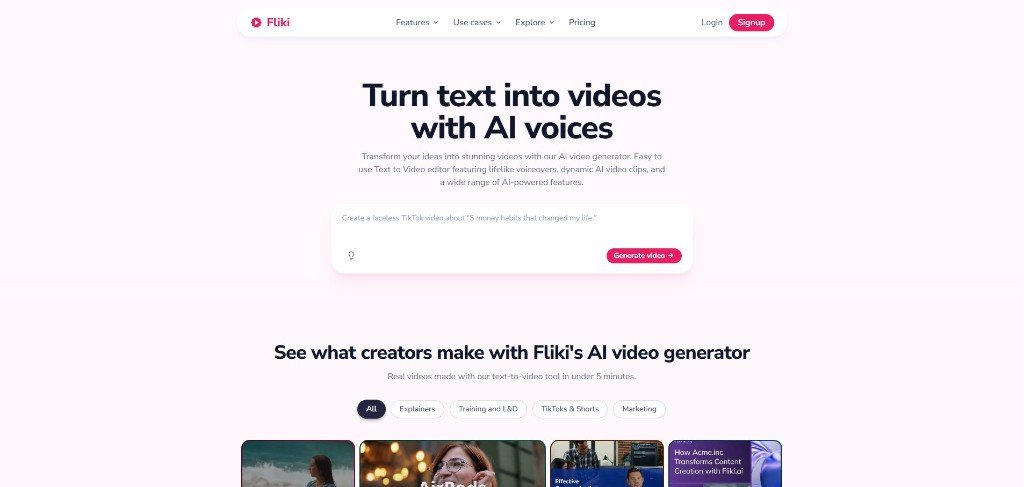
Visit the OFFICIAL SITE and sign up with your email address to get a FREE TRIAL. However, you can use my code (FIIKIAI10) to get FLAT 10% OFF on a monthly plan.
Step 2:
After signing up, click “SCRIPT TO VIDEO” to generate free faceless videos up to 30 minutes in any style.
So, now we’re in the main workflow area. This section covers everything that you need to create an 8- to 10-minute video from a script.
This section is divided into 6 major parts, including
- Script
- Format & Templates
- Scene Media
- Narrator & Subtitles
- Human-Like AI Character
- Extras & Advanced
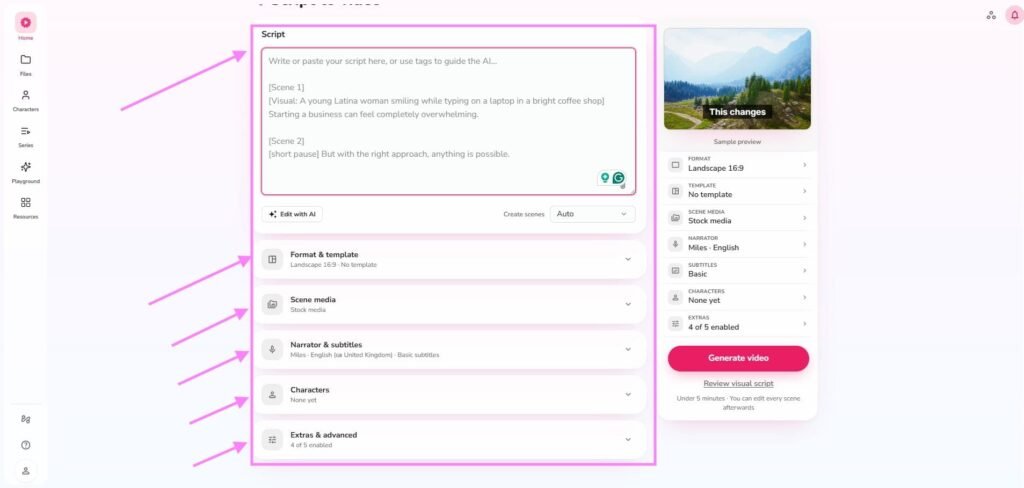
Now paste your script in the dedicated box and do some setup as per your choice.
One thing I want to highlight here is that do not paste all your script in a single shot. Always divide your script and upload.
Like in my case, I divided my intro into two parts and pasted the first section. See in the screenshot below.
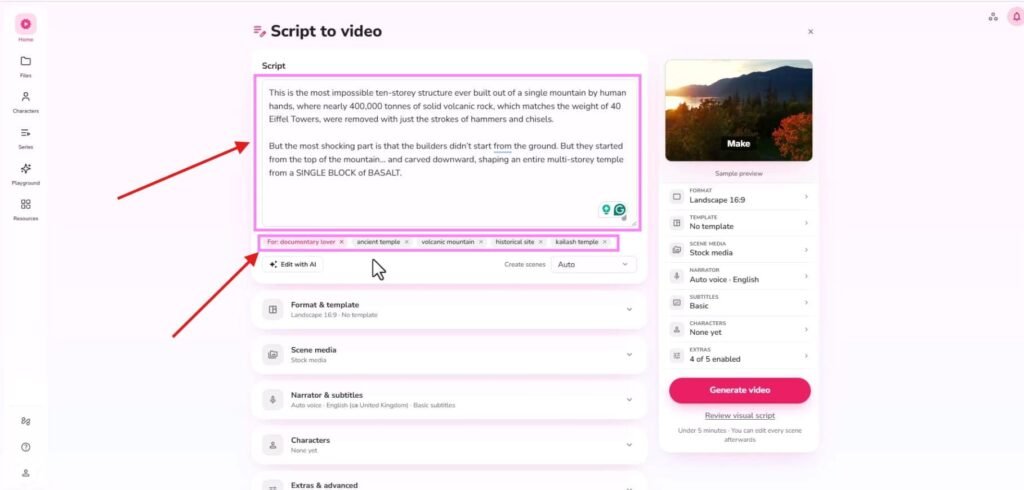
Here, as you can see in the screenshot, Fliki has an extremely useful feature that has helped me a lot to guiding the AI model to choose the right B-roll rather than random ones.
Basically, it has a tag feature that allows you to guide the AI model about the B-roll and target audience.
In my case, I have set the target audience data to ‘documentary lovers’ and added some B-roll guidance such as ‘Kailash Temple’, ‘historical site’, etc.
Then I set the format to 16:9 for a long-form faceless YouTube video, selected stock media for visual support, chose a voice narration for a documentary video and added a caption.
However, if you need realistic characters, then you can also select human-like characters from here. I didn’t need a character, so I skipped it.
Overall, the entire process was simple, and here you just need to choose from a wide variety of options.
I personally like Fliki’s AI voiceover section (here, ‘Narration & Subtitles’). These are human-like AI voiceovers and do not sound AI.
Now hit “REVIEW THE VISUAL SCRIPT” to check the visuals before proceeding further.
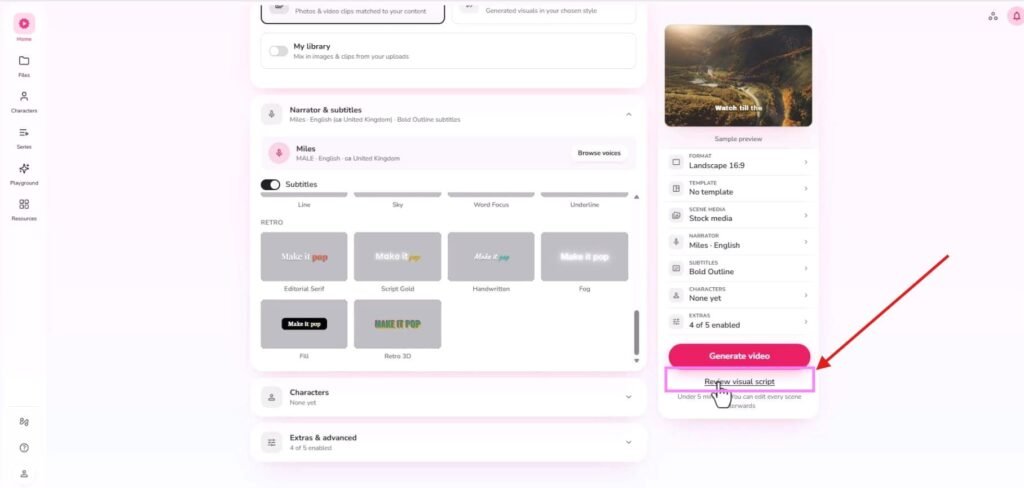
This is one of the features that I genuinely like, at least for faceless content creation.
It will help you a lot with an engaging faceless video-making process and is a highly effective way to avoid creating AI slop.
So, now you’re in the visual section. See the screenshot below.
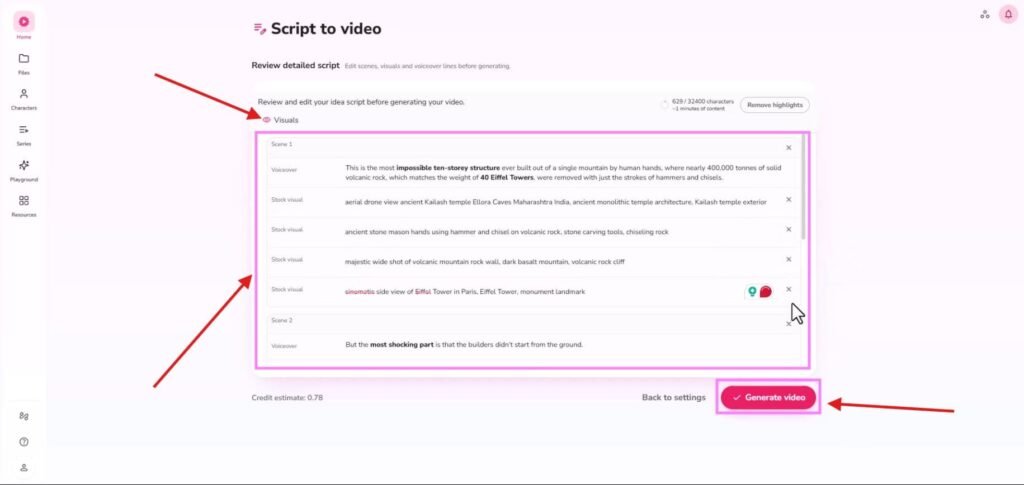
Btw, don’t forget to click the ‘EYE’ icon just beside the ‘visuals’ (I marked it on the screenshot) so that you can see the recommended stock visuals below in the review panel to review.
Here, if you don’t like any visual or want to remove the highlighted text, you can remove it by clicking the cross.
Plus, here you can see the estimated credits it would take to generate that video. Like, in my case, it took 0.78 credits.
So, if everything looks good, hit the “GENERATE VIDEO.”
Now, you’ll be redirected to the faceless video editor section. (screenshot below).
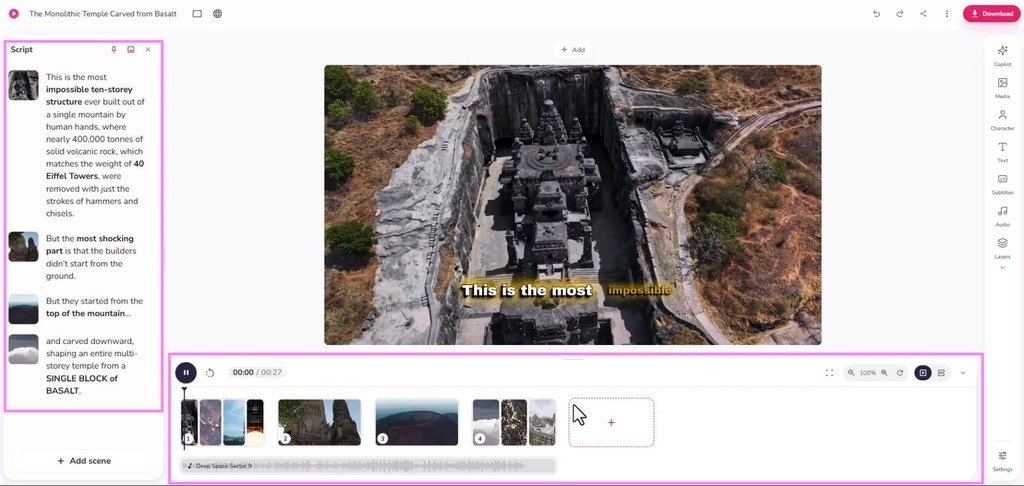
This video editing section was super easy to operate for me, and it reminded me of a free video editing software that I use frequently for my talking head video editing process.
Btw, on the left side, you can see the ‘script’ part and below it, a simple timeline with a drag-and-drop video editing workflow.
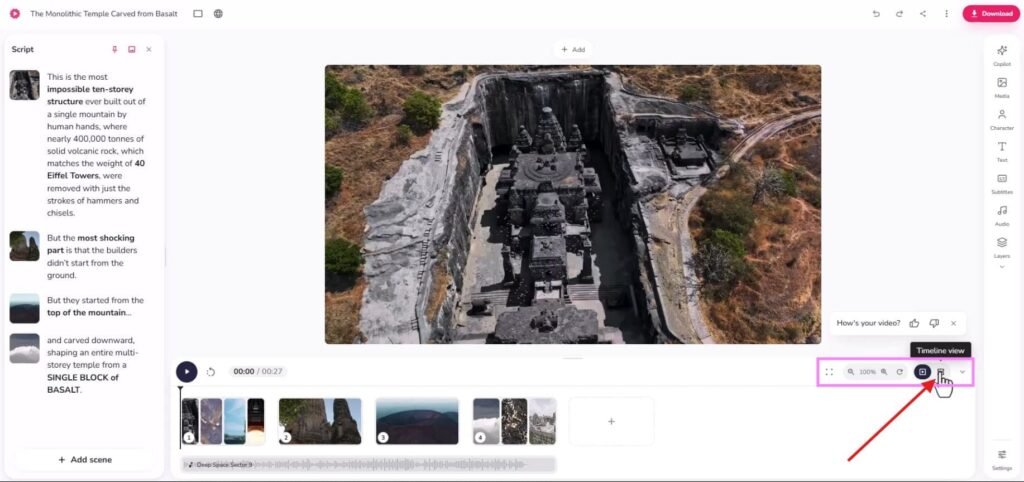
Here, I would recommend that you to click the “TIMELINE VIEW” so that you can easily execute the drag-and-drop faceless video editing process. (see the screenshot below).
Now, it’s time to edit the faceless video.
- If you want to change any B-roll or want to add an AI-generated video, just double-click on that particular clip in the timeline, and a media window will automatically open. You can just search there or can generate an AI video with some of the best AI video models (Seedance Pro Fast, Google Veo 3.1, Seedance 2.0, Kling 3.0 Pro and many more) and replace it with the old one. You can also add a reference to generate AI video clips accurately.
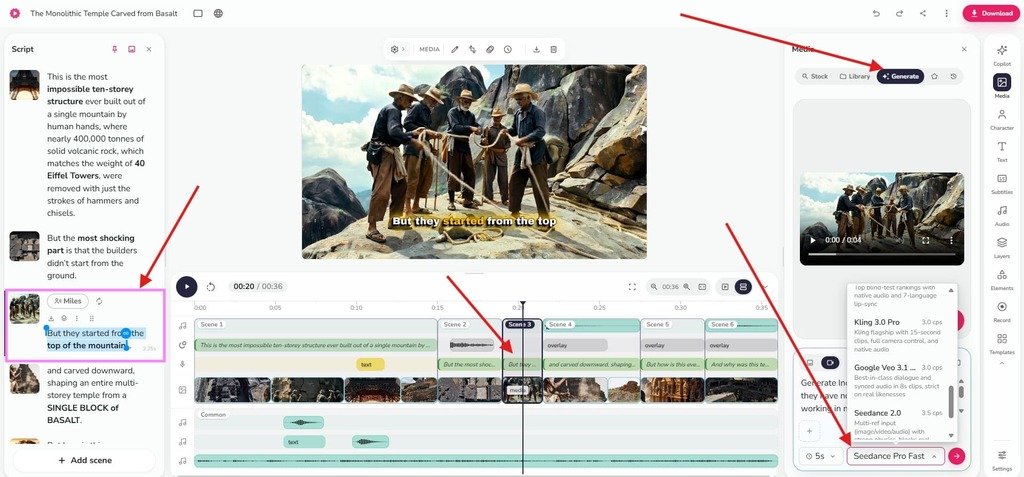
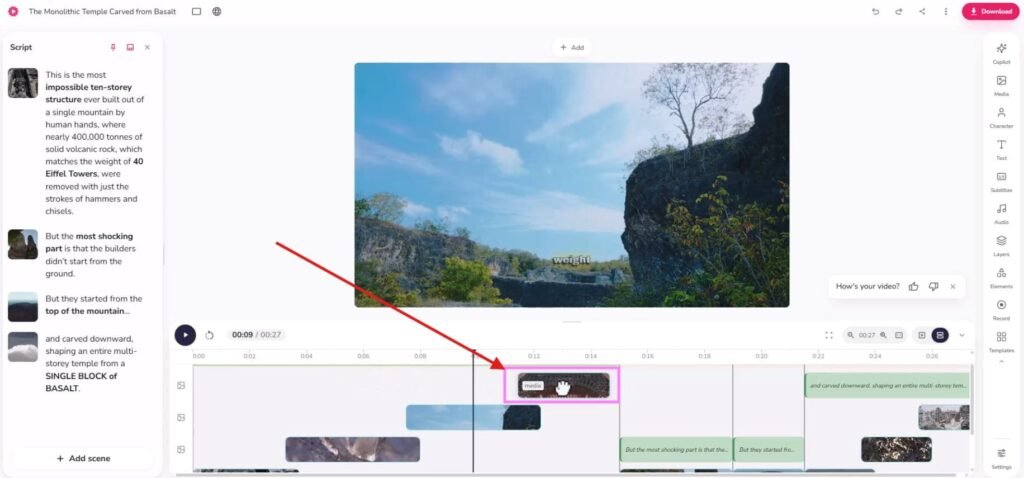
- If you want to move one clip to another place in the timeline, just drag that clip and place to a new area, or you can adjust any clip by just doing this.
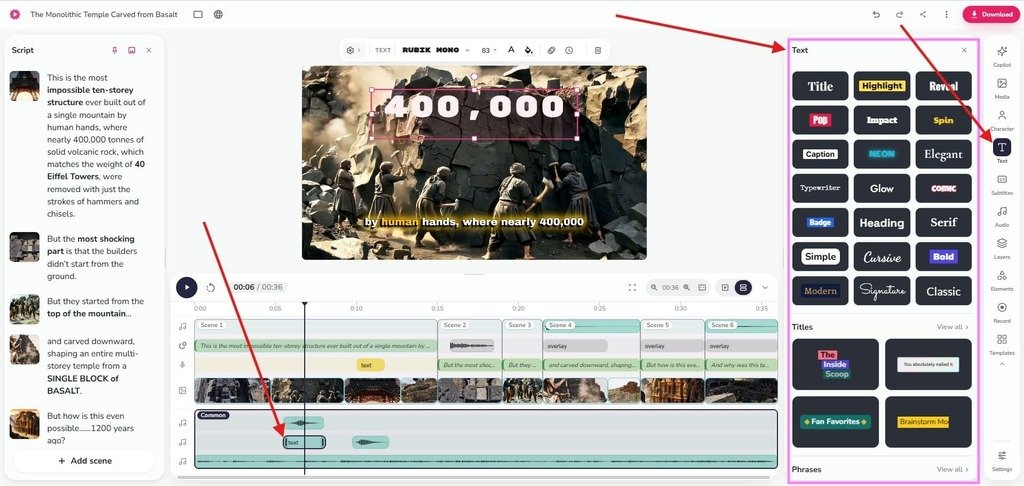
- If you want to add attractive text to your video, just place your timeline cursor, click the text icon on the sidebar and select from a wide variety of text options. You can also add text animations so that the video looks professional and premium to your audience.
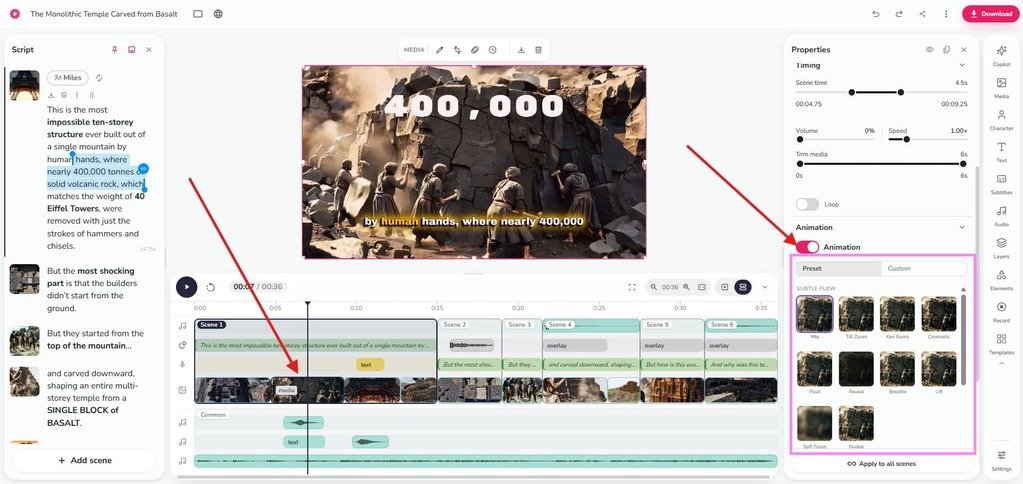
- If you want to add animation to your clip or images, first click that particular clip or image in the timeline and then click the settings icon above; it will open a sidebar with multiple options, including animations.
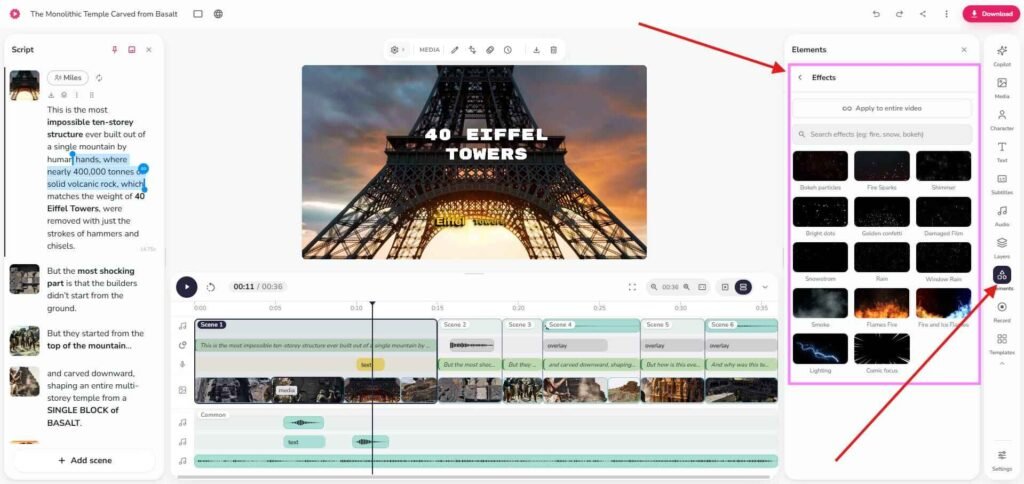
- If you want to add effects to your clips, just select the clip and click “ELEMENTS” in the sidebar. Select from there.
- If you want to add sound effects, just click the music icon in the sidebar and choose the preferred one to make your faceless video watchable.
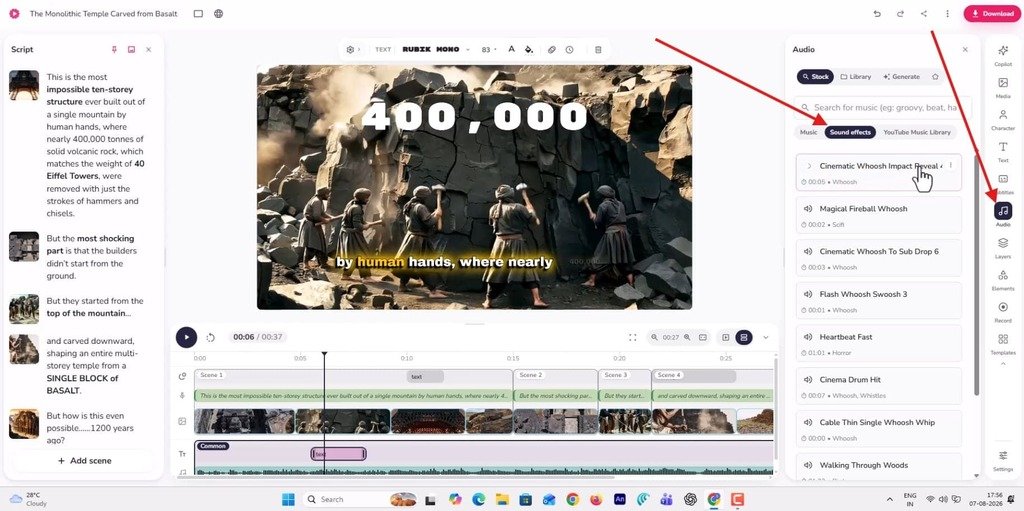
Here is a pro tip that I want to give you: sound effects are one of the most important things in a faceless video. By attaching perfect sound effects, you can easily create an atmosphere that your audience loves to watch.
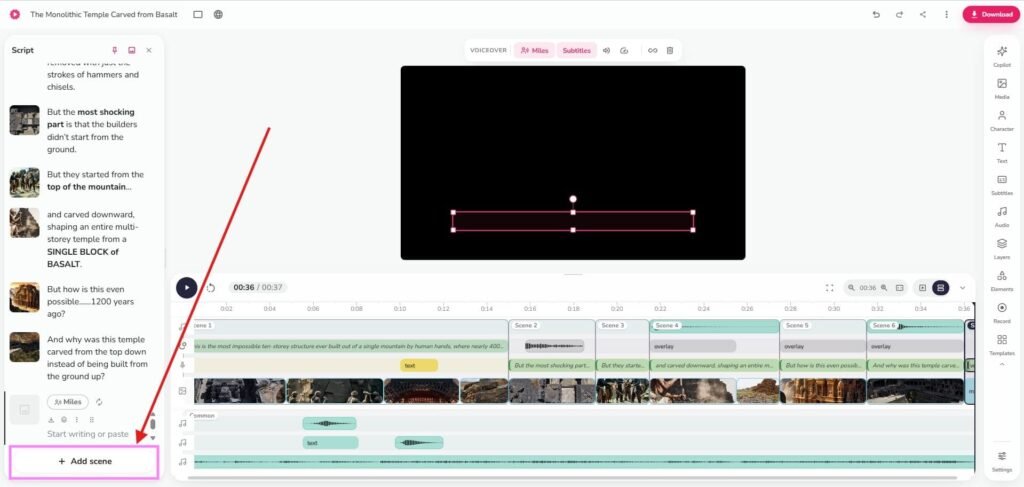
- If you want to make a long-form faceless video, just click “ADD SCENE”, paste your script and follow the same process that I have already covered earlier here.
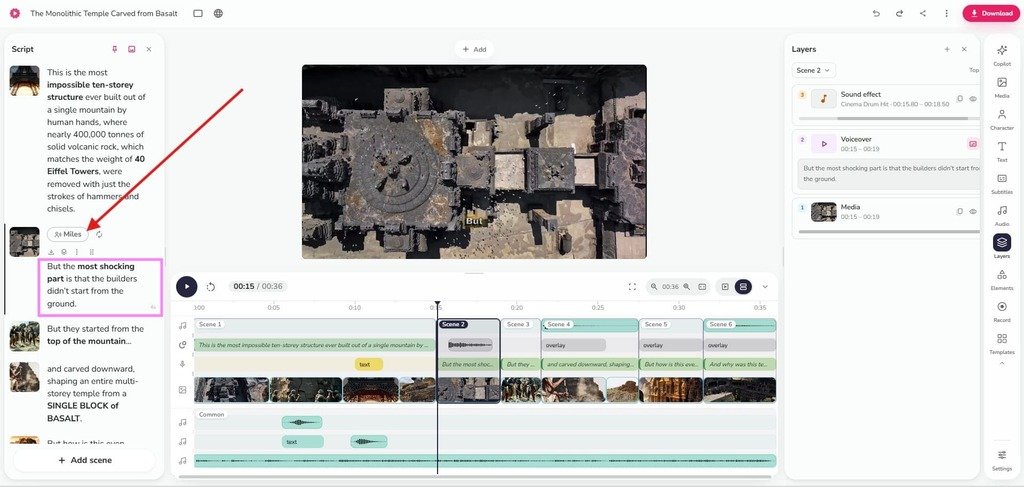
- Suppose your script has two different voice-overs and you want different narration for a specific area. For this, just choose the narration from the script sidebar and change your narrator. That’s it. (See the screenshot below.)
Well, Fliki has a lot of useful features that you can use specifically for faceless content creation.
And this entire faceless documentary intro creation took me around 5 to 6 minutes. However, you can make your video more engaging by adding some extra effects and sounds.
So, this is how you can generate faceless videos up to 30 minutes in any style with the help of this AI faceless video generator.
I have personally used it, and I think this is one of the best AI video generators for faceless YouTube channels.
Test Result: Can it Create an 8-10 Minute Faceless Video?
Yes.. Fliki can help you create an 8-10 minute faceless video with the help of the ‘Add Scene‘ option, but I would say that the best result does not come from leaving everything on autopilot.
In my test, the tool was strong at building the first draft. It converted the script into scenes, matched visuals, generated captions, and gave me a usable structure for a longer faceless YouTube video. That alone saves a lot of time because you are not starting from a blank editing timeline.
However, it was me who gave it the final touch by arranging everything in place.
Here, I would say that the biggest win was speed and proper B-roll recommendations because, as an AI faceless video generator, Fliki executed this task exceptionally well.
What the AI Faceless Video Generator Did Well
This AI tool has a uniqueness in terms of AI faceless video content creation because of its guided visual section process, along with AI human voiceovers and sound effects.
I mean, these are the main parts of this entire process with Fliki because, from the beginning, I didn’t want some unnatural B-roll attached video, but I wanted to create a video that people can actually watch.
However, this tool also has some drawbacks that I want to highlight here.
Where It Needs Improvement
To be honest, Fliki is not a one-click tool where you put an idea in, and you have a ready video in hand.
Trust me, those tools are the dumbest tools in the entire world. I have tested many of those, and they are just a waste in the backyard of your house.
Btw, Fliki has some drawbacks also, like I have not found any transition effects between two clips, as these effects can make your video a little bit catchier.
Overall, it looks pretty good in that space.
Can AI Faceless Videos Get Views or Monetised?
Yes, AI faceless videos can get views and can be monetised, but only if they feel original, useful, and made for viewers.
YouTube does not reject a video just because you used an AI faceless video generator. The real issue is whether the content looks mass-produced, repetitive, reused, or low-value.
YouTube’s monetisation policy says channels should publish original and authentic content, and it specifically warns against generic, repetitive, or templated AI-generated content with little added value.
And this is why I have chosen Fliki over others after a long search.
Who This AI Faceless Video Generator Is Best For
Fliki is best for creators who want to make faceless videos faster, but still want control over the final quality.
It is a good fit if you do not want to appear on camera, do not want to record your own voice, and do not want to build every video from scratch inside a complex editor.
Btw, it works best for:
- Beginner YouTubers who want to test faceless channel ideas without learning heavy editing.
- Side-hustle creators who need faster production for niche testing.
- TikTok, Reels, and Shorts creators who want quick faceless short-form videos.
- Marketers who need simple explainer videos, listicles, product content, or educational clips.
- Content creators who want a script -> voice -> visuals -> captions -> export workflow in one tool.
- People testing faceless YouTube channel ideas before investing in a bigger tool stack.
- Creators who need voiceover-led content but do not want to use their own voice.
Fliki is especially useful when your goal is not cinematic AI video but clear, watchable faceless content that can be edited and published faster.
Who Should Avoid It
Fliki is not the right fit if you expect a perfect one-click faceless YouTube channel. You should avoid this if
- You want zero manual editing
- You need cinematic AI video
- You need perfect B-roll automatically every time
- You hate reviewing output
Common Mistakes That Make Your AI Faceless Videos Look Bad
An AI faceless video generator can create the video draft, but it cannot always judge whether the story feels fresh, whether the B-roll supports the point, or whether the voiceover has enough emotion to hold your user attention.
Avoid these mistakes:
- Using a weak hook: If the first 10 seconds feel generic, your viewers leave.
- Publishing the first draft: Raw AI output often feels like AI slop without human editing.
- Accepting random stock footage: Replace your clips that do not match the script or emotion.
- Using flat AI voiceovers: Faceless videos depend heavily on voice, pacing, and delivery.
- Making the script too generic: Try to avoid a generic script angle.
- Ignoring long-form pacing: An 8-10 minute video needs section changes, visual variety, and story movement.
- Chasing one-click automation: One-click tools are useful for speed, but not enough for watchability.
- Forgetting YouTube value: Add storytelling or a clear point of view.
The goal is not to generate faceless videos instantly with AI and upload everything. The goal is to make scroll-stopping faceless videos with AI that still feel planned, edited, and worth watching.
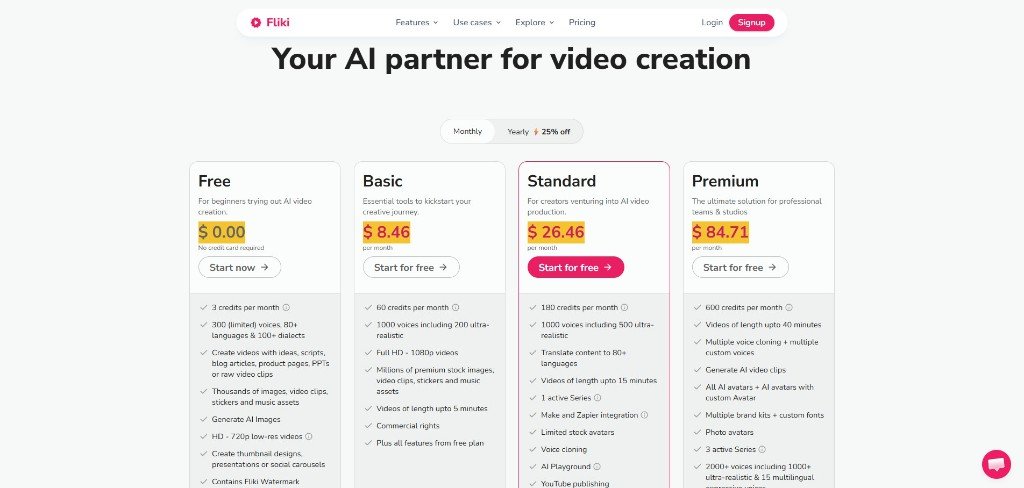
Fliki Pricing
Fliki offers a free plan for testing, and its Standard Plan starts at nearly $25 to $28 per month.
My Final Takeaway From This Test: Is This AI Faceless Video Generator Worth Using?
I would say a big YES.
Fliki is worth using to make scroll-stopping faceless videos with AI, but it is not worth using if you expect it to do all the thinking for you.
If your biggest problem is speed, Fliki helps because it can turn your script into voiceover, visuals, captions, and a full faceless video draft much faster than building everything manually. For beginner YouTubers, side-hustle creators, and marketers testing faceless YouTube channel ideas, that makes the workflow easier to start.
But if you want to produce quality content, then you still need to bring the human part like, you need a better hook, you need a well draft script, you need to replace weak stock footage, you need to fix pacing and finally you need to make sure the video feels useful, not like AI slop.
So my honest recommendation is simple:
Use Fliki if you want to create faceless YouTube videos with AI faster, and you are willing to edit the final output because the watchability still comes from your idea, your script, and your final edit. (Don’t forget to use the coupon code “FLIKIAI10” to get 10% off a monthly plan)
Avoid it if you want a one-click tool that guarantees views and 100% perfect long-form videos without your input.
FAQs About AI Faceless Video Generators
What is the best AI faceless video generator?
Fliki is a strong choice for beginners because it helps you create faceless videos from scripts with AI voiceover, visuals, captions, and export in one workflow. It works best when you use it as a first-draft tool and still edit the final video.
Is there any 100% free AI video generator?
Most free AI video generators have limits, such as watermarks, short video length, fewer credits, lower export quality, or restricted voices. A free plan is useful for testing only.
How to start a faceless YouTube channel with AI?
I would say to pick a niche first and research real viewer problems, and then write a strong script, use an AI faceless video generator like Fliki for voiceover and visuals, edit the draft, create a good thumbnail, and publish consistently.
How to create faceless content?
Start with one clear idea, write a script, add AI voiceover, use relevant B-roll or visuals, add captions, edit pacing, and export for YouTube, Shorts, Reels, or TikTok.
Do faceless YouTubers get paid?
Yes, faceless YouTubers can get paid through YouTube ads, affiliate marketing, sponsorships, digital products, and services. But the content still needs to be original, useful, and watchable.
Can I earn from YouTube without showing my face?
Yes. You can earn from YouTube without showing your face if your videos provide real value and follow YouTube monetisation rules. In my observation, faceless content works best when the script, voice, visuals, and editing feel intentional.