

TL;DR
TubeGen is one of the best Fliki AI alternatives for long form YouTube video production. Although, the reason behind this is heavily tied with my own experience. I found something interesting that can flip the way of your YouTube video creation journey. Btw, there are other AI video generators like Synthesia, VEED, or others in today’s list for different use cases such as text-to-video, AI voice generator, script-to-video, AI avatars, video editor, blog-to-video, YouTube video generator, and voice cloning. For my own hands on experience with these tool consider reading the full blog or you can use the table of contents.
Introduction
I have tested 10 alternatives to Fliki AI, and out of them, 5 look very promising to me as compared to Fliki.
Btw, I have used Fliki for a couple of months, and I believe when it comes to replacing this text to ai video tool, then it is a very tough task to execute.
Basically, here, you need a tool that keeps Fliki’s simple text-to-video workflow while giving you more control over scenes, voiceovers, captions, and finished video quality.
I tested 10 Fliki competitors against the same workflow content creators actually need, like converting ideas into scenes, editing individual visuals, generating AI voices, adding captions, and producing usable YouTube videos without a complex timeline.
Out of 10, I decided to keep 5, and this guide compares those hand-picked best Fliki AI alternatives for YouTubers.
Table of Contents
My Testing Process
I tested each Fliki competitor using the same prompt, like:
“Create a 30-second explainer video on the reasons for hair loss.”
I think using one prompt made it easier to compare how each AI video tool handled the complete text-to-ai video workflow
I assessed each video generation based on:
- AI Script accuracy: Did it explain the actual causes of hair loss?
- Visual relevance: Did each scene match the script and voiceover?
- Voice quality: Did the narration sound clear and natural?
- Editing control: Could I easily replace weak visuals or edit individual scenes?
- Generation speed: How quickly did it produce a usable first draft?
- Output quality: Was the finished video usable enough for YouTube?
- Credit value: Did creating or correcting the video consume too many credits?
My goal was simple. It was to find which Fliki AI alternatives could produce a usable video quickly, without burning extra credits.
Comparison Table of Fliki Competitors
Tool | Best for | Workflow strength | My Result (30 – 50 sec video making time) |
Complete long form video creation | Complete publish ready long video | 2 minutes | |
Pictory | Fast text-to-speech with stock visuals | Strong stock footage text to video workflow | 5 mint |
InVideo AI | Best for long YouTube videos | Generates complete videos from prompts | 5 mint |
HeyGen | Best for avatars and translation | Realistic avatars | 8 mint (30 – 45 credits) |
Professional explainers & training videos | Polished, consistent AI presenters | 5 mint | |
Short video creation and editing | Very easy short video creation workflow | 1 mint (Short video) |
Why Look for a Fliki AI Alternative?
As I was a real user of Fliki, I know that Fliki makes text-to-video creation a quick and easy way, but speed becomes secondary when you run out of AI credits or receive generic visuals.
However, you should consider a Fliki AI alternative if you need:
- More predictable credits for frequent YouTube uploads
- Better control over every scene after generation
- Stronger stock footage, AI voices, music, and captions
- Longer videos without stitching multiple projects together
- More realistic AI avatars
- A capable video editor without a complicated timeline
When I was looking for Fliki alternatives, my focus was to preserve Fliki’s simple script-to-video process, and that might be Pictory for scene-based YouTube production, InVideo AI for longer videos, HeyGen for avatars, or VEED for deeper editing.
TubeGen AI: Best Fliki Alternative for Long-Form Videos (8-10 minutes)
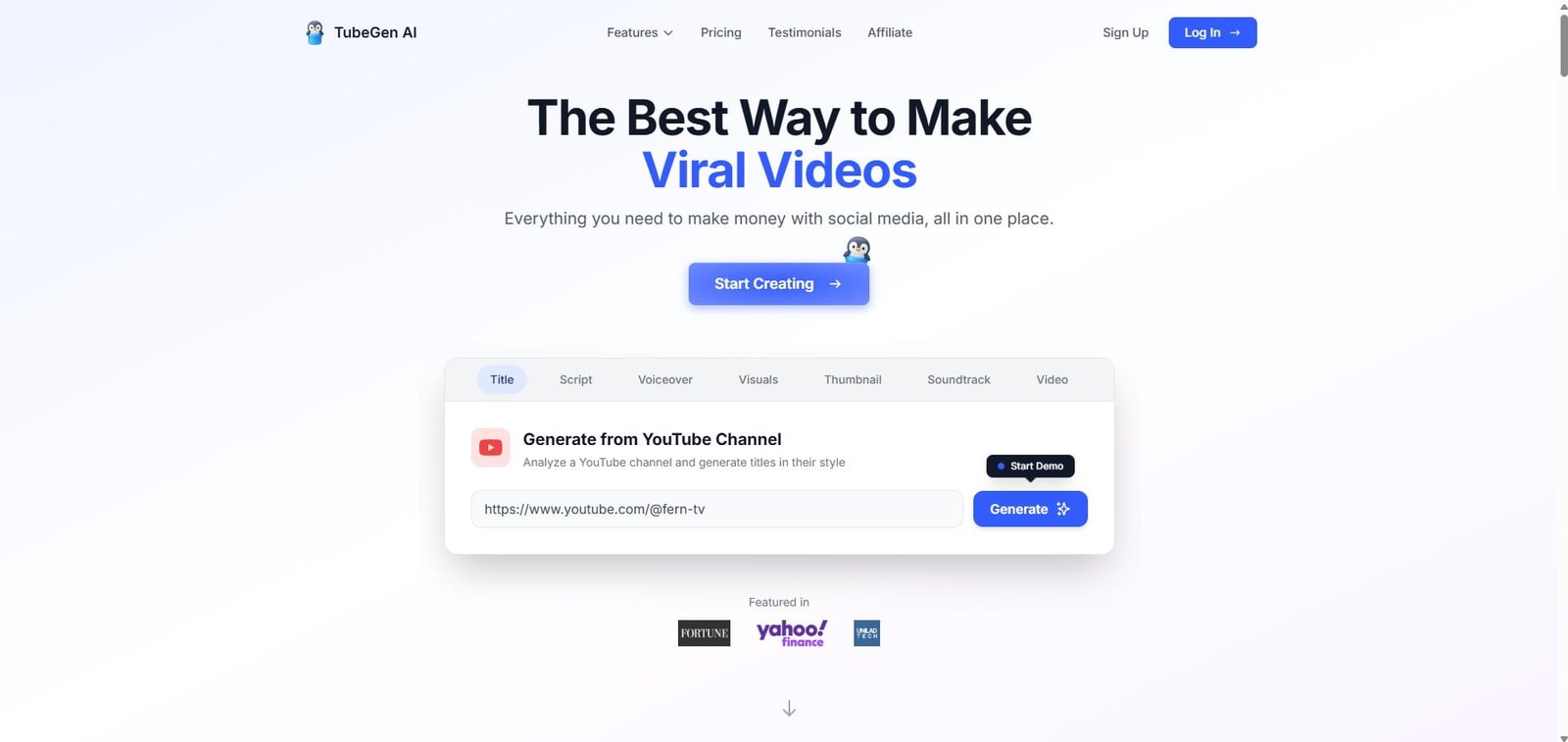
TubeGen AI offers a complete package for creating long-form faceless YouTube videos. Here, the workflow starts with niche research, scriptwriting, voiceovers and then continues with AI visuals, animation, background music, editing, captions, and thumbnail creation in a single and complete workflow.
This makes it a stronger Fliki alternative when you want to create 8–10 minute videos without moving between multiple tools. I know Fliki is useful for quickly turning text into voiceover-led videos, but what I found that TubeGen gives you more control by offering the complete long-form YouTube video, with visuals for every scene, complete sound design, editing and a thumbnail making.
I really like the way TubeGen is designed for long form content and here is the way you should describe TubeGen
Research—–> Script—–> Voiceover —–> Visuals —–> Motion —–> Music —–> Editing —–> Thumbnail —–> Faceless long form video creation learning/ best practices tips
My Personal Experience with TubeGen
If you are a faceless long form content producer then it is completely for you because TubeGen is designed around the complete faceless-video workflow rather than only the text-to-video stage.
I’ve seen that Fliki also has some popular AI video generation model but TubeGen has the capacity to produce long visual scene, which is a much needed for faceless content production.
Plus, TubeGen’s consistent-character and custom-style features are also useful for making long form episodes because it feel connected instead of looking like random AI filler and this is one of the most noticing part I experienced when testing this video generator.
However, TubeGen is expensive I think, because its plan starts at $149 per month, and there is no free trial. So, I would recommend you to go with this tool if you’re serious and want to regularly publish long-form faceless videos to stand out on YouTube.
Best Free Fliki Alternatives
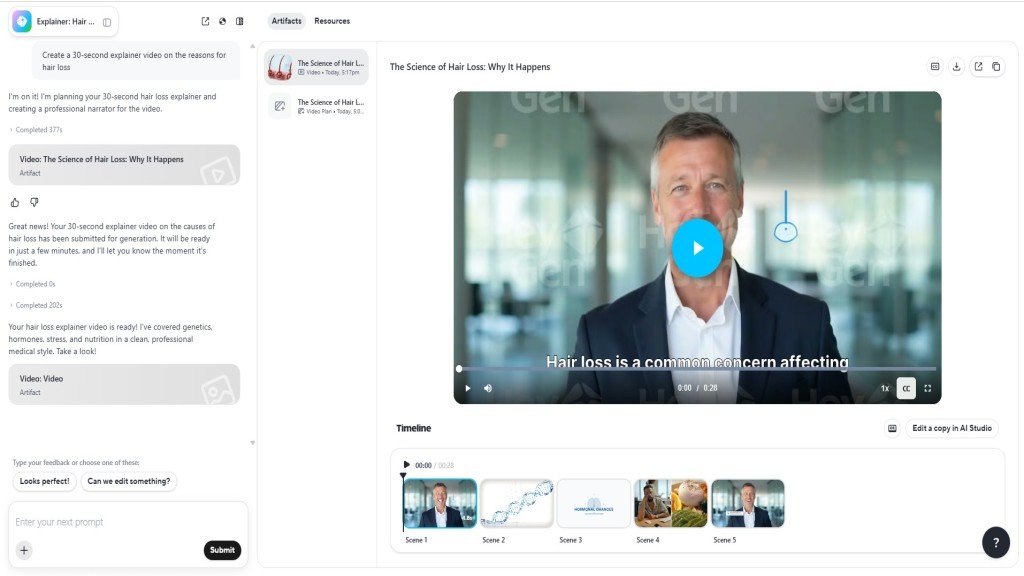
HeyGen is the best free Fliki alternative for testing short, presenter-led YouTube videos. Its free plan includes three videos per month, each up to one minute, plus 500+ stock avatars and support for 30+ languages.
I think this is enough to test the 30 to 50-second YouTube explainer video without paying first.
However, I would say that HeyGen is not a direct replacement for Fliki’s stock-footage-based workflow because I have seen that HeyGen is best for automatic scene selection without any human interference.
My Personal Experience with HeyGen
I have tested HeyGen with the same prompt, and the entire video-making process took around 8 minutes, with no interference from my side.
The output was not praiseworthy like Pictory AI. However, you can edit any scene, but the painful part of this is that it needs credits to edit the scene, also.
Plus, you have no control over the script like Pictory or Fliki AI.
Even downloading the AI video demands an upgrade to the HeyGen creator plan ($24).
However, the AI avatar looks very natural, and you can’t identify whether it is an AI avatar or not.
Overall, HeyGen, as the best free Fliki AI alternative, is the right choice for you in the initial period for testing purposes only and not for the whole life.
This is why I have also tested some HeyGen alternatives for content creation.
Best Fliki AI Alternative for YouTube
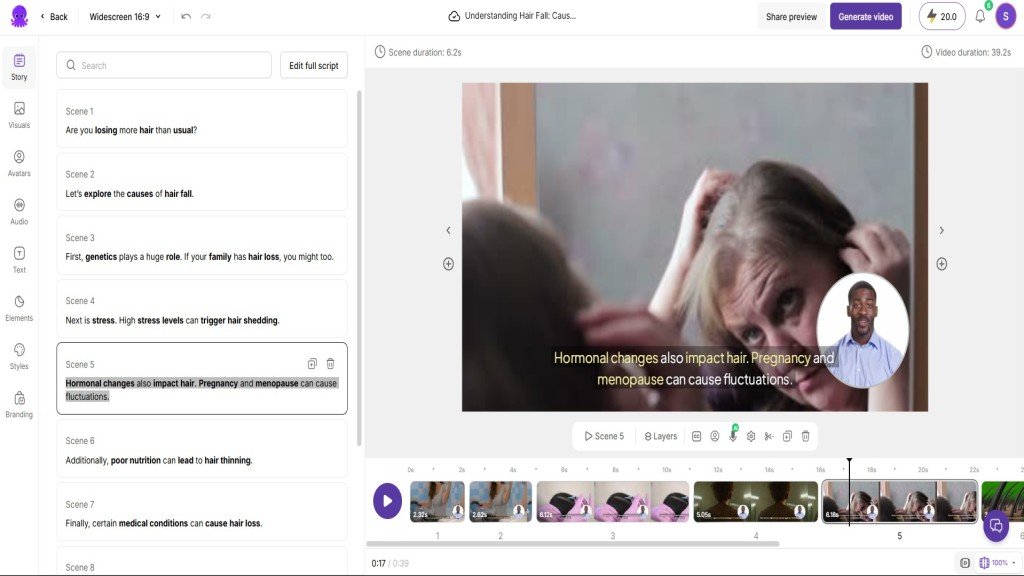
Pictory AI is the best Fliki AI alternative for YouTube creators who want Fliki’s simple workflow with stronger scene-by-scene editing.
Pictory AI is a direct competitor to Fliki AI, as you can turn an idea, script, or blog into automatically matched media visuals, captions, music, and AI voiceovers. Its media library is huge with royalty-free videos, images, and music tracks, making weak or generic scenes easier to replace.
I think Pictory AI is particularly useful for faceless YouTube explainers and blog-to-video content because you can refine each scene without learning a complex editing process.
My Personal Experience with Pictory AI
I have used Fliki AI for a couple of months, and I think Pictory AI carries the same workflow as Fliki.
Like Fliki, Pictory has an easy-to-use interface, and its text to video workflow feels very professional and useful to me.
I have tested Pictory AI with the same prompt, and before the final delivery, it took me to a very structured process for better video output than HeyGen.
From the AI script making to the AI avatar selection to the AI voiceover selection, all areas are perfectly covered, and I was satisfied with the overall result.
It took nearly 5 minutes to generate the video, and there was no extra credit needed to change the scene or download the video.
I think this is the best part for a content creator.
Best Alternative to Fliki AI for Long Videos
InVideo AI is the best Fliki alternative for long videos because its v4 agent (known as Agent One) can create up to 30 minutes of video from one single prompt.
I believe you can consider InVideo AI as one of the best AI video generators for long-form content. Although InVideo is not as easy as Fliki.
It can generate the script, scenes, stock footage, voiceover, subtitles, and music together. This makes it useful for long YouTube explainer videos.
However, I don’t think generating 30 minutes video from a single prompt can be useful for any YouTubers as it may lead to bad video output.
Best Fliki AI Competitors for AI Avatars and Presentation Video
HeyGen and Synthesia are closer competitors of Fliki AI only when your YouTube video needs an on-screen AI presenter rather than stock footage.
HeyGen: Best for Realistic Avatars and Translation
HeyGen suits you if you want natural-looking presenters and multilingual presentation videos. Its Creator plan supports unlimited photo avatars and 175+ languages and dialects, making it useful for localising your one video for different audiences.
An explainer video needs a professional and realistic look so that your audience doesn’t feel disconnected. From that point of view, HeyGen appears as the strongest alternative to Fliki AI.
Synthesia: Best for AI Avatar Led Explainer Video
Synthesia is another strong choice over Fliki for an explainer video maker, along with an AI avatar. It provides 230+ AI avatars, 300+ templates, analytics, easy updates, and LMS-friendly sharing.
Synthesia is not like traditional AI video generators, but it is purely based on creating AI explainer videos for your business.
Here you will get pre-made templates for specific purposes, and it needs your involvement to make AI videos.
In my experience, this is a drag-and-drop feature-based explainer video maker that allows you to change and shape anything in your scene as per your requirements.
And this gives you enough control to make your final output useful and worthy.
The free plan gives you 1200 credits, and you can easily make a 10-minute video to test Synthesia.
Best Fliki AI Alternative for Social Media Video Editing
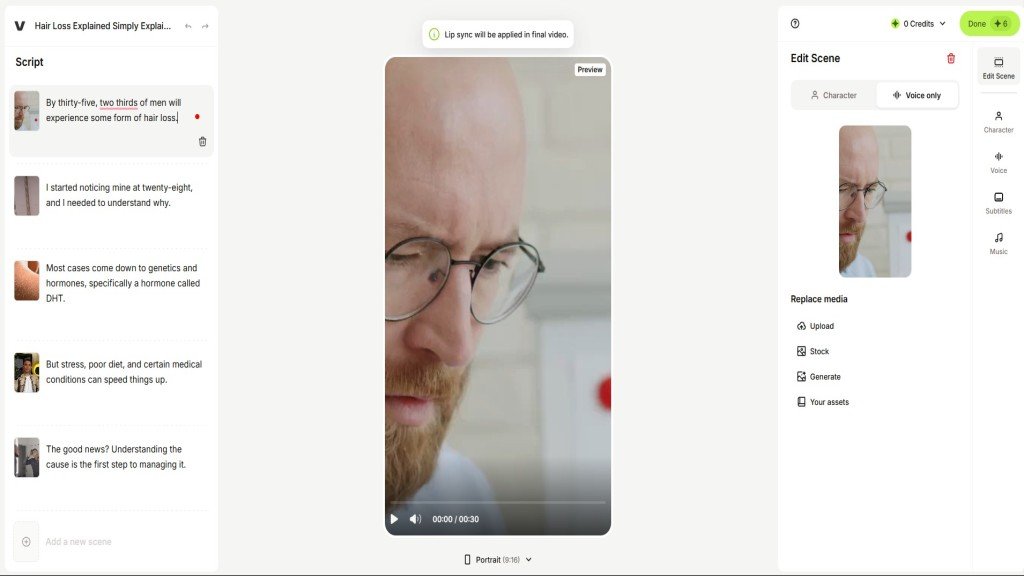
VEED is the best Fliki AI alternative for editing videos for YouTube Shorts, Instagram Reels, and TikTok.
I have tested every 5 alternatives to Fliki and generated a video, and also edited it on their own platform. Trust me, every platform looks the same except VEED in terms of video editing workflow.
Basically, VEED gives you tight control over video editing, just like Descript, where you can resize clips, trim scenes, edit through the transcript, add styled captions, remove filler words, clean audio, insert B-roll, and repurpose long content into short clips.
And this makes VEED a better fit when Fliki produces a usable draft, but you need more freedom to make it feel original and platform-ready.
Fliki Competitors Pricing Comparison
I have gone through each alternative to Fliki to compare the prices, but one thing I want to highlight here is that this comparison table shows an approximate value because each AI video model has a different credit cost.
So, read this data by keeping that in mind.
| Tool | Entry paid plan (approx.) | Included usage/month |
|---|---|---|
| Pictory | $29/month | Upto 200 video minutes |
| InVideo AI | $20/month | Usage depends on selected AI models |
| HeyGen | $24/month | Upto 30 minutes of video |
| Synthesia | $18/month | 10 video minutes |
| VEED | $6/month | 1200 AI short videos |
Key Takeaways
- Pictory AI Starter provides 200 video minutes for $25 monthly with annual billing.
- Synthesia’s free plan provides 10 minutes of AI video monthly.
- VEED is best if you are heavily dependent on YouTube Shorts UGC videos.
- All Fliki AI alternatives here are easy to use.
- HeyGen will ruin your credits faster.
Conclusion
The best Fliki AI alternative is not the tool with the longest feature list. It is the one that fixes the exact problem slowing you down.
If you want YouTube videos with better scene control, start with Pictory. If you need longer prompt-based videos, try InVideo AI. If you want AI avatar-based explainer YouTube videos, HeyGen and Synthesia make more sense. And if your main pain is editing social clips after generation, VEED is the better fit.
I would say that before paying, test one real script, check the output quality, see how many credits it uses, and then decide which one to go after. Each of the tools (except InVideo AI) here offers a free plan to test, so you can easily get an idea of how it performs for your specific use cases.