
TL;DR
Fliki is worth trying if you want a fast and professional text-to-AI video tool for usable voiceover-led videos, blog repurposing, YouTube explainers, training videos, and simple social clips/posts. But it is not the best choice for you if you need high-control editing or cinematic videos. Fliki offers 2,000+ AI voices, 80+ languages, and has 12M+ users, along with strong 4.4-star Fliki AI reviews on Trustpilot from 3,000+ users, which is a pretty good sign for an AI video tool.
Introduction
I have tested a lot of AI video generators, and to be honest, each of those has very similar features in general.
This is why I always try to test AI tools on the basis of one single thought:
Can this text-to-AI video tool create videos you can actually use, or does it only look impressive in demos?
So, this Fliki AI review has something raw and real-world data. I tested Fliki (Use my coupon code “FLIKIAI10” for 10% extra discount on any monthly plan) as a practical text-to-AI video tool across three common workflows:
- Text to video
- Blog to video, and
- Image-to-video
The goal was to see how well it handles real content.
In this Fliki AI review, I’ll break down each detail from the basis of practical use cases for content creators.
So if you want simple, fast videos without editing skills, this honest review will help you decide whether Fliki fits your workflow before you spend credits or upgrade.
So, let’s start
Table of Contents
My Testing Methodology
My testing process was pretty straightforward and user-focused because I know you don’t need all the features Fliki is offering.
Actually, you need a proper and authentic text-to-AI video tool that executes your task and makes professional AI videos without burning credits.
This is why, while testing, I looked at things like voice quality, visual alignment, credit usage, ease of use, output quality, and whether the final AI video felt professional enough to publish.
I gave this tool three prompts to check its capacity, and as I have tested a lot of AI video generators, I already have an idea about good AI video output.
I will walk through this process so that you can gain an idea about the output video quality.
Basically, my goal was to see where Fliki is useful, where Fliki fails, and who should actually pay for it.
That’s it.
Fliki AI Review: Is This Text-to-Video Tool Worth It?
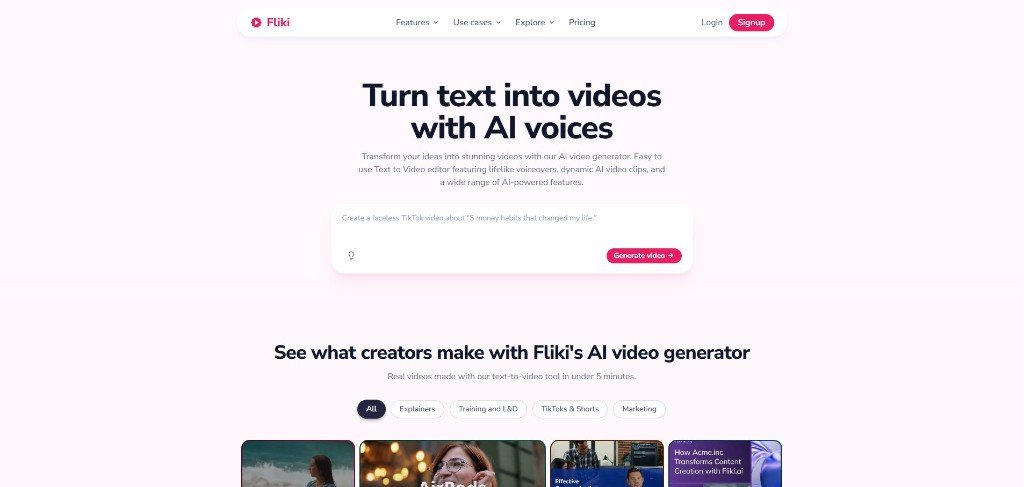
Fliki is a text to AI video tool that helps you turn blog posts, scripts, ideas, PPTs, and product content into useful voiceover-led faceless videos without editing skills.
Here, you can create simple, usable videos with 2000+ AI voices, stock visuals, avatars, captions, and music in one place.
I have personally tested this tool, and it actually matches the script with the visuals, and the final video looks usable to publish on social platforms.
For social creators, this is the most important thing, and it makes you feel that whatever credit you spent is worth it.
Key Features of Fliki AI
There are 9 key features of Fliki AI, and as a content creator, you may fall in love with some of those.
1. Text to Video
Fliki’s main feature is text to ai video generation. This feature looks simple because here, you paste a script, prompt, or article idea, and Fliki creates scenes with AI voiceover you like, visuals, music, and captions. I have seen this feature really useful if you want a finished video very fast without video editing skills.
This text to ai video feature is useful because
- You can turn a short script into a YouTube explainer
- You can create social media videos from content ideas
- You can make educational videos without recording your voice
- You can repurpose your product tips into short video clips
How I Tested this Feature: My Experience
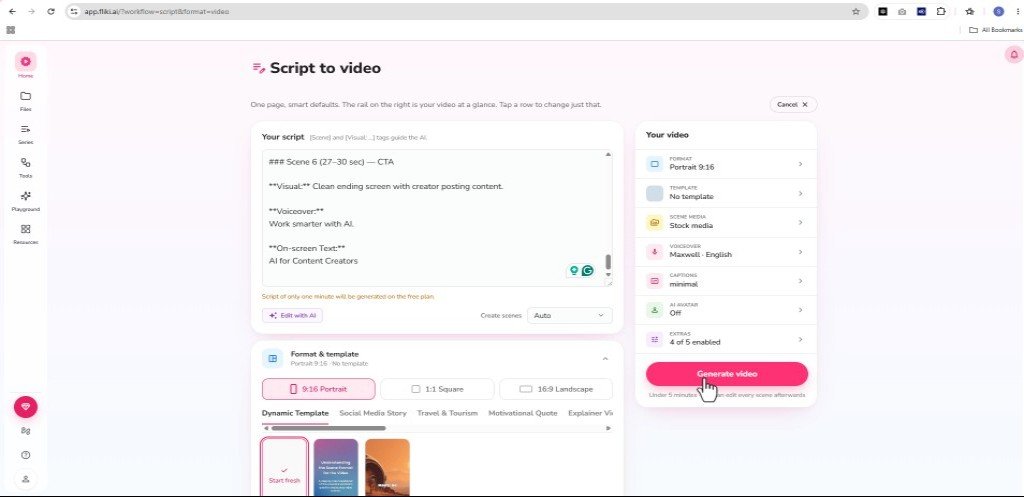
In this Fliki AI review, I gave this tool a short and simple script like ‘Create a 30-second vertical video for content creators about how AI helps speed up content creation’, and it generated a professional and ready-to-publish video within minutes (Fliki was showing 3 minutes, but it took 7 minutes from start to finish).
The test-to-video workflow looks very professional and easy, and if you are a beginner and don’t like editing tools, then Fliki can be the best for you. Each option here is pretty useful as per my observation because these give you enough control over your final output.
I liked the pre-made templates here, which are for each specific use case (social media story, travel & tourism, explainer video, etc.). Although I selected a dynamic template, the result was promising.
The stock media section inside this workflow allows you to upload your own clips and images if you want to personalise your content, and I think this feature alone separates you from other AI slops.
The AI voice selection option inside this text-to-video feature is another useful thing that I love a lot. There is a wide variety of languages and dialects you can choose to spread your voice from local to international.
Overall, Fliki text to video is useful and simple to follow without spending a lot of credits.
I have a dedicated YouTube video on how I created a complete video with the help of this text to video workflow. Here is the video for you
2. Tool
On the left side inside the Fliki dashboard, you’ll find this option, and once you open it, you’ll find some amazing workflows that are designed to execute some specific tasks.
As of 5th October, 2026, I am noticing seven ready-made AI video creation workflows like
- Slow motion story video generator
- Explainer videos
- Motion graphics explainer
- Raw clip to final video
- Product image to ad creatives
- Translations and dubbing workflow
- Product image to marketing videos
Once you open it, you’ll see each AI video-making process has some specific steps, and you just need to follow those steps to get a professional AI video output.
3. AI Voiceover
Fliki’s AI voiceover is one of its strongest features. It offers 2,000+ AI voices in 80+ languages and dialects, which is useful if you need natural narration without hiring a voice artist. I have seen many user reviews on G2 and Trustpilot praising this feature. These 2000+ AI voiceovers are truly a goldmine.
This feature helps you to
- Make multilingual content
- Test different voices for different audiences
I have not tested each AI voiceover from Fliki, but I tested some of them, and what I experienced was not generic AI voiceovers.
The workflow is simple and easy to follow because here you paste your script or paste your blog link, and Fliki will give you options to generate AI voiceovers for your content.
For example, you have a blog post, and you want to make an audio version of it. You can just paste your blog link, choose an AI human-like voice, and Fliki’s AI voiceover will generate a whole audio version of it.
4. Blog to Video
Fliki’s blog to video is another useful feature for content creators because it helps you turn written content into video content.
It’s simple because you can paste a blog URL or article text, and Fliki can create a narrated video with scenes, subtitles, and visuals.
This feature helps you:
- Turn blog posts into YouTube videos
- Create short clips from long-form articles
- Repurpose SEO content for social media
- Make educational summaries from written guides
How I Tested this Feature: My Experience
Fliki’s blog-to-video feature is like the text-to-video feature because it triggers the same workflow as text-to-video.
But my basic aim was to watch how Fliki handles the blog to give a usable video output. This is why I tested it with my own hand. Here is the complete ‘blog to video‘ article you can read to see the full process.
Btw, it took around 3 minutes to analyse the blog and then open the editor window so that I could edit as per the scene and make changes in everything I needed.
I found that Fliki easily created the script as per the scene, but it does not fully replicate the image as per the scene. For this, you need to add generated videos to make your scene more attractive to your audience.
I found that Fliki has some of the top video models included, so you can easily generate AI videos directly from the Fliki dashboard.
To change the images included in the scene, you just need to click on the image, and Fliki will take you to the media library, where you’ll find stock media, library and AI video generation options.
I have tested a lot of AI video generators for creators, but the variety Fliki is offering to select or add media is really praiseworthy.
Literally, Fliki’s blog-to-video feature gives you enough creative control over your video and allows you to make changes as per your requirements and needs.
5. Image to Video
Fliki has some of the popular AI video models like Veo 3, Seedance 2.0, Kling, Happy Horse, etc and with these models, you can easily generate AI video by giving it a sample reference image and a structured prompt.
What I found useful are some of the templates, and you can recreate that type of AI video by tweaking the prompt.
6. PPT to Video
This is another repurposing option available in Fliki.
Fliki can turn PowerPoint or Google Slides into narrated video scenes. This is helpful for educators, trainers, and marketers who already have presentation content but do not want to record everything manually.
This feature helps you:
- Convert webinar slides into a video
- Create course lessons from presentations
- Make product training videos
- Repurpose sales decks into explainer videos
For example, you have a 10-slide lesson deck, and you want to make it a usable video. What you just do is paste your script and adjust the settings, just as I did for text-to-video and blog-to-video.
The process is the same, but you just need to make adjustments as per your choice.
7. AI Avatars
AI Avatar is one of Fliki’s useful features because nowadays, many YouTubers are just making their AI avatar and using that in their video to eliminate the shooting process every time.
This is a great idea to save time and energy as well, and Fliki also supports AI avatars and digital twins.
This means you can create talking-head style videos without filming yourself every time. It is useful when you want a human-like presenter, but it may not be the best fit if you need very high avatar realism.
This feature helps you:
- Create presenter-led training videos
- Make faceless YouTube content
- Add a human element to explainers
- Build simple product walkthrough videos
For example, you are an introvert, but you want to make YouTube videos; what you do is just create your digital twin and add it to your video.
Fliki has popular AI video model integrations, and you can easily make professional videos by using those models.
8. Screen Recording
Fliki includes screen recording for tutorials and demos. You can record your screen, webcam, or both, then use Fliki to clean up the video to upload on social platforms.
This feature helps you to
- Create software tutorials
- Record product walkthroughs
- Make training videos
- Explain step-by-step workflows
For example, if you make explainer videos or how-to tutorial videos, then you can use Fliki to record your screen to show the original process, and then you can edit that video in Fliki and add B-roll videos or images to make it more useful and professional.
I like this feature very much, as my main workflow is to showcase AI & SaaS tools, and this is why the screen recording feature along with the complete AI video-making process makes Fliki a better option for me.
9. Design Workflow
Fliki AI is an all-in-one complete AI video platform with professional output quality, but what makes me excited is its additional features that include YouTube thumbnails, social posts, and a presentation-making creative workflow.
I have been in the copywriting and content marketing field for a couple of years, and I know how these additional features can be helpful for content creators.
This AI thumbnail maker includes some of the top AI image generation models like ChatGPT Image 2, Nano Banana 2, Queen Image Edit Plus and more.
Social design also has the same premium options that can help you make better output for social posting.
Fliki Pros and Cons
Pros
- Fliki is very easy to use, and anyone can operate it without having editing skills.
- The AI voices are huge in number, and most of them are very natural-sounding and human-like.
- The text to ai video output quality is way better than many AI video generators available in the market. I mean, Fliki’s AI videos are usable to any social platform.
- Pricing is reasonable compared to others in that niche.
- Fliki gives you more creative control than other AI video makers in the market.
- The tool section has pre-built AI video-making workflows that make the AI video-making process very easy to follow.
- Fliki’s playground section, located just below the tool section, is actually a creative playground where you can generate any images, videos, and music by using different popular AI models.
- Fliki’s autopilot gives you freedom to auto-generate video episodes and publish those daily without any break.
- Built-in estimated credit usage calculator.
- Each AI video generation shows you the credit cost breakdown, which provides transparency.
- Fliki is an all-in-one solution for content creation.
Cons
- The number of AI video templates is generally low compared to Fliki alternatives.
- Brand kit option available in paid tier only.
- Fliki is not that useful for extra high visuals like cinematic video production.
Fliki AI Pricing: Pricing Breakdown and Best Plan
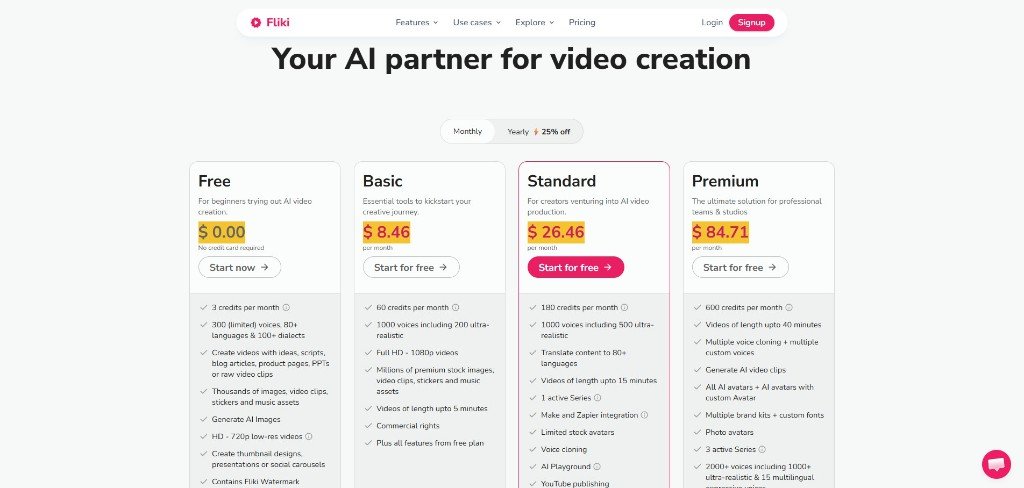
Fliki AI has 4 pricing plans, including a free plan to test. The paid plan starts from $28/month on a monthly tier. However, you can get a flat 25% off (as of 23rd June, 2026) if you choose the yearly plan.
I would suggest going with the standard plan ($28/mo) because you’ll get most of the useful features like brand kit, automation, Zapier or Make integration, and also the team collaboration feature for a shared workspace.
Fliki Reviews: Real User Data From G2 & Trustpilot
On Trustpilot, Fliki has over 3000+ reviews, and around 80% are 5-star reviews, and only 4% are 1-star reviews.
On G2, Fliki has 170+ reviews, and 85 % are 5-star reviews, and 1 % are 1-star reviews.
I have analysed Fliki reviews from the real user data point, and what I found is that most of the user reviews praise Fliki AI for ease of use, quality output (not a cinematic AI video generator), and human-like AI voiceover.
5 Key Takeaways from This Real Fliki Review Experience
Here are 5 key takeaways that I found during my Fliki AI review process
- Fliki is not a cinematic AI video generator, but it is a beginner-friendly text-to-video and AI voiceover tool for creating simple, fast, professional-looking content.
- Fliki AI’s generated visuals match the script or voiceover.
- Fliki has a credit usage calculator so that you can get an idea about how many credits you need to generate that particular video.
- This text to ai video generator has a natural-sounding voice library.
- Fliki works best for educational videos, social media shorts, text to video, blog to video, voiceover-led content and presentation purposes.
Key Facts About Fliki, A Text-to-AI Video Generator
Fact 1: Fliki has a dedicated credit tutorial page with an in-depth breakdown of each credit usage method.
Fact 2: Fliki has launched TikTok auto-publishing from 4th June, 2026, onwards without leaving the Fliki dashboard.
Fact 3: On Trustpilot, Fliki has over 80% 5-star user reviews, and only 1 % have 1-star reviews out of 3000+ reviews.
Fliki Alternatives
I have found 3 real alternatives to Fliki AI
Fliki vs Pictory: Fliki and Pictory looks like same until you tested both deeply. I have a Pictory review article, where I have discussed in detail about Pictory but compared with Fliki, I would say to go with Fliki if you’re looking for an advanced text to video workflow. Plus, Fliki has a lot of new features that entirely cover your AI video generation process.
Fliki vs Synthesia: Synthesia is an alternative option to Fliki AI if your basic need is to create polished AI avatar videos for training, business explainers, or professional presentations. Compared with Fliki, it is less about quick content repurposing and more about structured, high-quality text-to-video with avatars. I also have a dedicated Synthesia alternatives article. You can check that article also so that you can take better decision.
Fliki vs Invideo AI: Invideo AI is a strong Fliki alternative if you want prompt-to-video content for YouTube, social media, explainers, or marketing clips. Like Fliki, it can create scripts, visuals, voiceovers, subtitles, and music from a simple text prompt, but it is not an easy-to-use tool like Fliki.
Fliki vs HeyGen: HeyGen is another alternative to Fliki AI if you want more realistic AI avatars and presenter-led videos. Btw, if you want to know in details about HeyGen, then I have also a ‘HeyGen review‘ and ‘best HeyGen alternatives‘ article. You can read those also to get hands on reviews and testing results.
However, Fliki has a lot of alternatives, and each tool has some pros and cons of its own. So, it is better to try Fliki if this text to ai video generator matches your actual workflow.
FAQs on Fliki AI Review
Is Fliki good for beginners?
Fliki is best for beginners because its AI video creation workflow is very easy to follow and execute task.
Are Fliki AI voices natural?
Fliki has a huge AI voiceover library, and most of them are pretty useful and natual human sounding.
Is Fliki good enough for YouTube or social media videos?
Fliki is good enough for YouTube or social media videos, but it is not good for YouTube cinematic video production that needs very high-quality editing.