![You are currently viewing Fish.audio vs ElevenLabs: My Hands-on Experience with Both These Text-to-Speech [2026]](https://saas24reviews.com/wp-content/uploads/2026/02/Fish.audio-vs-ElevenLabs-2.png)
I’ve spent hours testing many AI voice generators to look for the differences these tools are delivering to us.
However, I’ve had a new experience while testing both Fish.audio ai and ElevenLabs, and I’m going to share my honest experience in this Fish.audio vs ElevenLabs text to speech review comparison article.
There is no issue that both these AI tools will help you to hit “Generate” and get a professional, consistent, engaging voiceover within a minute.
But here’s the problem, because both tools claim to be “the best.” However, here I’m giving an unfiltered breakdown of Fish audio text to speech and ElevenLabs text to speech for you. It helps you choose the better performer for your daily needs.
So, let’s start…
Btw, at first it looks like a messy thing for you, but trust me, when you actually know the right process (which I share here), your audience will take your video seriously just for the depth of the voice.
Table of Contents
ElevenLabs Text to Speech
ElevenLabs is the industry heavyweight in AI voice generation. As a heavy consumer of YouTuber content, I’ve noticed creators transforming their faceless YouTube channels from robotic narration to broadcast-level storytelling with this platform.
The best part of it is that you can launch a monetized YouTube channel without ever turning on a microphone.
ElevenLabs Text to Speech for YouTube Creators
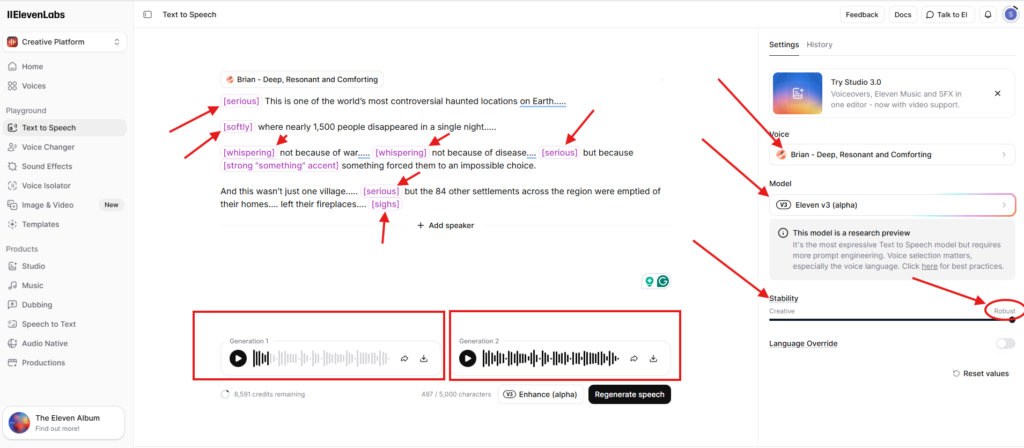
I tested ElevenLabs v3 (alpha) latest model for a documentary audio production about the Kuldhara Mystery script, with the desired emotional tags.
Here’s what I experienced after following all the best practices…. Look at the screenshot and voice sample here that I’ve generated so that you can understand clearly….
ElevenLabs TTS Voice sample
The Process You Should Follow to Generate a Perfect ElevenLabs Text to Speech
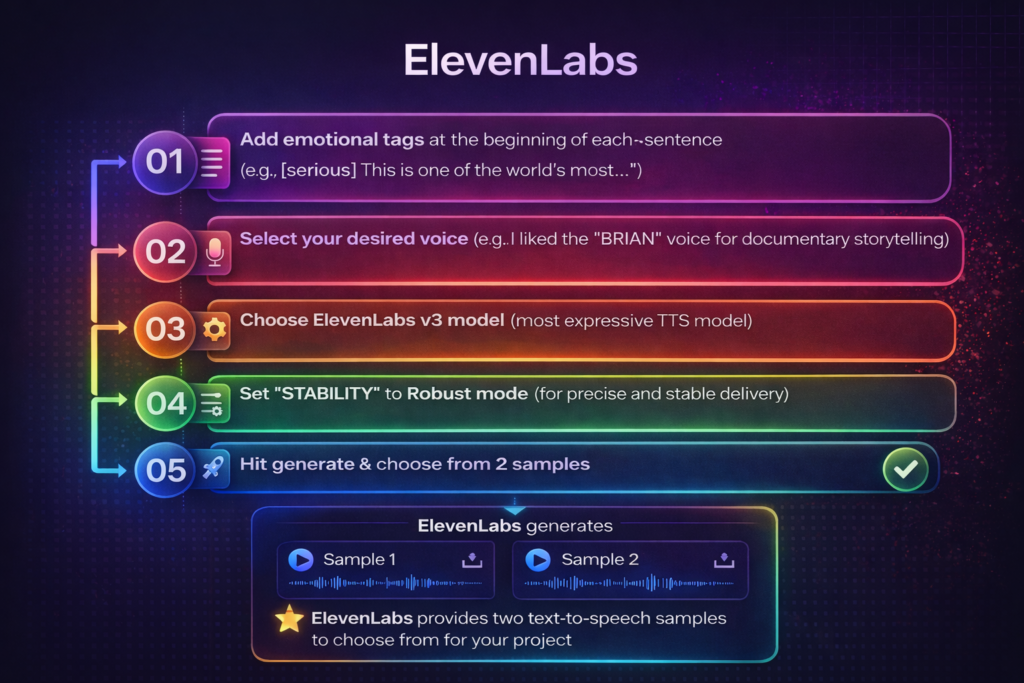
I pasted my Kuldhara script and added Elevenlabs emotional tags at the beginning of each sentence for a perfect human voiceover.
Then added emotional tags just like this: “[serious] This is one of the world’s most controversial haunted locations on Earth…..”
After carefully placing each tag, I selected the “VOICE SECTION” located on the right side and then chose my desired voice from there.
Friends…. Elevenlabs has lots of AI voice options, and you can choose from those as per your needs.
I really liked the “BRIAN” voice for the documentary storytelling. So, I selected that, as you can see in the screenshot above.
Next, I selected the Elevenlabs v3 model as this is the most expressive text to speech model, so that this AI tool can deliver the emotion as per my instructions.
Next, I moved to the “STABILITY” section, located just below the model section, and here set it to “Robust” mode. (Robust mode for precise and stable delivery)
Now it’s time to hit generate.
Elevenlabs always generates 2 samples so that you can choose from those for your project.
If you’re not satisfied with the result, then just tweak some emotional tags and hit regenerate for the final output.
Here are some of the Elevenlabs emotional tags you can use
[laughs], [laughs harder], [starts laughing], [wheezing],[whispers],[sighs], [exhales], [sarcastic], [curious], [excited], [crying], [snorts], [mischievously]However, you can add sound effects and create an atmosphere to make the audience feel very accurately. Here are some of the sounds and effects you can use….
[gunshot], [applause], [clapping], [explosion],[swallows], [gulps]Plus, you can also use some unique and special tags to add more depth to your voiceover. Such as
[strong X accent] (replace X with your desired accent)Fish audio Text to Speech
Fish.audio is the budget-friendly option in AI voice generation that’s quietly building a loyal following among volume creators. After watching countless YouTubers struggle with expensive voiceover costs, I tested Fish.audio with the same documentary script and discovered something game-changing.
For daily uploaders and YouTube Shorts creators, Fish.audio’s speed and affordability mean you can finally scale content production without the premium price tag holding you back.
Fish.audio Text to Speech for YouTube Creators
I tested the Fish audio S1 model for the same documentary script about the Kuldhara Mystery, with the same emotional tags.
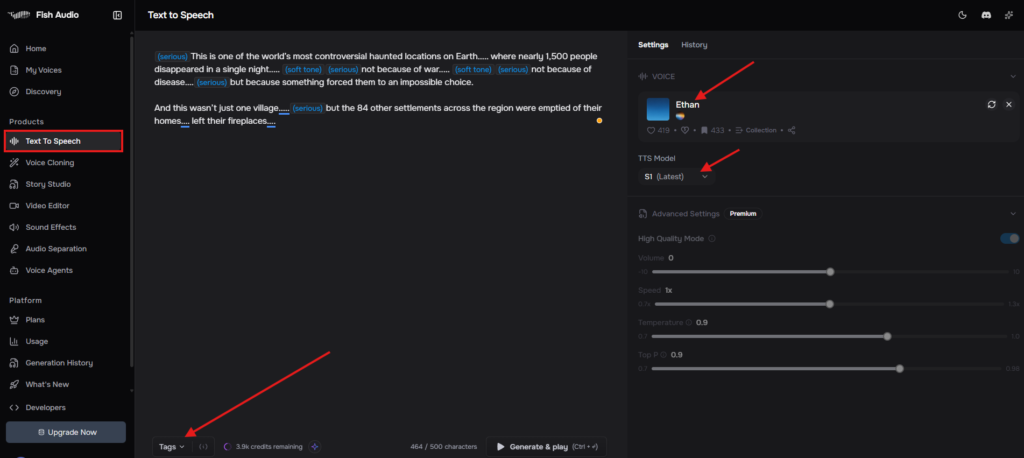
Here is what I actually experienced by following all the best practices…. Look at the screenshot and voice sample below that I’ve generated so that you can understand clearly….
Fish.audio Voice sample
The Process You Should Follow to Generate Fish audio text to speech
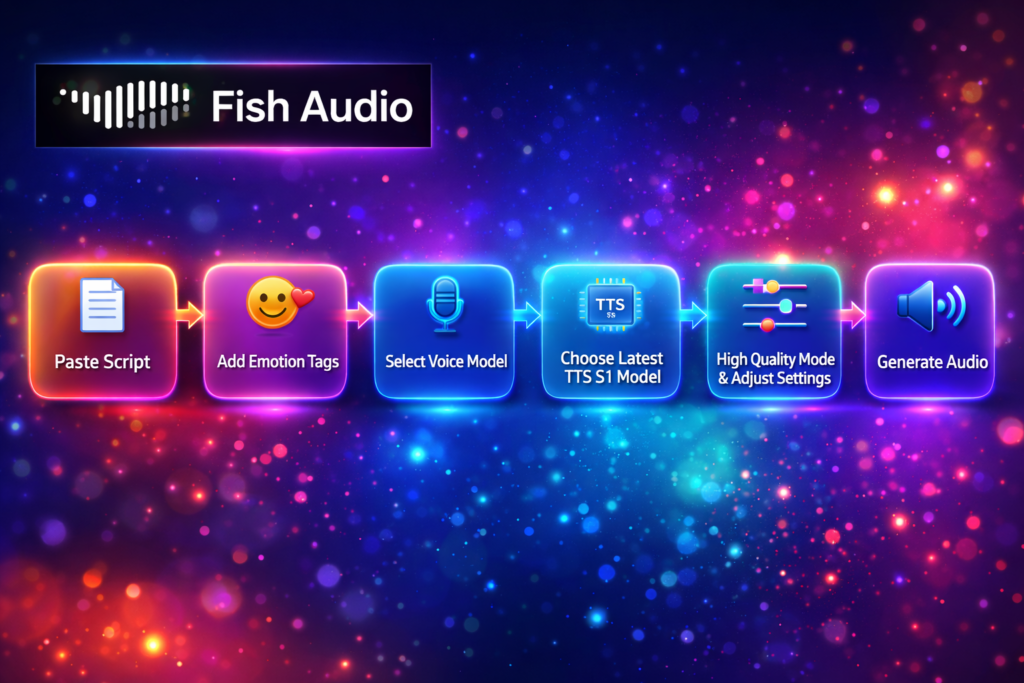
I pasted my documentary script and added Fish audio emotional tags at the beginning of each sentence to get the desired result.
Simply click the Tags section below and choose emotions, tone, and special emotions like laughing, sobbing, etc.
After putting each tag just before each sentence, simply move to the “SELECT VOICE MODEL” section located on the right side of your screen.
Select the “DEFAULT VOICES” section and search for whatever types you need, like in my case, I searched “Dramatic & Serious.” I’ve used the “ETHAN” voice.
Now select the latest TTS model (Fish.audio text to speech), which is the most expressive Fish audio S1 model.
Then toggle on the “HIGH QUALITY MODE” and adjust settings as I did here for this AI voiceover.
Now adjust volume, speed, temperature (controls expressiveness), and Top P (controls variation).
Here, the temperature (controls expressiveness) section is very important for proper emotional expression in your AI voiceover. The more you put it in a higher range, the more expressive it can be.
However, I kept the settings in default mode.
Which is the Best Text to Speech AI software?
After generating the same 2-minute Kuldhara Mystery documentary script on both platforms using identical emotional tags, here’s my honest verdict…
ElevenLabs wins on pure voice quality, delivering superior emotional depth with tags like [whispers] and [soft tone] [serious] that genuinely enhanced my haunted village narration, while Fish.audio wins on cost efficiency and speed.
Important Tips for a Realistic Voiceover
Follow these simple steps to generate your AI voiceover accurately.
Step 1: Think Like a Voice Director, Not a Typist
Before touching emotion tags or syntax, ask yourself:
- What should the listener feel in this moment?
- Is this line meant to build tension, create curiosity, or deliver authority?
- Should the voice sound intimate, grand, calm, or urgent?
Every sentence should have a purpose, and random emotion tagging creates chaos. Strategic emotion creates realism.
Step 2: Master Tag Placement (This Is Non-Negotiable)
This is where most creators fail because the emotion tags must always appear at the very beginning of a sentence. If the tag is not at the start, the AI tool will ignore it completely.
Correct:- (serious)This is one of the world’s most controversial haunted locations on Earth…..
Incorrect:- This is one of the world’s most controversial haunted (serious) locations on Earth …..
Do not add excessive emotion tags as they create distortion and unnatural pacing.
Step 3: Tone vs Emotion: Know the Difference
Emotion tags define the internal feeling, like (mysterious), (sad), etc.
Tone/effect tags define delivery style or sound like (laughing), (shouting), etc.
Tone tags can appear anywhere in the sentence, but emotion tags must start the sentence.
Step 4: Layering for Depth (Use Carefully)
You can stack tags when needed, like this “(soft tone) (serious) not because of war…..”. This adds cinematic depth, but overuse will make your audio unstable.
Step 5: Control Emotion Like a Story Arc
Real humans don’t jump emotionally with every sentence. They transition.
Example Flow
(calm) At first, the monument appeared silent and ordinary.
(curious) But subtle markings on the stone suggested a hidden purpose.
(suspicious) Measurements revealed patterns that shouldn’t have existed.
(tense) Each discovery raised more questions than answers.
(Revelation) The structure was not decorative, but it was a precise scientific instrument.
Step 6: Use Atmosphere to Create Immersion
Atmospheric tags make narration feel alive. Instead of saying “The crowd was cheering loudly.” Try to say “The crowd was cheering loudly (audience cheering).” This subtle layer adds realism and cinematic texture to your voice.
Step 7: Keep Characters Emotionally Consistent
If you’re narrating:
- A serious documentary → Avoid playful emotions.
- A mystery story → Keep tension, curiosity, and suspense dominant.
- An inspirational piece → Build gradually toward hope and confidence.
Random emotional shifts break immersion and make your voice feel artificial, and this is why I chose Etham and Brian as my AI narrator.
Step 8: Preview, Adjust, Repeat
- Generate → Listen carefully.
- Adjust emotion intensity.
- Reduce unnecessary tags.
- Fix pacing issues.
- Re-export.
Small tweaks often create massive improvements.
FAQs
What’s the best free text to speech AI tool that sounds really human?
Between Fish.audio and ElevenLabs, ElevenLabs has a more human-sounding voice than Fish.audio.
Is fish.audio really 2nd place in TTS after ElevenLabs?
Fish.audio isn’t necessarily “2nd” in pure quality, but it’s a TOP CHOICE for budget-conscious creators who need volume. ElevenLabs is “1st” in quality, but Fish.audio is “1st” in accessibility for small channels.
Is fish audio text to speech free?
Yes, Fish.audio offers a free plan.
![Read more about the article Akool AI Voice Generator: Honest Review with Complete Guide [2026]](https://saas24reviews.com/wp-content/uploads/2026/01/Akool-ai-voice-generator-300x200.png)