

I’ve been writing SaaS content and marketing copy for the last 3 years, and if there’s one thing I know, it’s that e-commerce brands are spending a lot of money on UGC ads in 2026.
Not because UGC ads don’t work. It absolutely does, but the problem is you’ll only get a conversion if you arrange it in the right way with a proper hook and deliverable.
I personally used Creatify AI for 5 weeks, and to be honest, there are a lot of UGC Ads generators, and you probably know all their names and features because everyone is talking about those. But nobody is talking about the real process of generating those authentic social ads that feel real human.
And I think, this is why you should read this Creatify AI review tutorial blog… Plus, I’ve given here all the top-rated review platforms (Trustpilot, G2, Reddit, Quora) data so that you can notice the frequency of what works for others and what’s not.
Table of Contents
Why You Should Trust This Review
I have tested this AI tool for 5 weeks, and I’ve gained some real experience that must be helpful for business owners.
Plus, before writing this review, I have also researched on popular review platforms like Trustpilot, G2, Reddit and Quora data to see how other people have experienced with Creatify AI.
So, I think this blog is just the thing you need before making any decisions. This is where you get the actual people’s opinion, complaints, Pros & cons, pricing details, who Creatify is best for, information regarding the customer service, and a step-by-step process about how to create e-commerce UGC ads with AI.
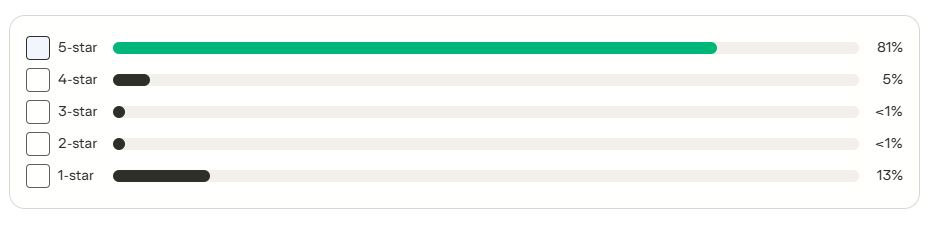
Creatify AI Review: Creatify AI Trustpilot
Trustpilot has 802 user reviews for this UGC ads tool
Creatify AI Review: G2 Creatify Review
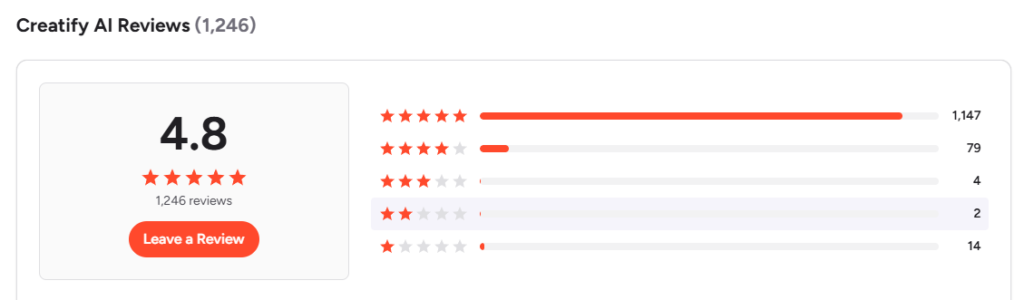
G2 has 1246 user reviews with a 4.8/5 stars for this UGC ads tool.
Creatify AI Review Summary (Unbiased Opinion from Users)
This review summary is generated from real user reviews across G2 and Trustpilot.
Before I share my own findings from five weeks of testing, I want you to hear what other users are saying. I went through Creatify reviews, testimonials, and customer references across G2 and Trustpilot.
On G2, many users praise the ease of using the platform for non-designers. Many appreciate the realistic AI avatars and call them a genuine differentiator in the UGC ads space. What makes Creatify AI so good, according to G2 reviewers, is the combination of speed and output quality.
But some users are showing frustration with the credit system. Many Users find that lip-sync errors force re-renders, which burn credits unnecessarily. Plus, newer avatar models like Aurora also consume significantly more credits.
| Positive Side | Negative Side |
|---|---|
| Easy to use | Credit system |
| Realistic AI avatars | Inflexible pricing |
| speed and quality output |
Quick Overview of Creatify AI
Creatify AI is an all-in-one generative video creative platform that is built to help marketers produce UGC-style ads, product videos, and avatar-led scripts for your business. If your goal is to rapidly generate and test e-commerce UGC ads at scale, Creatify is built exactly for that workflow.
Key Strengths (Pros)
- Ad Analyser and Tracking:- You can analyse competitor insights, creative testing, and performance analytics in one place.
- Easy to Get Started:- Creatify’s URL-to-video make your UGC ads production workflow very fast.
- Realistic AI Avatars:- The AI avatars look very real and natural with proper lip sync after final render.
- Built for Multi-Platform Output:- Creatify supports multiple aspect ratios such as 9:16 for TikTok and Reels, 16:9 for YouTube, and 1:1 for Instagram.
Key Weaknesses (Cons)
- Frustrating Credit System:- Every render costs credit. If you’re in the experimentation phase, then credits disappear faster than you’d expect.
Honest Verdict
Creatify AI has some excellent plus points, but it also has a certain drawback, like the credit system. I recommend that you to test its FREE TRIAL beforehand, or you can try at least the starter plan ($19) (20 videos/mo (100 Credits) and then make a long-term decision.
How to use Creatify AI to Create E-Commerce UGC Ads: A Step-by-Step Process
Creating UGC ads is very easy with this AI tool. Just follow this step-by-step process..
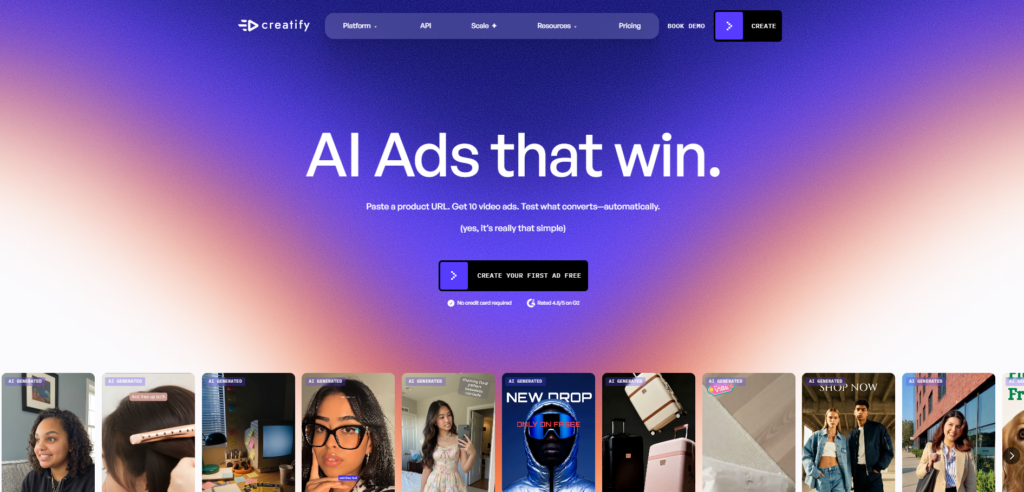
Step 1
Go to their OFFICIAL WEBSITE.. and click the ‘CREATE’ option…
Step 2
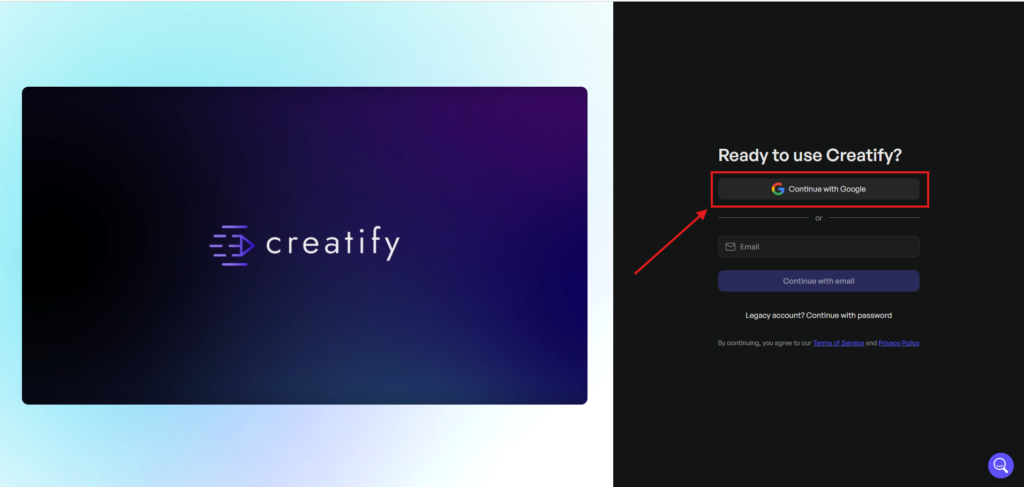
Next, click “CONTINUE WITH GOOGLE”..
Step 3
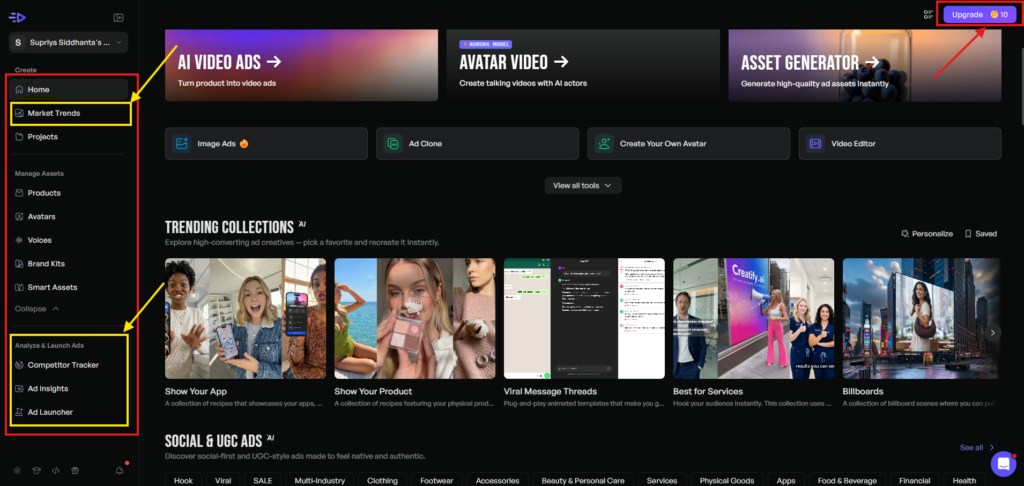
Now you’re in the ‘MAIN DASHBOARD’. Creatify will give you 10 FREE CREDITS for each month for testing purposes.
On the left side, there are multiple important options such as “Market Trend, Competitor Tracker, Ad insight and Ad launch” options.
Step 4
To create an E-Commerce UGC Ads, click the “AI VIDEO ADS” option and enter the product URL from your site.
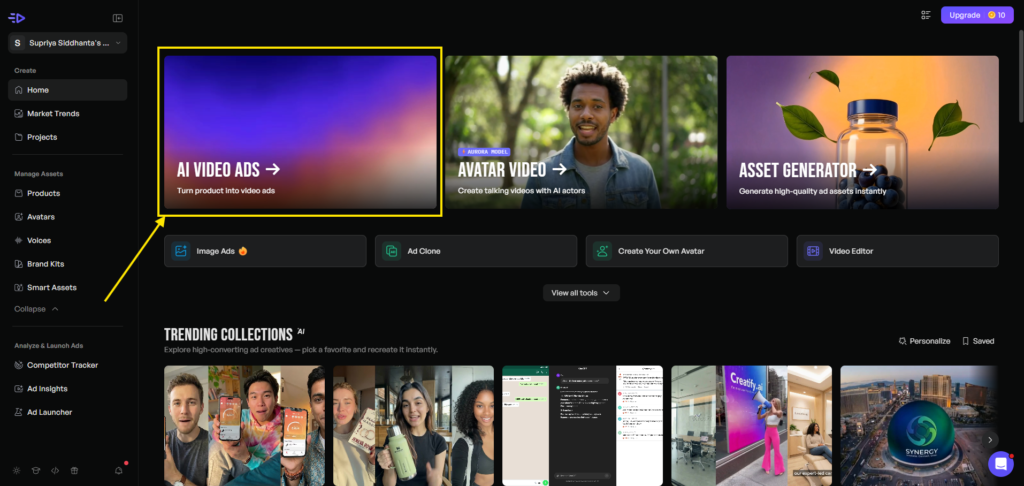
Like I did here…
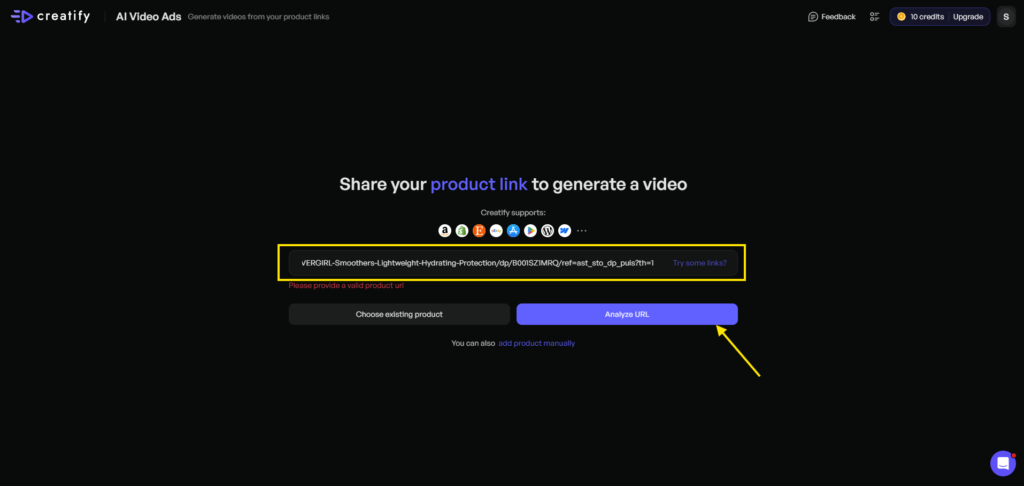
Now hit the “ANALYSE URL”, and Creatify will take some time to analyse your product URL.
To be honest, this section really surprised me because from that single URL, Creatify pulls the PRODUCT NAME, PRODUCT DETAILS, along with CREATIVE ASSETS, which is a cool thing, I believe…
Plus, besides the brand name, there is an option to ADD A LOGO. You can simply add your logo to look professional.
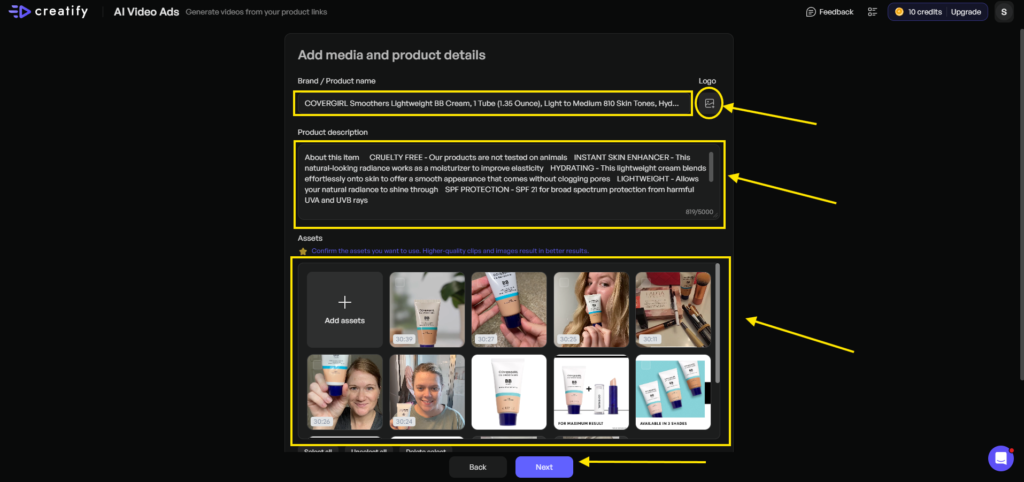
One thing I want to mention here is that you can remove those assets that are no longer needed by you. Only keep those that look great to you.
Now hit “NEXT” below…
Step 5
This is the most important part, I believe, as here you can set the “VIDEO ASPECT RATIO, DURATION, LANGUAGE and TARGET AUDIENCE”.
For Instagram & Facebook Ads, choose 1:1 and 9:16. For YouTube Ads, you can choose a 16:9 ratio.
I want to make this UGC Ads for Instagram, so I chose 9:16 and a 15-second duration. Kept the language to English and gave a clear idea about the target audience. Then hit “NEXT”.
Important tip:- Use this FREE MARKET RESEARCH TEMPLATE to generate target audience data.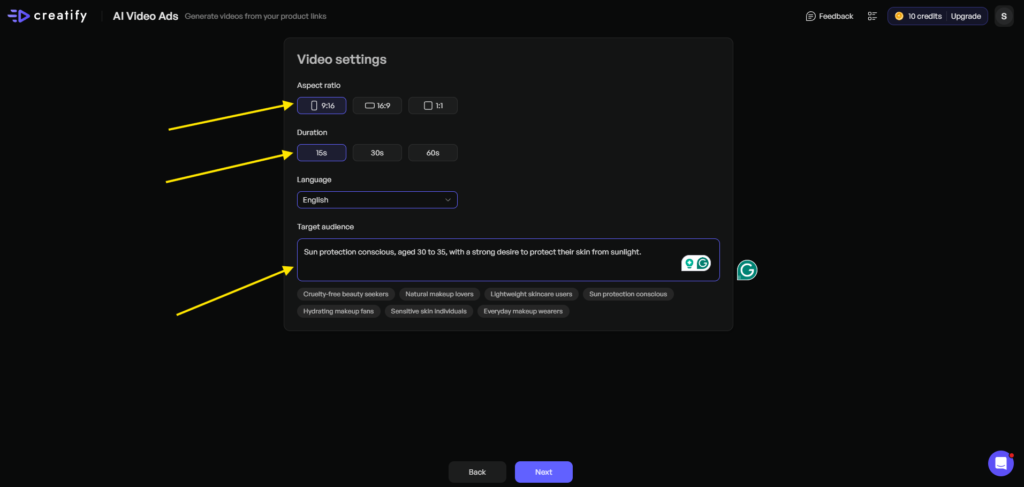
This will take some time, and now it’s time to look at the Ad script part.
Based on the data you provided, Creatify has generated different scripts with different angles.
I selected an option and also selected the tone of this script to be inspiring…
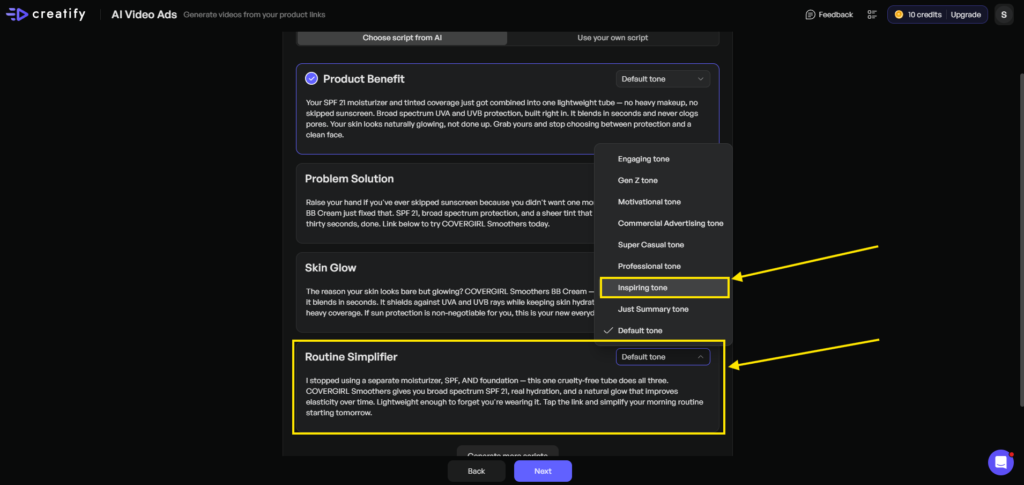
However, if you don’t like the script, you can “GENERATE MORE SCRIPT” by clicking the button below.
Step 6
Now hit “NEXT” and it’s time to select your favourite avatar.
Creatify AI has a wide range of avatar libraries along with styles. Just go through the library and choose according to your needs.
Here you can literally play with your avatar, as the Creatify avatar library has a lot of options.. Look at the screenshot here..
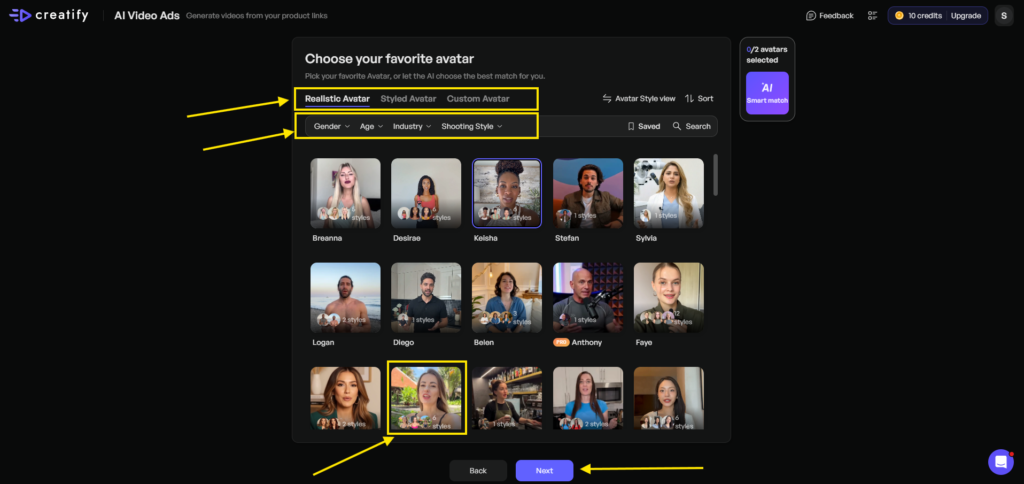
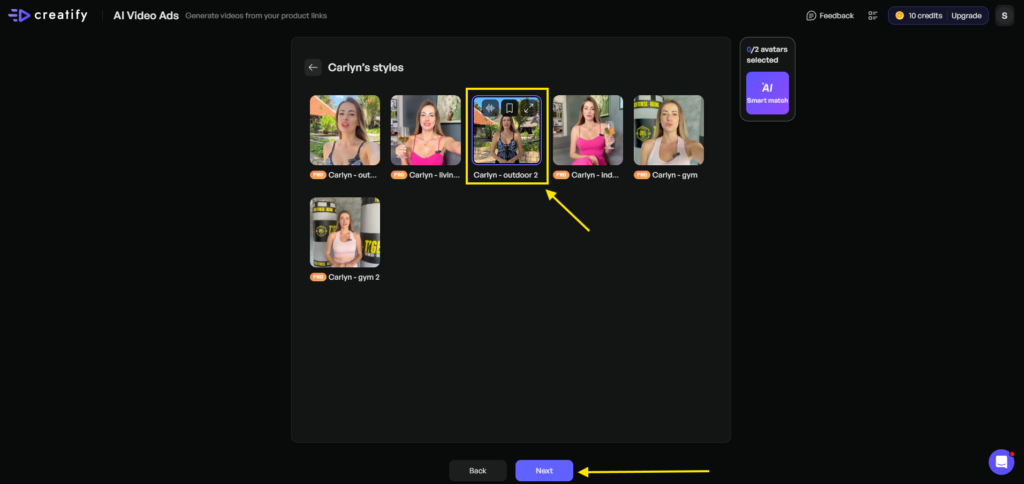
I selected Carlyn for this UGC ad and hit “NEXT”.
Now it’ll open the Carlyn styles. As you can see here, Carlyn has 6 different styles, and most of them are in the pro section. But I selected this…
Step 7
Now, it’ll take some time to generate nearly 14 videos to select from.
Play each of the videos to check the quality of the ad.
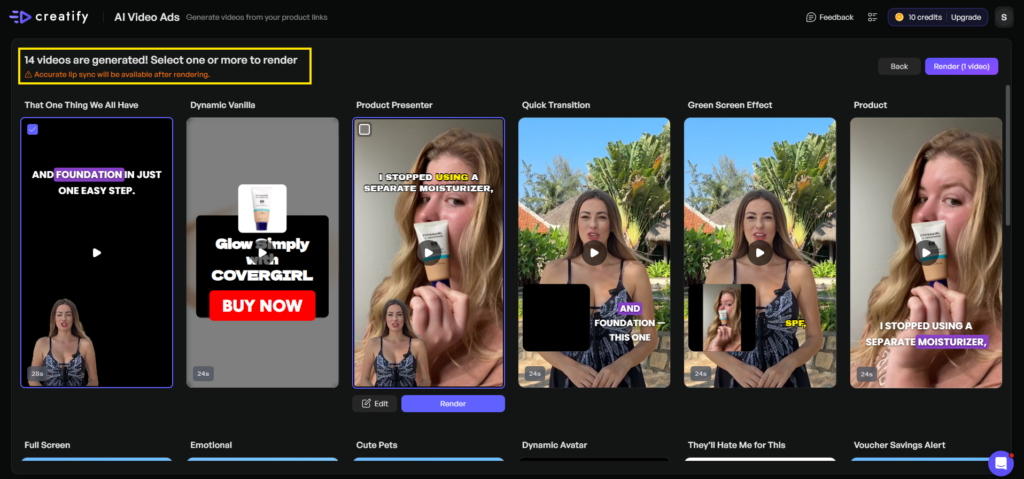
I have selected one, and I think that is ok, and I do not need an edit, but if you would like to edit, you can do so by clicking the edit button.
I hit “RENDER” to generate this UGC video. Then go to the “PROJECTS” folder to see the render video.
Download it by clicking the 3 dots on the right side.
See….. It’s like so so easy to use, and I am very happy with this one.
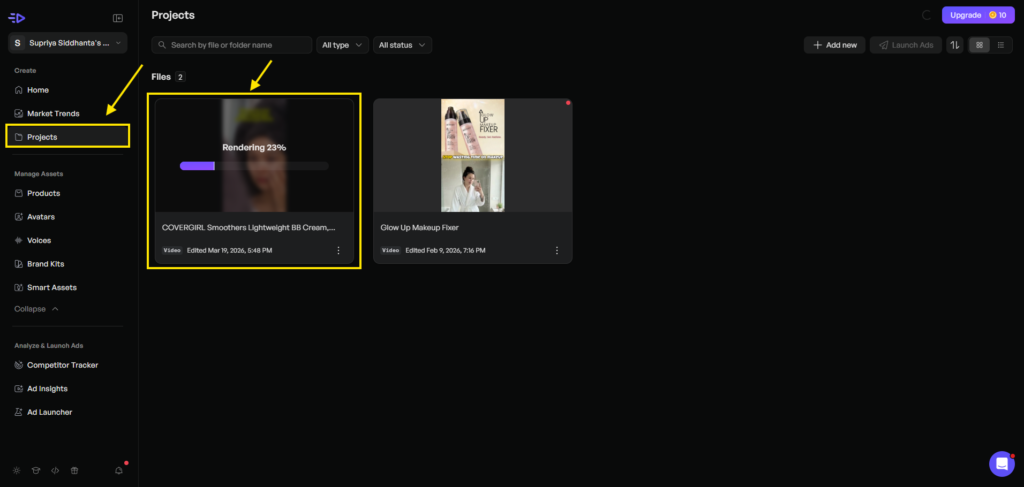
Here is the final output..
Creatify AI Pricing: How much does Creatify cost?
| FREE | STARTER ($19/month) | PRO ($49/month) |
|---|---|---|
| 10 Credits/month | 100 Credits | 2,400 credits / year |
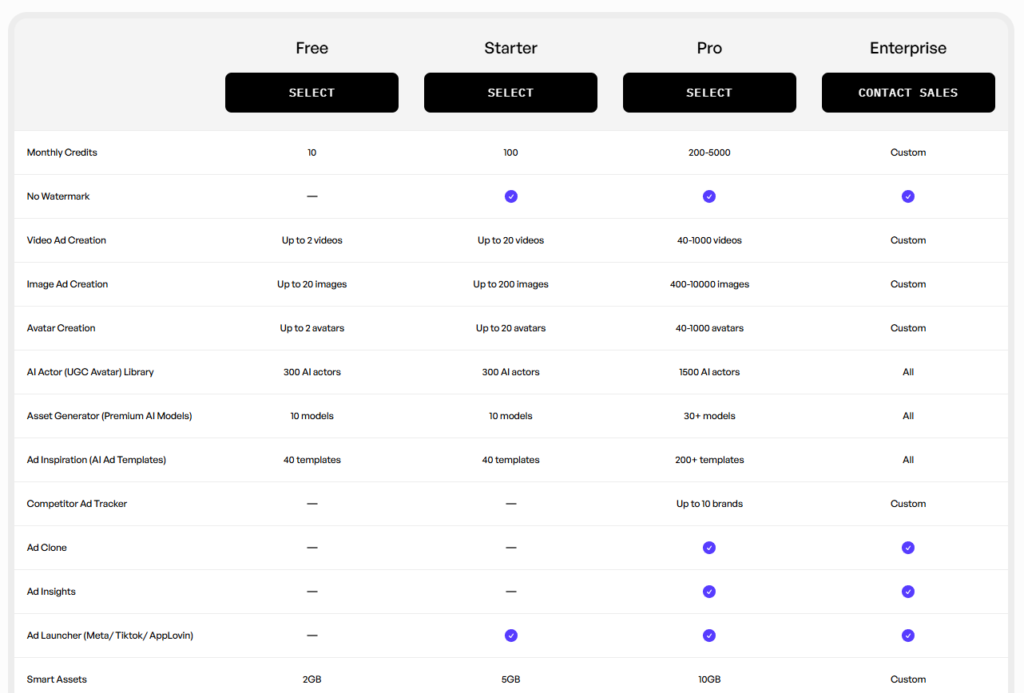
Creatify Features: A Detailed Look
Creatify AI is a performance-driven AI ad generation platform that turns your product pages into scroll-stopping video ads in minutes, and is specifically for an e-commerce brand owner, performance marketer, or DTC founder spending thousands on video production every month.
I spent five weeks inside this platform, and here’s exactly what you’re getting.
Core Features of Creatify AI
1. URL-to-Video
Paste your product link, and Creatify pulls the copy, visuals, and key selling points, then automatically generates a ready-to-post video UGC ad.
2. AI Avatars
Choose from 1,250+ hyper-realistic avatars or upload your own. These aren’t robotic talking heads. I tested several across different product categories, and the best ones genuinely pass as human spokespeople on a paid social feed.
3. AI Shorts
AI Shorts generates short-form creatives from text and a selected visual style. Fast, platform-native, and low-effort, exactly what fast-moving social feeds demand.
4. Product Ads
This feature produces studio-quality product shots and animations for e-commerce brands selling physical products, making it a genuine cost-saver.
5. AI Script Writer + Text to Speech
Creatify automates both copywriting and voiceover in one workflow.
6. Batch Generation
You can generate up to 50 video variations instantly, testing different hooks, formats, and angles for your brand.
7. Ad Cloner
Ad Cloner lets you recreate and remix proven concepts in seconds.
8. Inspiration Library & Discovery
Browse winning ad templates filtered by industry and platform. In my workflow. It’s like having a swipe file built directly into your tool.
9. Direct Launch & Auto-Optimisation
Connect your ad accounts and push videos live to Meta, TikTok, and YouTube directly from Creatify. The platform auto-optimises for each platform’s specifications, no manual reformatting needed.
10. Performance Analytics
Built-in A/B testing with tracking for ROAS, CTR, and ad spend. It’s designed to help you kill underperforming creatives fast and double down on what’s working.
Creatify covers all major platform formats, such as 9:16 Vertical for TikTok, Instagram Reels, YouTube Shorts, 16:9 Horizontal for YouTube, Facebook Video, 1:1 Square for Instagram Feed and Facebook Feed.
Who Is Creatify AI Best For?
Creatify AI is best for an e-commerce brand owner, a performance marketer, or a DTC founder who spends thousands on video production every month.
Who should ignore Creatify AI?
If you want extra polished, like cinematic brand content, then you can avoid this AI tool.
How Smooth is the Customer Service of Creatify AI
From Trustpilot, G2, and Reddit data, I’ve found that some users report genuinely impressive support experiences.
But there are some issues regarding the ignored refund requests and charges continuing after cancellation. I don’t know much about this. What I found in those review platforms, I simply state here.
Creatify Reviews Complaints
In my research, a significant number of people are complaining about credit issues. However, overall, the platform is good.
Final Thought: Is it Truly Helpful for You?
In my opinion, Creatify AI is helpful for an e-commerce business owner. I think you should test at least the starter plan for just $19, because I do really like the overall platform, and this tool is a must-have for small business owners.
Useful Tips to Create High Quality UGC Ads for Your E-Commerce Business
These are some useful tips to create quality UGC ads for your e-commerce brand.
- Do not fully rely on this AI tool. Do manual edit.
- Do market research properly to find out the pain points and apply them to the hook.
- Test multiple avatars, then select.
- Use real customer language in your scripts.
- Don’t skip the caption layer.
Alternatives to Consider
I think you’ll love the Creatify AI, but in case this tool doesn’t fit to you, then you can move towards these top-rated UGC makers.
FAQs (Frequently Asked Questions)
Is Creatify AI good?
Yes… For e-commerce brands and performance marketers who need UGC-style video ads at speed and scale, Creatify genuinely delivers good results for you.
Will the AI avatars look robotic or fake?
Creatify avatars don’t look fake. I have seen that they look truly genuine.
Can I use Creatify without any video editing experience?
Yes, you can easily use this tool without any experience. It has a very simple and effective video editing dashboard.
Can I cancel my Creatify subscription easily?
Yes.. if you don’t like the platform, you can simply cancel their plan, as multiple reviews show a smooth customer service experience.
Does Creatify work for dropshipping stores?
Yes….. The platform specifically targets e-commerce brands, dropshippers, and marketing agencies for quick video content for paid social.
Affiliate Disclosure:-
Some of the links above may be affiliate links, which means that if you click on them, I may receive a small commission at NO COST to YOU. Thank you! All information in this review blog is taken from online sources and my own experience as a content marketer, and I encourage you to test a FREE TRIAL before investing your hard-earned money. I appreciate your support!