As a content marketer and copywriter, I’ve worked with many marketing agencies that charge a lot to e-commerce business owners, as well as Shopify owners, for AI UGC video content.
This is why I feel I should create a guide to help them make AI UGC content for their Shopify store.
So, this is not the generic one but is packed with resources that you, as an e-commerce business owner, need to create viral UGC video ads for your business.
So, let’s start..
Table of Contents
What is UGC Content?
UGC (User-Generated Content) is a short-form video content made to look and feel like a real person or customer filmed it. In 2026, tools like Creatify AI, Holo AI, Predis AI, and MakeUGC AI are dominating to make AI UGC content for e-commerce business owners like you.
Data from Whop, marketingltb and archive suggests that UGC ads deliver 4x higher CTR and 50% lower CPC than traditional branded creatives. On product pages, UGC can lift conversions by up to 161%, and that’s not a small number; that’s a fundamentally different result.
Today, these tools pull your product details, generate authentic-looking video scripts, and drop a believable face on camera for you.
However, as per my testing, the process of all the AI UGC makers is simple. Just paste your URL → pick a UGC style → generate variations → push live. So, what used to take weeks now takes minutes.
And it works across every major platform, such as TikTok, Meta, Instagram Reels, and YouTube Shorts. Each one rewards content that feels native and unscripted. AI UGC fits that mould perfectly.
Top AI Tools for Generating UGC Video Content
Here are the top AI tools for generating UGC video content for your Shopify store
- Creatify AI
- Holo AI
- Predis AI
- MakeUGC AI
Key Steps for Generating AI UGC Content
There are 4 key steps for generating AI UGC content for your e-commerce store.
- ICP (Ideal Customer Profile) Research.
- Choosing the Right AI UGC Tool.
- Targeted Copywriting.
- AI Avatar Selection with Demographic Alignment.
1. ICP (Ideal Customer Profile) Research
This is the main part, I think. Before making any UGC content, always research the market on Reddit, Quora, and other social platforms. Those are the gold mines for your business. Fill this market research template, and here you’l’ find the biggest pain points your customer has.
2. Choosing the Right AI UGC Tool
This is the second most important thing, and I believe many of the e-commerce business owners have been distracted due to the flood of AI UGC tools in the market.
I have tested many AI UGC tools, so you don’t have to, and I know the pros and cons well. This is why I’m writing this post.
3. Targeted Copywriting
Nowadays, you can use ChatGPT as your writing assistance, but you do need a perfect and well-structured UGC video content generator prompt. Just paste this with your ICP (Ideal Customer Profile) research data, and you’ll get a highly optimised prompt for your AI UGC Content.
This well-structured prompt can create conversion-focused hooks, body and CTA in minutes.
4. AI Avatar Selection with Demographic Alignment
So, now you’re ready with your main weapon (Hook, Body and CTA), and now it’s time to create something that resonates with your brand and audience in a visual format.
Like if you are selling skincare to women over 40, your AI creator should be a woman over 40 in a natural home setting. I think you’ve got this point…
Why You Should Follow This New Technique
As I’ve promised to you, I’ll give you my honest experience here as a content marketer on this topic.
To be honest, AI UGC content only converts when you put the element that can make your audience to stop scrolling and start thinking.
This is why I’ve given you the 4 major steps for generating AI UGC content for your e-commerce store.
In my experience, the person who has cracked the code of those 4 steps wins in this AI UGC world.
How to Make AI UGC Content with Creatify
To make viral AI UGC content, I’ll show you some important steps here..
Step 1
Click the official link and land on their official site. Then sign up with your Google account to get a FREE CREDIT (10 credits) for testing.
Step 2
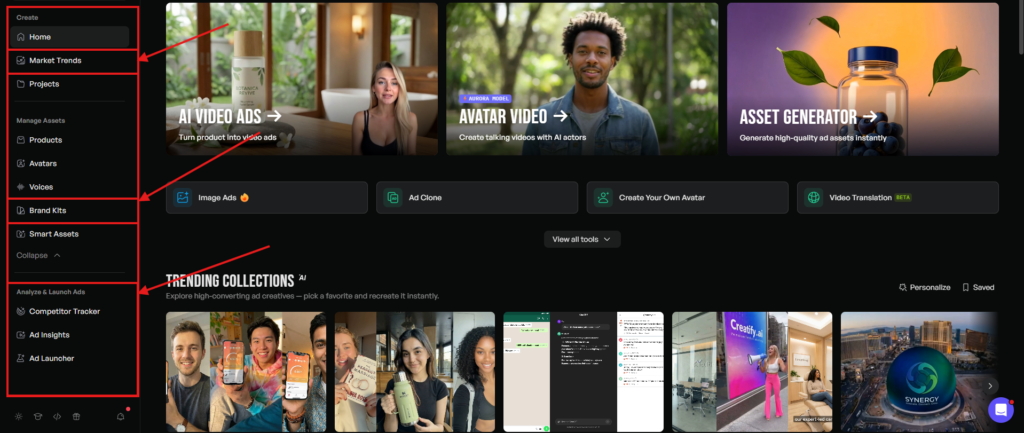
Now look at the left side… Some useful options are here for you. I’m not mentioning here all the options. I’ll only talk about the most important features of Creatify AI.
Now head to the “MARKET TREND” feature, located just below the HOME menu… Here you can watch trendy UGC ads for inspiration.
Now move to the “BRAND KITS” feature section. Simply click on it and fill in your brand details for consistency.
Now, the most important feature I’ve seen is the “ANALYSE & LAUNCH ADS” section. Here you can analyse your competitors and also get ad insights for better results. However, to use this tab, you have to upgrade your account, but I mention this because it’s very useful and important for you.
Step 3
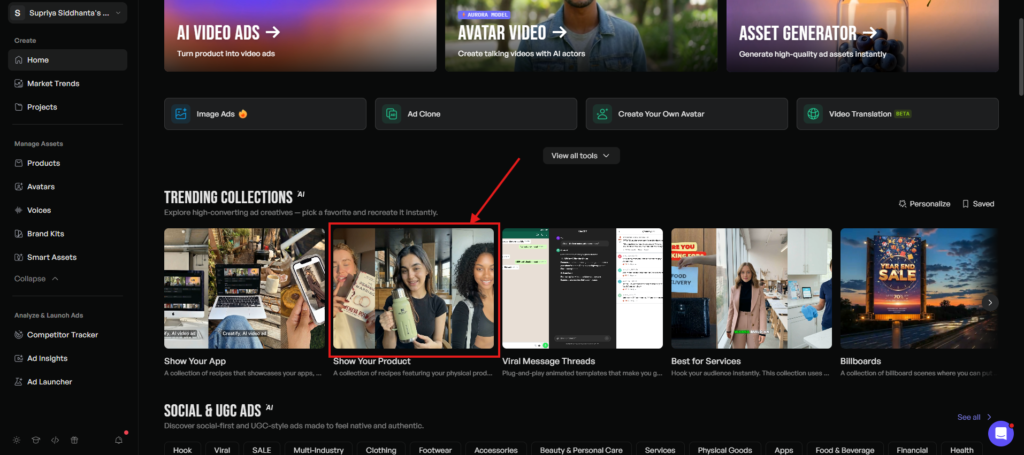
Now, click the “HOME” and head towards the “TRENDING COLLECTIONS” section. If you have a physical product, then click “SHOW YOUR PRODUCT”.
Step 4
Next, choose any video from the library and hit “RECREATE” like I did here…
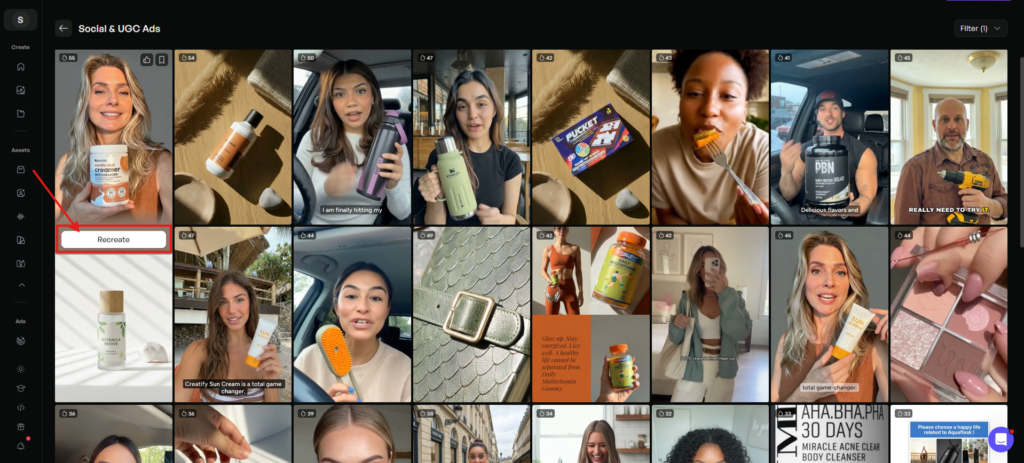
Step 5
Now, here is the interesting part for you, because here, Creatify has TWO options.
- “AUTOFILL FROM PRODUCT” (Paste your product URL. Creatify will fetch it automatically)
- “MANUAL ENTRY” (Manually input your product details)
In my experience, this section takes time to load the video. If it takes time simply refresh the page..
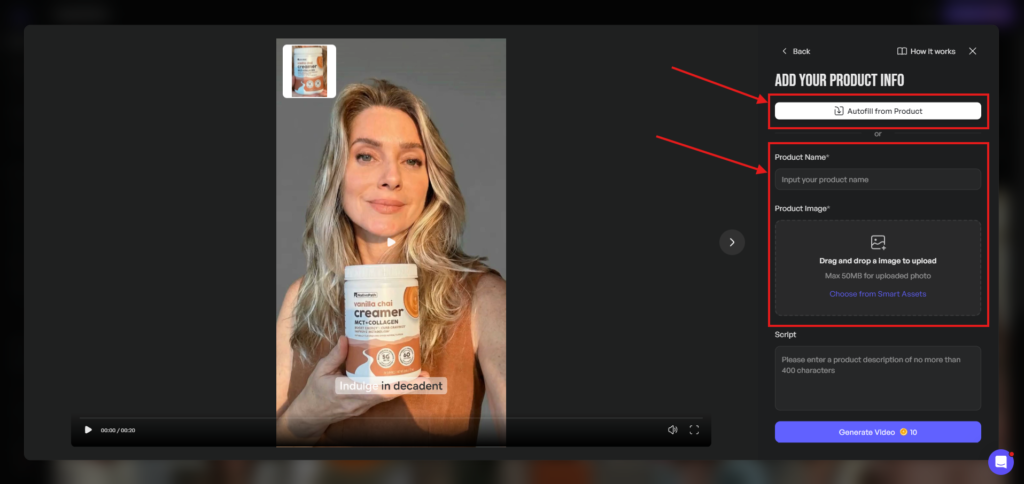
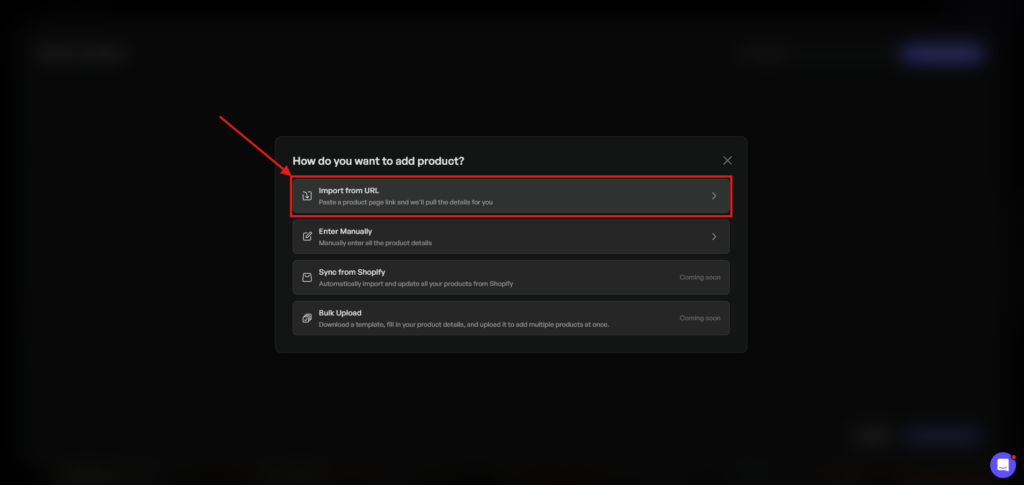
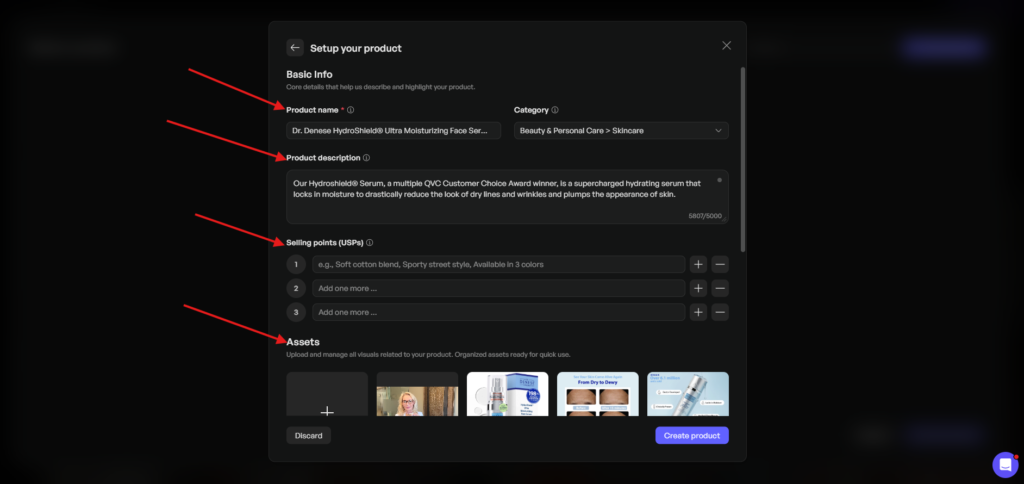
Now, click the “AUTOFILL FROM PRODUCT” button and then again click the “NEW PRODUCT” button located on the right side and then click “IMPORT FROM URL” so that Creatify can fetch all your product details….
“AUTOFILL FROM PRODUCT” ——> “NEW PRODUCT”——→ “IMPORT FROM URL”
Now enter your product link here, and hit “ANALYSE URL”
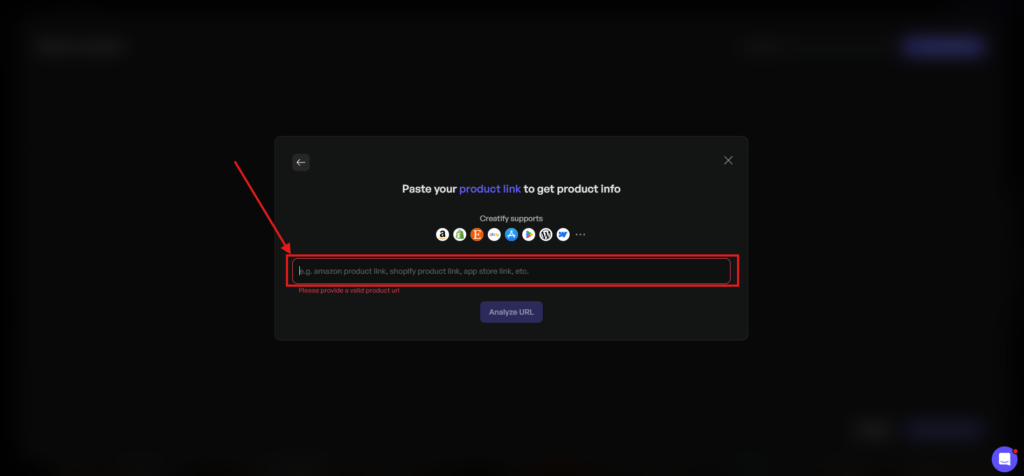
Now it’ll take some time and will give you all the data regarding that particular product.
Now hit the “CREATE PRODUCT” button. It looks very easy… Right?
Step 6
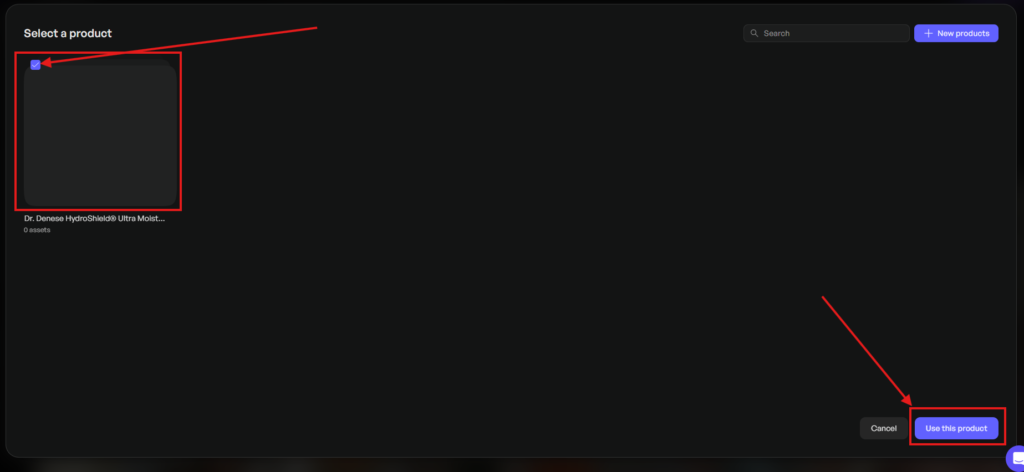
Now, your product is added to the product library section. Simply tick the box and hit “USE THIS PRODUCT.”
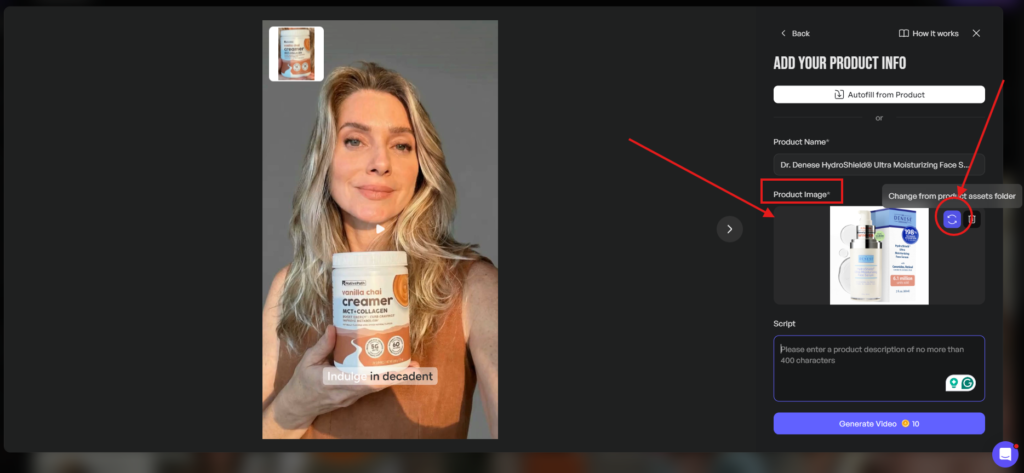
Now it’ll redirect to the video creation page, where you have to put the “SCRIPT” to proceed.
Before you proceed, just check the product image. If you continue with that image, then it is ok, but if you want to change that image, simply click the “DOUBLE ARROW”, and it’ll change as I mark here.
Step 7
Now, here is an important note for you. Your AI UGC ads will not do well unless you optimise them for conversion.
Your customer will only buy your product if you give them a reason to buy yours. You can only do it if you know their pains, desires, notions and most importantly objections.
In my opinion, objection handling is very important to make your AI UGC ads perform.
But don’t worry, because I have experience with doing these kinds of things over and over again, and I have done it for many businesses. From that experience, I have created a “Prompt templates for UGC scripts” to make your AI UGC ad creation process easy and effective.
You can watch this video also to know how to use the prompt templates for UGC scripts..
Step 8
Now add the “SCRIPT” and hit the ” generate video option…
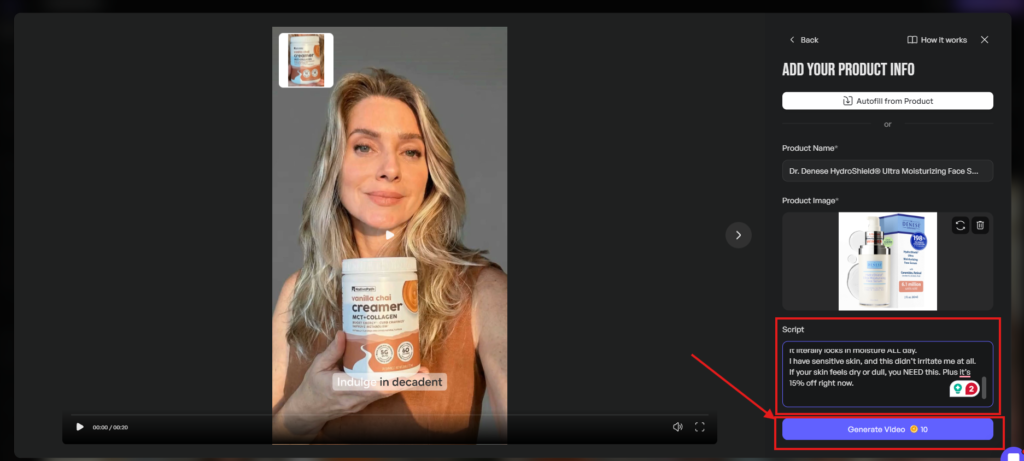
So, your AI UGC Video content is ready, and you can find it in the project section.

Step 9
However, if you aren’t happy with the output, then simply “EDIT” it or “DOWNLOAD” it by clicking the download option.
Here is the final output…
My Recommendation on Best Practices for AI UGC Content
Here are my top 5 recommendations on best practices for AI UGC content…
- Generate Multiple Hooks.
- Match Your UGC style to the platform.
- Always Batch, Never Single.
- Create Your Own AI Avatar.
- Keep it short and punchy
1. Generate Multiple Hooks
I find that if the opening frame doesn’t earn attention immediately, nothing else matters. Run the MASTER PROMPT multiple times to get multiple hooks around your ICP data.
2. Match Your UGC style to the platform
I recommend spying on the targeted platform and trying to find out what type of UGC content is performing well there. This is a one-time investment for your proper understanding of the whole game.
I’ve seen raw, unpolished content win on TikTok, but slightly cleaner creative performs better on Meta Reels.
3. Always Batch, Never Single
I prefer creating 8 – 10 variations per offer with different hooks and angles so that you can test and make a decision based on performance data.
4. Create Your Own AI Avatar
I do really like this feature in Creatify, and I think this feature can make your UGC video feel real and new every time. I always recommend not using generic templates and avatars every time. Use the feature of AI avatar creation and create something new in minutes.
5. Keep it Short and Punchy
I think 15 to 30 seconds is the sweet spot for AI UGC video content in 2026. However, if you extend this, it’ll probably backfire on you.
Make AI UGC Content That Converts
Making AI UGC content for Shopify in 2026 isn’t complicated, but it’s just become smarter, faster, and cheaper.
Creatify makes that possible. It’s honestly the best AI for UGC ads I’ve used, not just because it helps you make AI UGC fast, but because it connects creation directly to performance data, and that is really important.
If you haven’t tried it yet, I’d start today. It’s free to get started, no credit card needed, and you’ll have your first batch of video ads ready before the end of the day.
That’s a pretty good deal.
Good luck… Have a nice day…
FAQs
Is Creatify AI the best tool for making AI UGC ads for my Shopify store?
I have tested 10+ AI UGC tools, and I think Creatify AI is one of the strongest options right now, especially if you sell physical products.
How is AI UGC different from hiring a real UGC creator?
To be honest, the real UGC creators bring genuine personality and authenticity, but they cost more and are harder to scale. On the other side, the AI UGC tools give you speed, volume, and consistency. I think, if you choose the right tool, then you can outperform real UGC creators.
Does AI UGC actually convert, or does it just look good?
It converts, but you have to do it in the right way. In my experience, AI UGC ads only convert if you write a perfect script, not the perfect AI avatar.
How much does it cost to get started with Creatify?
Creatify offers a free plan with 10 credits, no credit card required. That’s enough to generate your first test videos. But I think this is not enough to test. I recommend that you to test the STARTER PLAN to use this platform fully.
Do I need a copywriter to write the scripts, or does the tool handle that?
The tool can auto-generate a script from your product URL, but it won’t know your customer’s real pain points, objections, or desires without input. The smarter approach is to do quick ICP research first and feed that data into a structured prompt. That’s what separates a forgettable AI UGC ad from one that actually stops the scroll.