I remember that day when I simply wasted all my energy and time on Reddit forums to figure out the best affordable AI video generator for my own YouTube channel, but ended up with more confusion because everyone was talking about different AI video generators without clarifying the ‘how’ and the ‘why.’
Then I became aggressive and started analysing tools myself to find out the real hero from a vast ocean of villains.
During this process, I noticed an interesting thing that really matters a lot to any YouTubers, and that is the “CREDIT.”
Literally, almost every YouTuber I came across was frustrated with credit-based pricing models that limit their creativity and consistency.
This is why I decided to take a serious deep dive into the world of AI video tools to pick the best affordable AI video generator, not just for myself, but for my clients’ YouTube channels, where I usually create documentary-style content.
And then I found Vheer AI. (4.3/5 stars from 1000+ reviews on Trustpilot).
In this blog, you’ll get the ‘why’ and ‘how’ Vheer appears as the best affordable AI video tool in 2026, especially if you’re aiming for a cinematic YouTube video production.
So, let’s get into this.
Table of Contents
What to Look For in an AI Video Generator (as a YouTuber)
Before I show you the creative goldmine, I want to share something serious with you so that you can understand what to look for in an AI video generator as a YouTuber.
In my experience, there are 5 things that you should care about before choosing any AI video tools.
1. Pricing Architecture: How Much Does a 1-minute AI Video cost?
AI video generation cost is one of the main barriers if you have just started with a YouTube channel or are struggling in the middle.
One hard thing I want to say here is that if you are searching for completely free AI video generators, then you’ll never find them.
In this case, I recommend that you to pick an AI video tool that has some sort of free features so that you can use those with your AI video generation workflow.
This is why the Vheer V2 model is on my top priority list. Here you can generate AI images and AI videos with Vheer’s built-in Vheer Quality AI model for FREE.
This means that if you generate AI videos with the Vheer Quality model, then you don’t have to pay anything. I personally tested the AI video quality, and that is quite decent for general use.
Plus, this model has a lot of creative features under one dashboard, so that you don’t have to jump from one tool to another to run your creative workflow.
2. Temporal Consistency: Does the AI Video Actually Stay Stable?
This is the second most important thing I check before deciding which AI video generator to go with, and most creators don’t even know it exists as a metric.
Basically, temporal consistency refers to whether your video holds together across every frame, such as objects, textures, faces, and lighting, to stay consistent as the clip plays out.
I have tested multiple AI video generators and found Vheer more precise in this matter. However, in the free model, I sometimes noticed some sort of temporal inconsistency. But after a little tweak in the prompt, that issue was solved.
3. Physical Realism: Does It Understand How the World Actually Works?
This is the third most important thing I mark during my testing.
I believe that your YouTube video only earns credibility when it mimics reality. I mean, if you create an AI video that looks pretty cool in graphics but fails to replicate reality, then it’ll fail the test.
Isn’t it?
4. Directorial Control: Can You Actually Direct the AI?
This is the feature gap that separates casual AI video generators from genuinely professional ones, and it’s one I wish more creators talked about.
The best AI video tools shouldn’t just respond to text prompts, but also let you direct the scene the way a filmmaker would.
I have noticed the Vheer prompt enhancement feature (’THINK’ feature) is super useful to give a specific direction to the AI model.
I have used it, and it works pretty well.
5. Character Consistency: The Make-or-Break Feature for Narrative Channels
If you run a faceless channel, a storytelling series, a virtual influencer account, or any content with recurring characters, this feature is everything.
You have also noticed that there is a tendency for AI models to unnecessarily change a character’s face, clothing, or build between scenes.
So, you should be cautious about this before jumping to any AI video generators for your YouTube channel.
Vheer AI: The Best Affordable AI Video Generator in 2026
What Is Vheer AI?
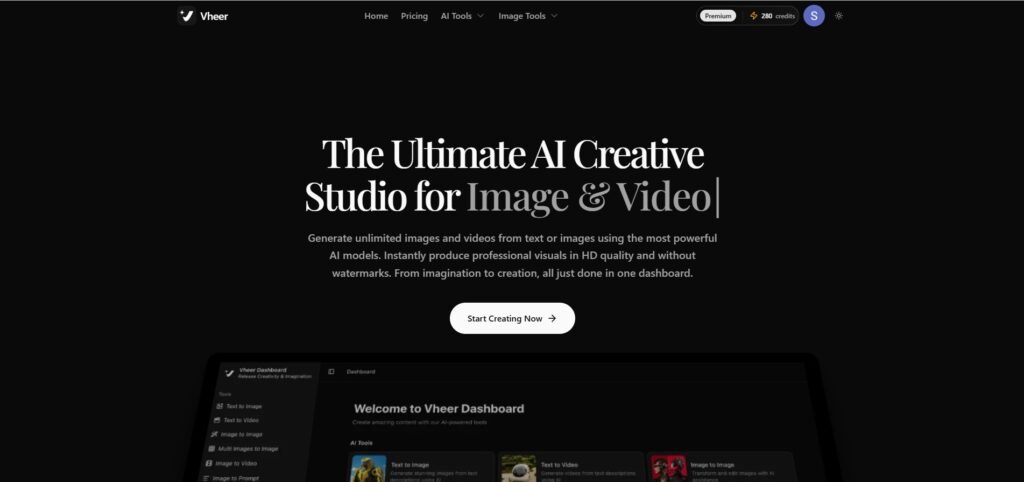
Vheer is an all-in-one AI creative studio built specifically for professional content creators who need cinematic-quality videos and images, without a high budget or a five-tool workflow to manage. In one sentence, you can literally do all types of visual creative workflow under a single platform.
Who is Vheer Built For
- YouTubers who need consistent, high-quality visual output at speed.
- Video editors who want a quality asset creation pipeline.
- Digital artists looking to bring concepts to life without rendering software.
- Influencers who need brand-consistent visuals across every piece of content.
Key Features of Vheer AI
1. All-in-One Visual Generation Dashboard
Vheer AI dashboard brings every stage of your visual content creation, like text to image, text to video, image to video, background removal, multi-image merging, prompt enhancement, and aspect ratio control, into a single integrated workspace. Nothing lives in a separate tab or a separate subscription.
I think one of the most frustrating situations for a YouTuber is jumping from different tools for different creative purposes. This is where I really appreciate this.
Btw, when I first opened the dashboard, I felt that this was the AI tool I actually needed to perform all my creative workflows because the creative features it contains are not ordinary at all.
2. Image to Video Animation (No Watermarks)
This is the feature I usually use frequently. Here, you can take any static image, such as a still AI image, and Vheer AI animates that into a smooth, professional video clip with natural motion, realistic movement, and cinematic flow.
Honestly, this feature perfectly works on Vheer AI, and I have generated a lot of AI videos from static images, and they are truly good.
This AI video maker contains multiple top AI models, such as Veo 3.1 fast, SeeDance, LTX Video, and Minimax. My favourite is Veo 3.1 fast, and I think this is the perfect one you need cinematic video clips for your own channel.
There is another thing I want to mention here, the Vheer Quality video model. This is a FREE-to-use model, and the output looks really, really good.
I frequently use this FREE model to save some of my credits.
3. Text to Video
Any type of AI video generator has this feature. You can type a single sentence, such as a scene description, a mood, or a creative direction, and selected AI video models will render cinematic video clips from it.
This feature helps you generate the exact shot you imagined in seconds.
In my experience, the text to video feature will only benefit you if you want a single video shot and not a series of shots.
I usually use this feature on Vheer to generate supportive single clips. As I said earlier, the prompt enhancement feature on the Vheer V2 model really helps a lot on this.
4. HD Image Generation (No Watermarks)
Vheer V2 model generates high-resolution, studio-quality images from text prompts and delivers them to you completely clean, with zero watermarks, ready to use directly in your content and thumbnails.
This feature allows you to not to jump from one AI tool to another to generate your images. It means you can simply use one AI video generator and access all the creative features under one dashboard.
Basically, Vheer AI is not only an AI video generator at all, but you can play here with your images, by using premium features for FREE under one umbrella.
Below are the features that you can use to do anything with your images:
- 32 types of Image generation templates.
- Frontend tools. (best for video editing purposes)
- Multi-image to image.
- Image style transfer.
- Headshot generator.
- Image to prompt.
- Background remover.
- Hairstyle change.
- Pet portrait.
- Anime portrait.
This is why I even count Vheer AI as one of the best AI image generators for creators and influencers.
5. Access to Best AI Models (No Watermarks on Any Export)
Nowadays, AI video technology is evolving at an incredible pace, and using high-end models can give you a serious competitive advantage.
As mentioned earlier, I occasionally use the Vheer Quality FREE model, but that’s mainly to cut costs.
This AI platform gives you direct access to some of the most advanced AI video and image generation models available in 2026, including Sora 2, Veo 3 Fast, and LTX Video 2.3.
Personally, I rely on Veo 3 for my projects, and it consistently delivers excellent results.
If you’re someone who doesn’t want to compromise on quality and aims for cinematic-level production, Veo 3 is a strong recommendation.
Pros & Cons
Pros
- Cinematic Output Quality That Actually Competes.
- Everything Lives in One Dashboard.
- Free AI Image Generation.
- Free AI Video Generation. (With Vheer Quality Model)
- No Watermarks.
- Multi-Image Merging for Brand Consistency.
- Prompt Enhancement Built Right In.
- Aspect Ratio Flexibility for Every Platform.
- Pricing is Reasonable.
Cons
- No Storyboard to Create a Long Scene.
- Sometimes the Prompt Enhancement Feature (’THINK’ option) shows an Error.
Vheer AI Pricing
Vheer AI has 4 subscription plans. You can simply try with $9.99/month for 1000 credits. It allows you to access all pro features.
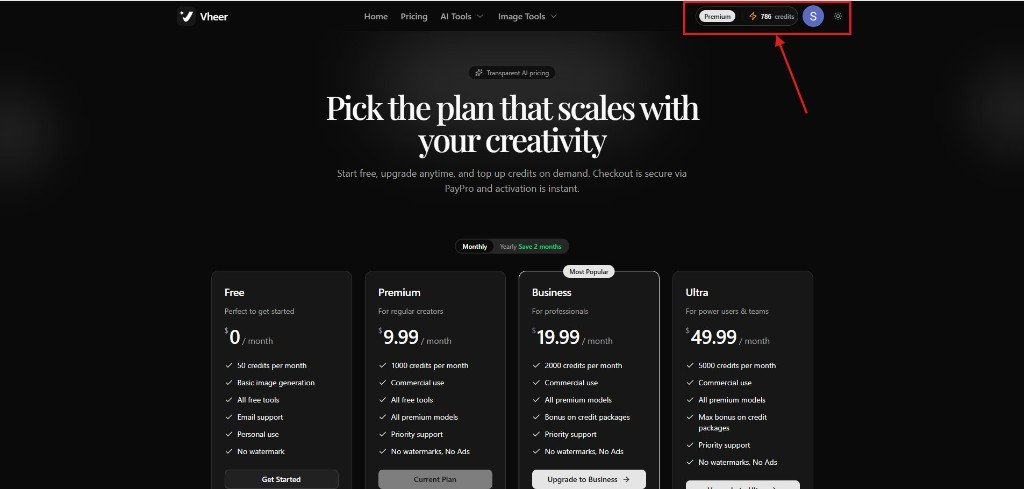
I have the premium plan, and I am happy with the overall affordability and quality output that this AI tool offers.
Vheer AI Reviews
On Trustpilot, Vheer AI has 4.3/5 stars out of 1000+ reviews.
I think the number of reviewers is pretty solid, and there is a strong reason behind the 4.3 stars.
Why Vheer is the Best Affordable AI Video Generator for YouTube
This is the most important part of this entire article, and I will focus on some areas to explain my honest opinion on this topic.
Basically, as a content creator, you need three things:
- AI image generator.
- AI image to video or text to video generator.
- Character consistency across scenes.
This looks simple…..Right? But here is the reality…
- You use one tool for images → it charges credits.
- Another tool for video → more credits.
- Need consistency? → premium plan required.
- Want decent quality? → upgrade again.
And this cycle repeats… every single time, and before you realise it, you’re juggling 3–5 tools, and constantly worrying about credits.
I have gone through these, and I know the pain when you just jump to one tool to another to streamline your workflow and pay a handful of prices for each one.
This is truly frustrating, and I think this is where Vheer AI comes as the best affordable AI video generator option to YouTubers.
This AI video generator provides you with a complete YouTube content creation system so that you can use all creative features under one roof, by paying a little bit or for FREE.
Literally, I have used the FREE models for my AI image and AI video generation process, and I am happy with the result.
Here, sometimes, you don’t need to burn your credits, but you can just use FREE options to run your workflow.
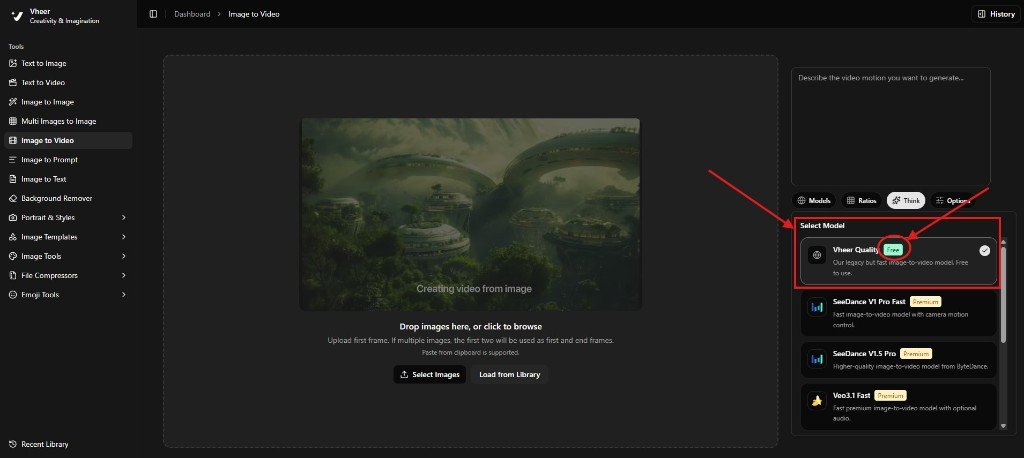
How to Create AI Videos with an Affordable AI Video Generator: A Step-by-Step Guide
This step-by-step guide will help you to create quality AI videos without worrying about credits.
Step 1
Visit the OFFICIAL WEBSITE and sign up with your Google account to get 50 credits for FREE.
Now you’re in the Vheer V2 creative dashboard. On the left side, you can find a lot of options to explore.
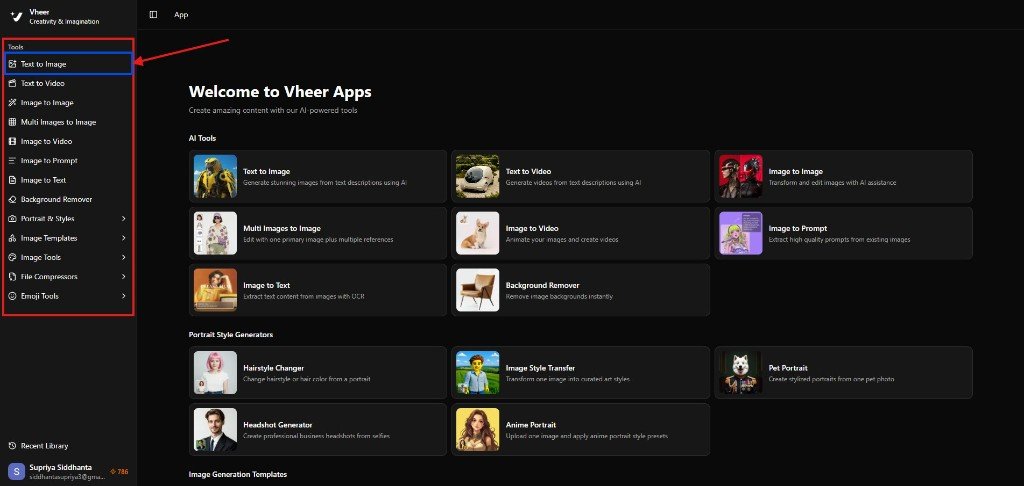
Simply click on the “TEXT TO IMAGE” option to generate AI images for FREE.
Step 2
Now you’re in the text-to-image dashboard. Simply fill the prompt in the large box, choose your model (Vheer Quality for FREE), ratio (16:9 for YouTube), and don’t forget to try the ‘THINK’ option to use the prompt enhancement feature.
Then click “Generate.”
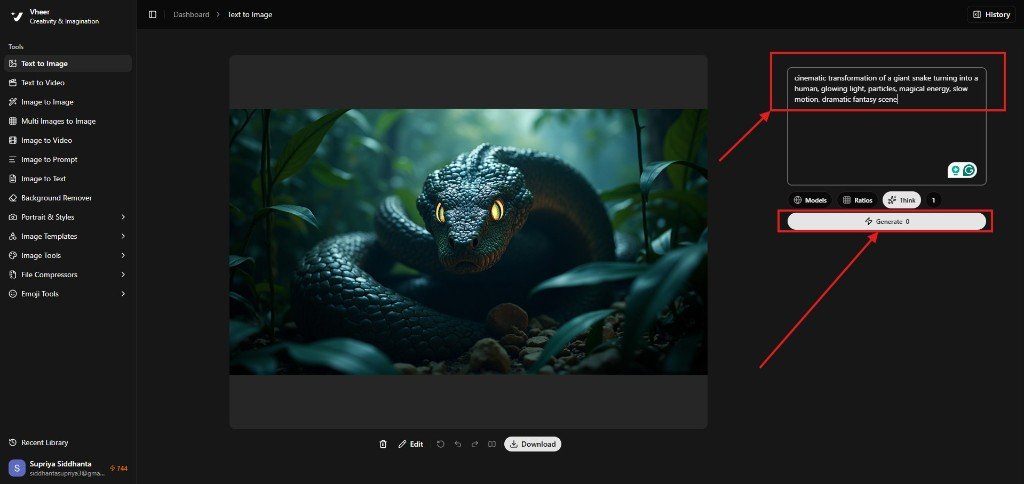
I have generated some AI images with the Vheer Quality model, and it’s absolutely FREE. I have also used the Nano Banana model for some detailed output.
The image you’re noticing in the screenshot below was generated using the Nano Banana model, which costs me 30 credits.
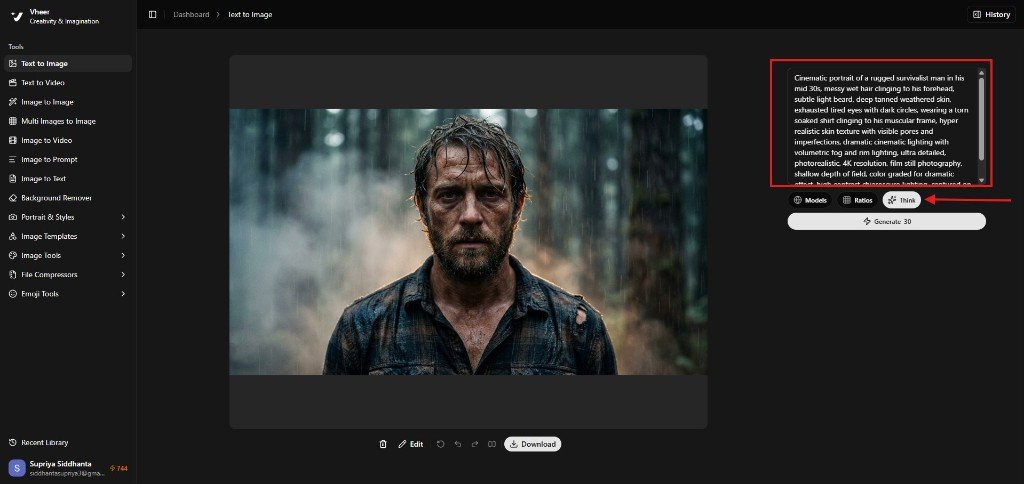
So, this is how I have generated all the characters with the scenes along the way.
Here is one thing I want to recommend to you.
Always generate your hero character images first and then generate scenes around them. I think this approach will maintain your consistency and give you better results.
In some cases, I have also used the “IMAGE TO IMAGE” generation feature to guide the AI with a reference image so that the output matched closer to what I had in mind.
Plus, I also experimented with the “Multi Image-to-Image” tool to combine two characters into a single scene. This feature requires credits; for example, using the Flux Klein model costs me 4 credits per generation.
So, this is how I generated all AI images one by one, and it took me nearly 20-30 minutes.
Step 3
Now it’s time to create a storyboard to give a proper sequence of the story scenes.
The storyboard is very important if you want to create a visually appealing story for YouTube audiences.
Basically, this storyboard concept will give you an idea of the overall story. This is what it looked like.
Look at the screenshot below.
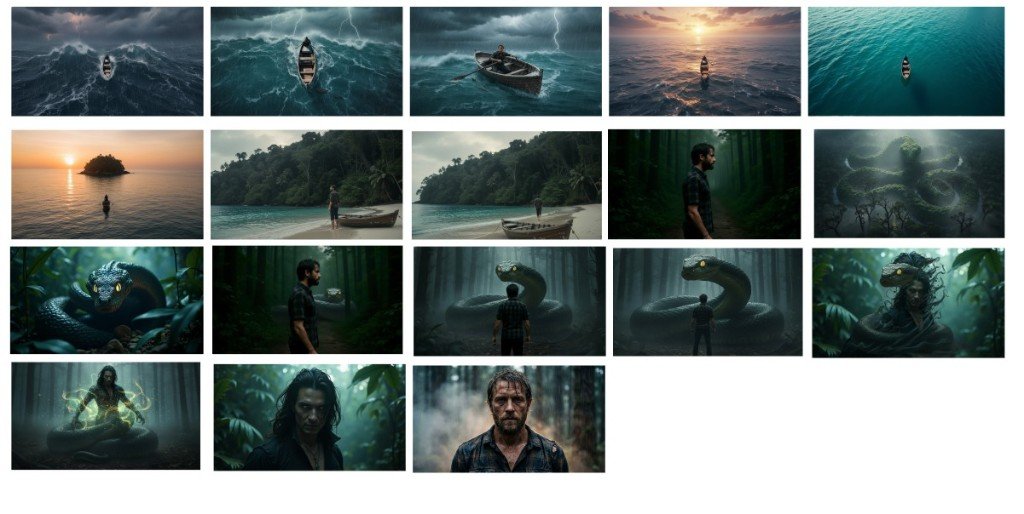
After that, I attached this screenshot and provided it to ChatGPT to give me image to video prompts for each scene.
And ChatGPT provided me scene-wise video prompts, and in that case, I just want to mention to you that there may be some chance to create some extra images to arrange some scenes, and I think this is also a part of AI film creation.
Because if you depend 100% to this AI video generator, and don’t use your brain to give direction, then there is a chance that you won’t get the proper output you deserve.
Look at the screenshot below.
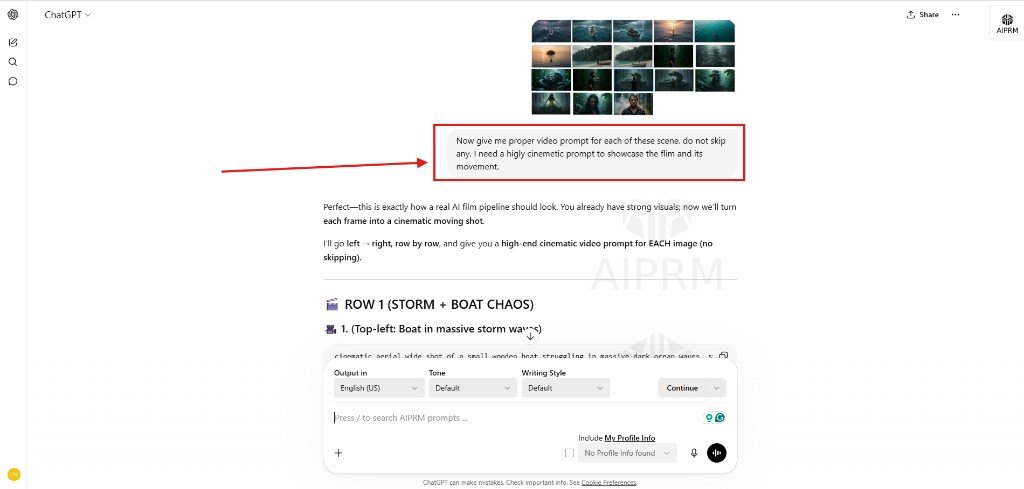
Now I have video prompts, and it’s time to generate the AI video with the Veo 3.1 fast model. You can use any model as per your needs.
Btw, if you want to know which AI video model you need to generate YouTube videos, then I highly recommend reading my other article, where I have shared a section containing the best AI video generation models for YouTubers in 2026.
Step 4
Now I just added a start frame and an end frame as per my storyboard and ran a simple video prompt to get the final output.
One thing I want to mention here is that when you feel the two scenes are not matching properly, just add a short scene in between with a different camera angle, as I did here.
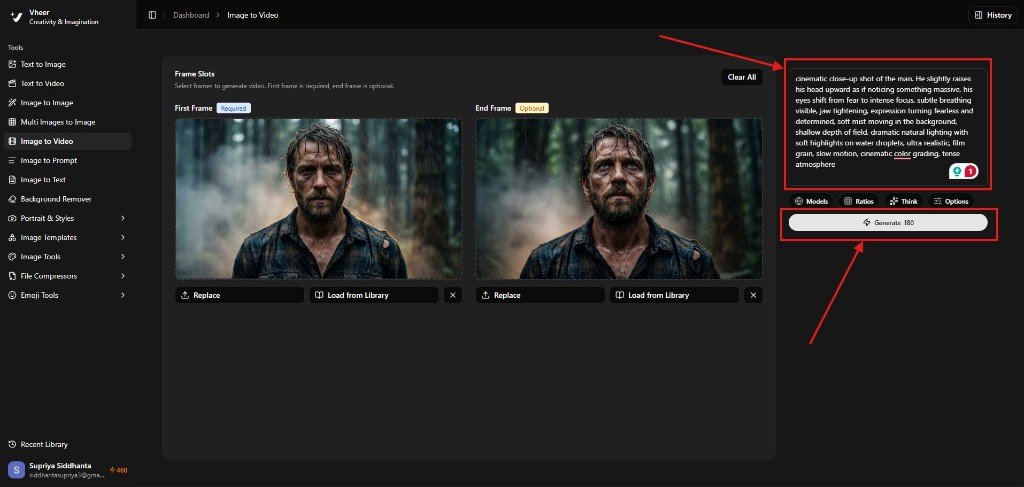
The above screenshot is just an in-between scene to maintain the overall flow.
So, this is how I created an entire AI film as per my storyboard, and I feel the process is pretty straightforward with Vheer AI if you do it in the right way.
Here is a small 30-second part that I have generated with Vheer AI.
Just remember to use prompts in simple and straightforward way. Plus, always use a start frame and an end frame to keep the AI video intact.
And I believe with some trial and error at first, you’ll definitely be able to create affordable, high-quality cinematic video with Vheer AI.
My Honest Take on Affordability of Vheer AI
I have already discussed why I chose Vheer AI as an affordable option in the AI video generator space, but again, I want to recommend that you to create a proper AI video generation workflow first.
The reason why I’m telling this again and again is that every AI video generator out there in 2026 is purely based on a credit-based model, and this is your ultimate weakness.
I have seen and also suffered a lot to figure out how to put a prompt in the right way so that I get a proper output.
I think you should focus on this matter first, and this is why I recommend you to start with a basic plan that costs around $9.99 on Vheer, and when you become familiar with the tool, then only invest in this.
Btw, one thing I always believe is that the tool that worked for me may not work for you. So you should try with a basic plan, and if it fits your workflow, then you can continue with the higher one.
Which AI video generator is best and cheapest?
In my opinion, Vheer looks like an affordable option for content creation on YouTube.
Is Vheer AI good for beginners?
Yes, absolutely. Vheer AI has no complex dashboard. It’s pretty simple and easy to use for beginners.
What AI models does Vheer use?
Vheer has multiple AI models for AI image (Vheer Quality, a FREE model, Flux Klein, Nano Banana Pro, Nno Banana 2, SeeDream V4, Minimax Image 01) and AI video generation (Vheer Quality, a FREE model, SeeDance V1 Pro Fast, SeeDance V1.5 Pro, Veo3.1 Fast, LTX Video 2.3 Fast, Sora 2, MiniMax Hailuo 2.3 Fast).