
This Revid AI review is going to be a goldmine to learning about this tool in a practical way because there are a lot of useful video generators out there, but selecting one from them is quite hard for TikTok videos and Instagram Reels.
However, nowadays, creators want an all-in-one way to produce a finished, credible-looking Short without bouncing between generators, editors, caption tools, and publishers, and this is why I tested Revid from a TikTok and Instagram Reels creator’s perspective.
I looked at whether it could create a complete 30–45-second reel video, keep the visuals consistent across scenes, add useful captions and voiceovers, and reduce the need for manual editing.
(Use my coupon code “SUPRIYA” to get 20% off for the first month)
What You Get from this Revid AI Review Article
This review will give you hands-on testing information about this AI TikTok or Instagram Reels maker. This article includes real testing results, my real experience that you’ve never found anywhere, how to generate Viral TikTok short videos & Instagram Reels with Revid AI, the cost of a 30–45-second Reels video, and some examples of reels and short-form content generated by Revid AI.
Key Takeaways
Revid AI can turn an idea, URL, or script into a vertical Short or Reels with captions, voiceover, music, and visuals, but it cannot guarantee that the video will go viral.
- Revid AI is best for Instagram & TikTok creators who want an all-in-one AI Reels maker for turning ideas, URLs, and scripts into vertical videos.
- Revid has a feature where you can find viral TikTok shorts or Instagram Reels videos and analyse the concept and recreate them in your own format.
- It can handle captions, voiceover, music, visuals, and basic editing, reducing the need to combine several separate tools.
- The virality of your reels depends on your hook, script, pacing, and scene instructions because AI visuals alone will not make a Short viral.
- You should review every scene for visual consistency, realism, voice quality, and unwanted stock-ad vibes before publishing.
How I Tested Revid AI for Viral TikTok Videos & Instagram Reels
I tested Revid AI as a short-form video generator for social platforms for those who want a publish-ready Short without switching between an AI scriptwriter, AI video generator, AI caption tool, AI voiceover platform, and editor.
My goal was simple. It was to check whether Revid could produce a usable vertical video with a strong hook, clear pacing, consistent visuals, and minimal manual editing.
This Revid AI review is based on these pillars
- The 30–45-Second Short Test: I checked whether Revid AI could create a complete 9:16 TikTok video or Instagram Reel with a catchy beginning, middle, and strong closing point.
- The Idea-to-Publish Workflow Test: I tested how easily I could move from an idea, URL, or script to a finished video without another AI tool.
- Visual and Character Consistency Test: I reviewed whether the AI visuals matched the script and whether scenes stayed consistent.
- Captions, Voiceover, Music, and Editing Test: I checked the quality of captions, narration, background music, scene timing, and basic editing controls.
- Credit Cost Per Usable Short Test: I checked how many credits a 30-second reel cost on Revid.
(Use my coupon code “SUPRIYA” to get 20% off for the first month)
Some Examples of Instagram Reels & TikTok videos Generated by Revid AI Video Generator
What Is Revid AI?
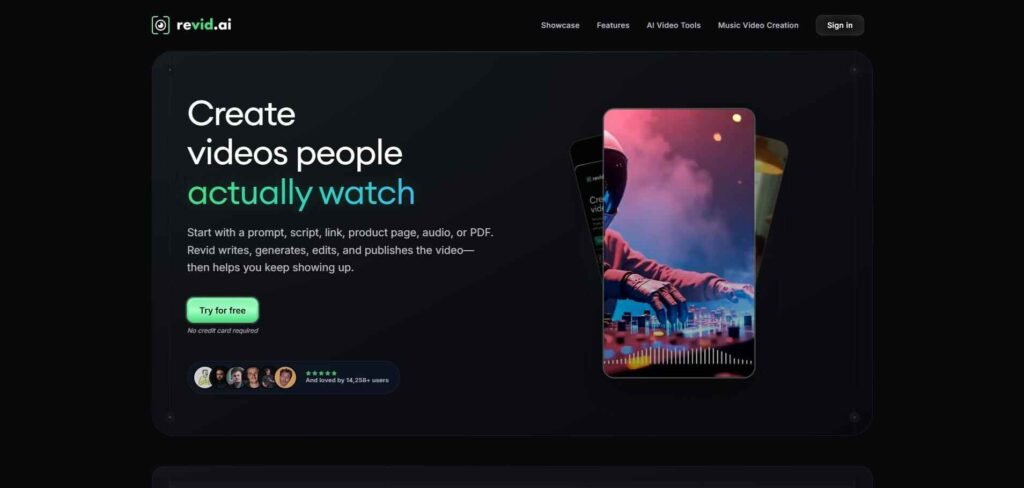
Revid AI is an all-in-one short-form video creation workflow that helps you turn your idea, URL, script, or reference video into a vertical TikTok or Instagram Reel.
It can help with scripting, scene creation, voiceovers, captions, music, editing, and publishing, so you do not need to move between several tools.
Revid AI also analyses viral reel video structures to help you create content inspired by proven formats, but you still need to review the hook, pacing, realism, and scene consistency before publishing to your social account.
Best For
Revid AI is best for TikTok and Instagram creators who need to produce Shorts quickly with AI voiceovers, captions, music, and AI visuals in one workflow.
Not Suitable For
Revid AI may not be the right fit for you if you need high-quality cinematic video production, frame-by-frame video editing, advanced motion graphics, or complete control over every visual detail.
Can Revid AI Create a Finished Short Video & Reels Without Another Editor?
Yes, Revid AI can create a complete TikTok Short video or Instagram Reels video without another AI tool. It can combine your script or idea with AI visuals, AI voiceover, captions, music, scene timing, and vertical formatting in one workflow. This is useful when you want to create TikTok videos or Instagram Reels quickly without switching between separate tools.
However, I would highly recommend that you to review the hook of your reel, AI scene pacing, and visual consistency because if a scene feels AI-generated or the visuals do not match your script, you may need to regenerate or manually adjust it.
So, it can replace a basic editor for simple TikTok and Instagram content, but it should not replace you as a human reviewer when realism, or, I would say, strong storytelling matters.
How to Generate Viral TikTok Short Video & Instagram Reels with Revid AI
CLICK the LINK and SIGN UP with your email address to get some credits to test this AI video generator.
After signing up, you’ll land in the main dashboard with many options on the left sidebar.
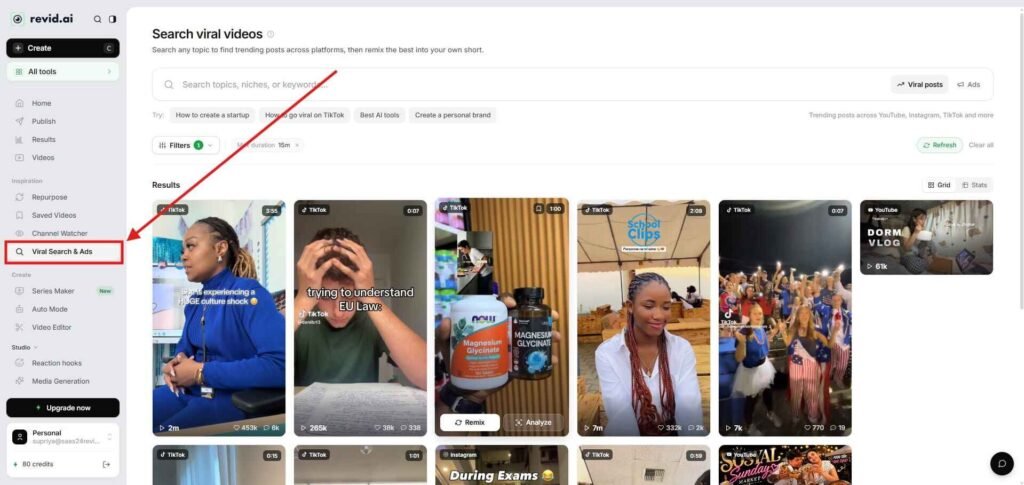
The left sidebar is divided into 5 sections, and what I really like here is the ‘inspiration’ part.
This section allows you to find trending viral posts across social platforms. You can even filter by each metric to find trending videos for your niche or topic, then remix them or analyse them to spot patterns of virality.
Step 1
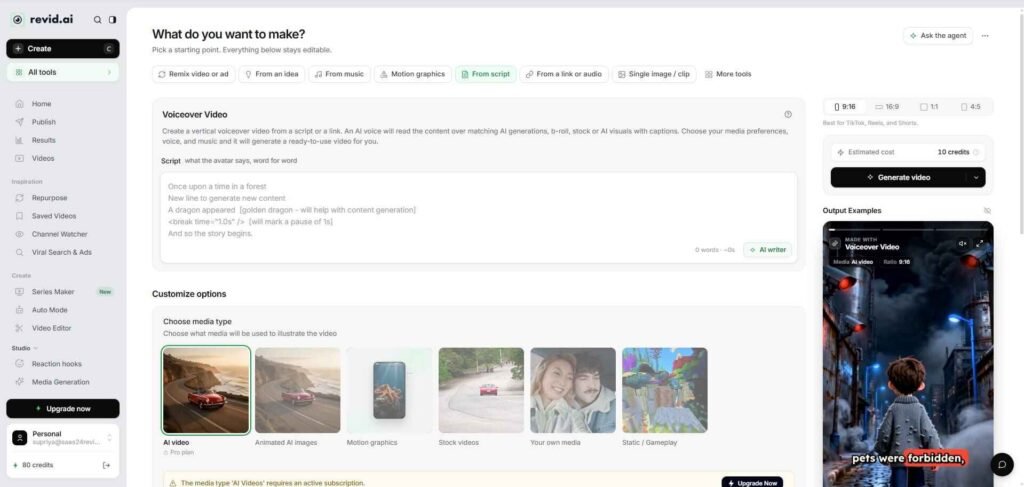
Now click the ‘Create’ button above on the left sidebar. After clicking this, you’ll find multiple options to start with.
Today, I’m going to start with a fresh script, so I selected the “From Script” option.
You can go with others.
Step 2
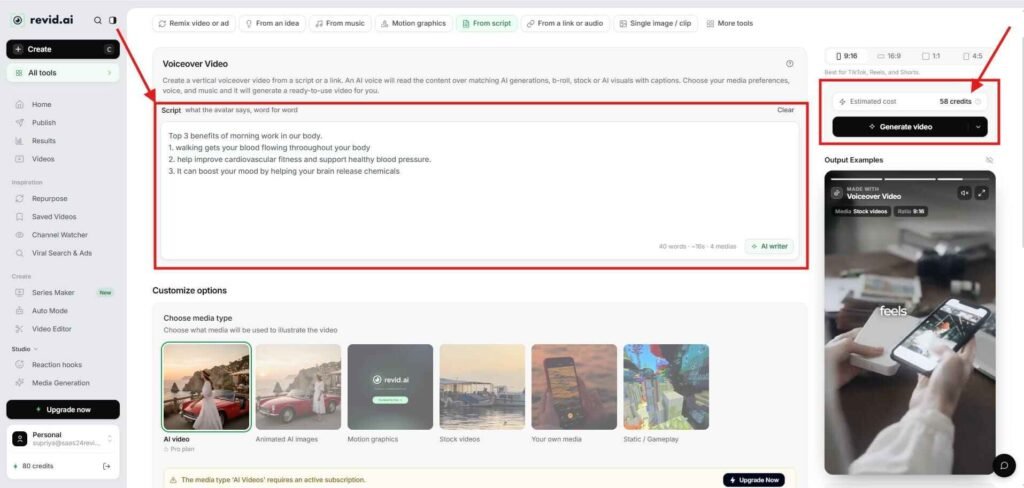
Now paste the script in the script box. You can guide the AI model to get the best output.
But I would say to give guidance in plain or simple language. Do not overcomplicate things here.
Like in my case, I just entered…..
“Top 3 benefits of morning work for our body.
- Walking gets your blood flowing throughout your body
- It helps improve cardiovascular fitness and support healthy blood pressure.
- It can boost your mood by helping your brain release chemicals
Then select customise options, and this section will determine your AI video credit cost.
I selected ‘AI video’ mode, and to make this video, it asks for 58 credits. In the same way, if you select ‘Animated AI images’, ‘motion graphics’, ‘stock videos’, or other options, it will cost you differently.
I have seen that ‘animated AI images’, ‘stock video’, and ‘static gameplay’ cost extremely little.
Anyway, then select the ‘generation preset’, and Revid has 62 styles of presets like ‘Pixar’, ‘Ghibli studio’, or others. I selected the ‘educational.’
Then give the visual direction for the whole reels video, like style, camera or anything you want to provide to guide the AI video model.
Then set the generation model to ‘Low ’, ‘Pro ’, or ‘Ultra.’ ‘Low’ is a cost-effective option, which will cost you 15 credits / 5s. Pro and Ultra are a little bit pricey. I selected it as ‘Low’.
Then select a character, which is an optional choice for you.
Then add AI voiceover and background music to make your TikTok videos or Instagram Reels more attractive to your audience.
Finally, there are advanced options where you can decorate your reels with captions or specify how many media to generate, voice settings, animation control, and localisation.
After all of these, you’ll find the estimated cost of producing this exact reel video, and in my case, it showed 58 credits.
Step 3
After doing all these, locate the ‘Generate video’ button with two other options, including
- Generate video, which costs 28 AI credits for me
- Generate & review storyboard, which costs 60 AI credits for me.
If you want to review before generating any video, then I would highly recommend that you to go with the second option, which will cost you a little bit more.
As in my case, this is a simple script; I would like to go with the ‘Generate Video’ option.
So, now click ‘Generate Video.’
Step 4
It’ll take some time to generate the video, and later you can download it, or you can edit & publish directly from Revid AI.
Revid AI Test Results: Short Video Quality and Scene Consistency
In my hands-on test, Revid AI was able to turn a short script into a complete vertical video with scenes, voiceover, captions, music, and platform-ready formatting. I felt the strongest part of this browser-based AI video software is the all-in-one workflow.
In this test, I did not do any editing, as the final output looked perfect to me. However, during the review of Revid AI, I came up with some advantages and disadvantages, and I think that could help you a lot to including this tool in your content creation workflow.
Pros & Cons
Pros
- Creates videos with voiceover, captions, music, and visuals in one workflow
- Highly useful for TikTok, Instagram Reels, and faceless animated videos
- Clear credit cost calculation with no surprise credit cuts
- Extra layer (visual direction feature + review feature) to guide the AI models before generating video
Cons
- Some outputs can look AI-generated
- Review before rendering feature costs additional credits
Revid AI Features
Here are some of the best features of Revid AI that could allow you to create Viral TikTok Videos & Instagram Reels within minutes
1. AI Video Generation & Content-to-Video Automation
Revid AI can turn prompts, scripts, blog posts, articles, social media posts, YouTube content, product pages, PDFs, and links into editable videos. If you’re a content creator, marketer, educator, or faceless channel owner who already has written content but does not want to produce every video manually, then Revid is highly beneficial for you.
Here, you can repurpose your existing content instead of starting from a blank project each time. It gives you a faster way to turn one article, post, or idea into multiple TikTok videos, Instagram Reels, or YouTube Shorts without hiring an editor.
2. AI Script and Hook Generation
Revid AI can help you create or structure scripts from an idea, link, or content source, including the hook and basic narrative flow. If you’re a beginner who struggles to write short-form scripts that get to the point quickly, then it is helpful for you.
It gives you a starting structure for testing different hooks, topics, and story angles, while still allowing you to rewrite the script in your own tone.
4. AI Video Editing by Typing
Revid AI allows you to edit video by changing text and adjusting scenes, visuals, audio, and timing without working entirely inside a traditional timeline-based editing software.
It reduces manual editing for simple Shorts and helps you to fix awkward narration, unnecessary scenes, and pacing problems more quickly.
5. Voiceovers, Captions, and Music
Revid AI can add AI voiceovers, captions, and background music to generated videos, with voice options available across multiple languages.
It helps creators like you to prepare a more publish-ready TikTok or Reel in one place, while still requiring a final check for pronunciation and caption timing in the advanced settings section during the video creation process.
6. Scene, Visual, Audio, and Timing Control
Revid AI gives you control over individual scenes, visuals, audio, and timing before the video generation. During the review, I found these settings inside the advanced controls.
It helps you to adjust captions and improve pacing before publishing, which increases the chance of producing a usable Short instead of wasting credits on an unedited draft.
7. Viral Video Research and Remixing
Revid AI helps you search for viral videos on platforms such as TikTok, YouTube, and Instagram, study their structure, and create an original version. You’ll find this feature on the left sidebar inside the dashboard. You can even filter according to your specific needs or topic.
It helps you to identify useful patterns in hooks, pacing, and storytelling before creating your own version.
8. Multi-Platform Publishing
Revid AI allows you to schedule and publish videos to YouTube, TikTok, Instagram, and X from one dashboard.
9. AI Series Maker
Revid AI’s series workflow is designed to reuse the same characters, locations, props, visual style, music, captions, and outro across multiple episodes. If you produce recurring shows, animated explainers, storytelling videos, and faceless series, then this is highly beneficial for you.
I’ve seen this type of feature on Fliki also, where you can automate your AI shorts video creation workflow easily.
It gives you a more repeatable format for building a series instead of recreating every character and scene from scratch.
Overall, Revid AI’s advantage is the combination of content repurposing, AI generation, text-based editing, captions, voiceovers, publishing, and automation in one workflow.
Revid AI Pricing: Real Cost of a 30–45-second Reels Video?
Revid AI offers three pricing plans, including
| Plan | Price | Best For |
|---|---|---|
| Hobby | $39/month | Occasional short-form creation |
| Growth | $39/month (Offer running) | Creators publishing regularly |
| Ultra | $199/month | High-volume creators, brands, and agencies |
However, a typical 30-second short video using Pro moving images and voiceover costs roughly 40–80 credits, though AI video models can cost more. This is an estimate.
Final Verdict: Can Revid AI Help You Create Better TikTok Short Videos & Instagram Reels Faster?
Yes, Revid AI can help you create TikTok videos and Instagram Reels faster, especially if you want an all-in-one workflow for scripts, visuals, voiceovers, captions, music, and editing. It is useful for faceless creators and social media teams that want to test more hooks and content ideas without switching between several tools.
The main benefit is speed and a video research dashboard.
Btw, Revid AI does not remove the need for creative judgment. You still need to review the hook, scene consistency, captions, voiceover, and whether the video feels AI-looking.
I recommend Revid AI for creators who value fast production and are comfortable making small revisions, and it is less suitable for cinematic projects or advanced editing.
Overall, Revid AI is a strong option for producing more Shorts faster and in a consistent way.
(Use my coupon code “SUPRIYA” to get 20% off for the first month)
Frequently Asked Questions
Is Revid AI worth it?
Revid AI is worth considering if you want to create TikTok videos and Instagram Reels using one workflow for scripts, visuals, captions, voiceovers, music, and editing. It may not be worth it if you need advanced editing control.
Can Revid AI create viral Shorts?
Revid AI can help you create Shorts with hooks, pacing, visuals, and captions, but it cannot guarantee virality. Your topic, opening line, audience fit, and publishing strategy still matter to make your content viral.
Can Revid AI create a complete Short without another editor?
Yes. Revid AI can create a vertical video with scenes, voiceover, captions, music, and basic editing in one platform.
How much does Revid AI cost?
Revid AI’s Hobby plan starts at $39 per month, Growth at $39 per month (discount), and Ultra at $199 per month.
How many credits does a 30–45-second Revid AI video use?
There is no single fixed credit cost because usage depends on the script length, video model, and visual style. However, if you use AI images as a visual style, then you can significantly reduce your credit cost.
Does Revid AI create captions and voiceovers?
Yes. Revid AI supports captions and AI voiceovers as part of its short-form video workflow. There is a huge library with customisation features to make your short-form video content look highly professional.
Is Revid AI good for faceless YouTube channels?
Revid AI can be useful for faceless channels that publish short explainers, stories, commentary, or educational videos. However, you should add original research, stronger scripting, and human editing so the videos do not feel generic or mass-produced.